
How to fix the "ACL failed for databroker" error in UIB and make your life easier in the future
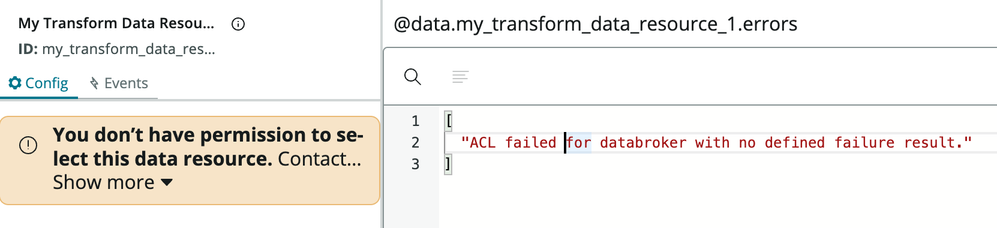
If you've used Transform Data Brokers within UI Builder (UIB) you have likely encountered the error "ACL failed for databroker with no defined failure result." and "You don't have permission to select this data resource" immediately after creating a new data resource and adding it to your page.
If you've used Transform Data Brokers then you also probably know that you just need to create a special ACL to resolve this (name=Sys ID of your data Broker, type = "ux_data_broker", operation = "execute").

No big deal (except the fact that "name" is a drop down makes it a little messy). However, you can make it much easier to track the ACLs back to their data brokers, and make it almost a one-click affair to create a new one with the addition of one record.
The Power of Relationships
That's right! Just add a new relationship to show you existing UX Data Broker ACLs. And thanks to a quirk (feature?) of how relationships work it will also allow you to use the "new" button (if you have elevated permissions set) to create new ones with a couple of clicks.
- Go to System Definition > Relationships and create "new".
- Configure it similar to the screen grab below:

3. Properties:
- Name: Data Broker ACLs
- Applies to Table: Simple Data Broker (sys_ux_data_broker_simple) NOTE: This will cause it to appear on the different types of data brokers which inherit from this type.
- Queries from Table: Access Control (sys_security_acl)
- Query With:
(function refineQuery(current, parent) { current.addQuery('name', parent.sys_id); current.addQuery('type', '6d9c40e9531210101cb3ddeeff7b12f6'); // 'ux_data_broker' current.addQuery('operation', 'execute'); })(current, parent);
4. Open a Data Broker Server Script (Transform) record in the old UI (sys_ux_data_broker_transform), click the hamburger and Configure > Related Lists.
5. Add your newly created "Data Broker ACLs" relationship.
You will now see a spot for ACLs in your related list. You may not have one yet, but to get one all you have to do is click "New" (don't forget to elevate your role to security admin or you won't have the option).
Simply save the record, return to your data resource, and you'll see the ACL in the list. You will also notice that the error in UIB resolves itself.
https://www.servicenow.com/community/next-experience-articles/how-to-fix-the-quot-acl-failed-for-databroker-quot-error-in-uib/ta-p/2391976