
Closed ticket sorting on My Request page on ESC portal
 New article articles in ServiceNow Community
·
Dec 30, 2025
·
article
New article articles in ServiceNow Community
·
Dec 30, 2025
·
article
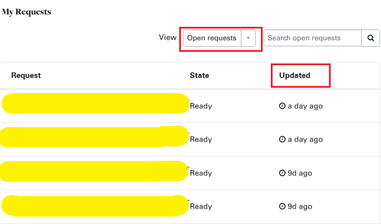
Use case: On the My Request page, there is a filter for Open Request and Closed Request. These two filters shows same columns as Request, State, and Updated. The business requirement was that if I select Open Request in the filter, then the columns will be Request, State, Updated, and if I select Closed Request in the filter, then the columns will be Request, State, Closed, and the ticket will sort based on the Closed column.
Below is the solution to fulfill the above requirement
1. Navigate to Service Portal > Widget
2. Open and Clone the My Requests widget
3. After cloning, do the changes provided in the XML file.
4. Link the cloned widget to my_request page on ESC portal
Output:
You will be able to see the reflected changes on the portal as per the screenshot below.


If the article is helpful to you. Please mark it as helpful.
Thank you!
https://www.servicenow.com/community/employee-center-articles/closed-ticket-sorting-on-my-request-page-on-esc-portal/ta-p/3458068