
Azure DevOps add new Test Type Integration via OOB API
Hi All,
Hope you are doing fine.
In todays article we will see how we can add a new custom test type and call the OOB DevOps API to push the payload for the same from external interfaces.
Symptoms
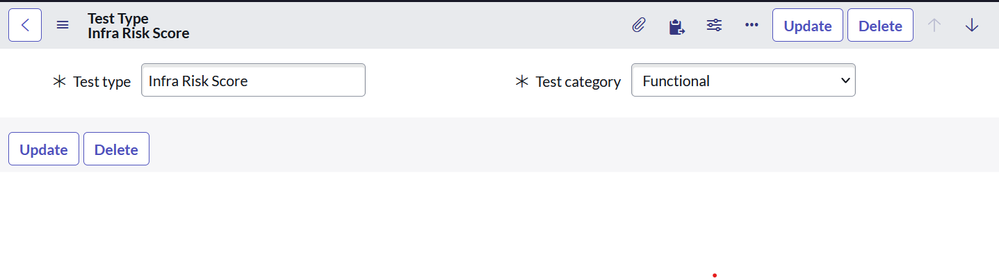
- Create a new Test Type called 'Infra Risk Score'
- Define it as a functional test unit
- Define the API to insert the test summary for the new test type
For this we will be following the steps as given below
- Create new Test type
- Create new Test type mapping
Configure the OOB API to call the same.
Navigate to Test Types as DevOps --> Integration --> Test Types
Create new Test Types reord
Set categeory as one of Functional ,Performance or Unit
Create new Test Type Mapping by navigating to DevOps --> Integration --> Test Type Mapping
Configure the record as given below with the Tool integration defines the source from which this payload will be pushed.
Now thats it on the configuration side and now we can use the OOB Webhook | Tool API to push the Test Summary for new test type
Attributes for the call is as given below
Request
Request HTTP Method : POST URI : https://<Instance name>.service-now.com/api/sn_devops/devops/tool/test?toolId=6fa7250287c38194c00c4116cebb357a&testType=Infra%20Risk%20Score Headers Accept : application/json Content-Type : application/json Request Body { "name": "Test-selenium#60", "duration": 78.802, "passedTests": 4, "failedTests": 0, "skippedTests": 0, "blockedTests": 0, "totalTests": 4, "startTime": "2020-06-30T18:12:31Z", "finishTime": "2020-06-30T18:12:31Z", "passingPercent": 100, "buildNumber": "30291", "stageName": "<Pipeline stage name>", "pipelineName": "<Azure Project Name>/<Pipeline name>" }- Response


Response
Status code : 201 Created

Response Body
{
  "result": {
    "status": "Success",
    "sysId": null
  }
}
Please be sure to bookmark this article as well as mark it as Helpful if you thought it was helpful.
Regards,
Amit Gujarathi
ServiceNow Community Amit Gujarathi

https://www.servicenow.com/community/developer-articles/azure-devops-add-new-test-type-integration-via-oob-api/ta-p/2361051