
Configuring the Virtual Agent client chat icons
 Mark Roethof
Articles, Blogs, Videos, Podcasts, Share projects - Experiences from the field
Hi there,
Branding the Virtual Agent client displayed on a Service Portal, is a frequently asked question in the Now Community. In the past releases, the branding options available have been enhanced. With the Tokyo release, now also the chat icons can be configured! Let's have a closer look.
Chat icons
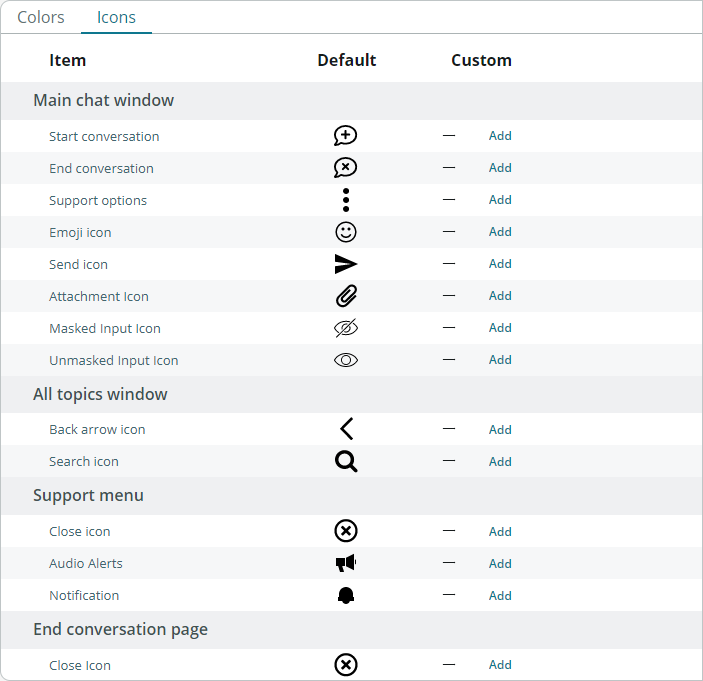
One of the options which were still not configurable on the Virtual Agent client... the chat icons! The chat icons concern the icons on the main chat screen, the all topics screen, the support menu, and the end conversation screen. It concerns chat icons like the one to end a conversation, the emoji icon, etcetera.
Configuring chat icons
With the Tokyo release, the Branding record under the Branding Settings has been expanded with an "Icons" section (Conversational Interfaces > Settings, General > Branding Settings > [Your branding record]). This section contains all chat icons for the four different chat screens mentioned.
To customize chat icons, select the Icons tab in the "Customize color for each item below" area. From here you can add or replace a custom icon. If wanting to revert to the system default icon, you can simply remove the custom icon concerned.
Valid file formats for the chat icons are .jpg, .png, .bmp, .gif, .jpeg, .ico, and .svg.
All configurable chat icons
Here is an overview of all configurable chat icons in the Tokyo release:
Conversational Interfaces > Settings, General > Branding Settings > [Your branding record]

---
And that's it. Hope you like it. If any questions or remarks, let me know!
Kind regards,
Mark Roethof
Independent ServiceNow Consultant
3x ServiceNow Developer MVP
3x ServiceNow Community MVP
---
https://www.servicenow.com/community/virtual-agent-nlu-articles/configuring-the-virtual-agent-client-chat-icons/ta-p/2361346