
How to configure incident management to align with CSDM; a leading practice guide
ServiceNow has made several changes to how incidents integrate with CSDM. This lays the foundations for Service Portfolio Management, Digital Portfolio Management, and ability to tie Events to Business Services.
Ensuring first line agents capture and record incidents so that they align with CSDM will reduce data entry time and maximize the capabilities of ServiceNow platform.
Summary of Recommendations:
We recommend 5 configuration and operational changes to maximize the potential of CSDM in the incident process
- Consider three use cases for incident creation: agents, IT staff, system-generated
- Configure your incident form so that Services are automatically derived from service offerings
- Get started with CSDM by creating Service offerings, linked to Services
- Populate the Service Offering first when creating new incidents
- Auto-populate the Service. Examples are included below.
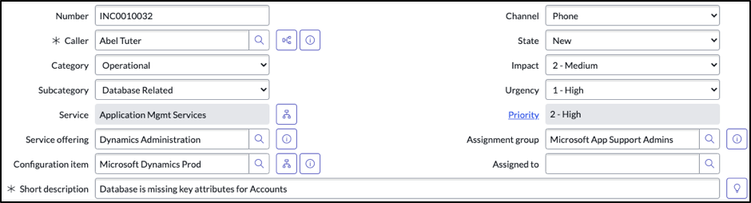
Following those recommended changes the form should look similar to below. Representative data is shown in the form to show how this might also be populated in practice :-

1. Consider three use cases for incident creation: agents, IT staff, system-generated
There are 3 main perspectives to consider when raising an incident. The use case will have a significant effect on the approach taken to populate the fields and whether that is manual entry or driven by the system.
| User Perspective | IT Staff | System Perspective |
|---|---|---|
| End users do not have a concept of business services or business service offerings They will often refer to an application that has been offered to them e.g. Outlook , Workday or device e.g. Printer | Users in the support groups (e.g. network, middleware, database) raising incidents either for systems they own or systems affecting those | System generated incidents · alert and event management systems · outages · Caused by change |
Here we will focus on then user perspective as this is likely to be an interaction with first line agents to capture and record incidents, though the others should be considered (see CSDM Workshop for further detail).
Out of the box it is possible to populate 3 fields (Service, Service Offering and Configuration Item) with data intended for one of the other fields. E.g. Service entered into CI field. This leads to inconsistent data entry impacting quality of service.

2. Configure your incident form so that Services are automatically derived from Service Offerings
These simple changes to the incident form will reduce data inaccuracies and inconsistency, making incident reporting more reliable:
- Make the Service field read-only
- Configure the form to auto-populate the Service once the Service Offering is populated.
- Add filtering on CI classes to display those that relate to a typical IT environment

The configuration changes required to achieve this are enumerated here:

Following those recommended changes the form should look similar to below. Representative data is shown in the form to show how this might also be populated in practice :-

* form layout may differ slightly for workspace
The fields on the Incident form directly related to CMDB/CSDM are :
- Service
- Service Offering
- Configuration Item
These fields relate to each other as described in the CSDM Whitepaper

3. Get started with CSDM by creating service offerings, linked to Services
Mapping services is key to taking advantage of the recommended changes and can feel like a big task but it can be broken down into key steps that reflect your organizational needs and maturity.
There is no one single model that suits all organizations, think of CSDM as a compliance framework for the model that suits your organization.
Set up some service offerings, using our CSDM workshop and Service Portfolio Management Workshop as guidance
- this can be application or service focused dependent on what fits your organization best
- ensure you stay in alignment with CSDM
Where you have Discovery it is recommended to populate and have these classes as Principal CI’s
- Application Service, Server, Computer, Network Gear, Data Center, Database, PDU, UPS
- further detail see CMDB process guide
For further guidance see:
4. Populate the Service Offering first when creating incidents
The hierarchy described in CSDM needs to be reflected and asserted within the incident form
The critical field on the record is the service offering. Taking a one up / one down perspective, populating this provides filtering for
- Business Service
- Application Service / CI
This reduces the potential for level of error in populating these fields and time required. The diagram below shows how the modified form and CSDM relate to each other and the required actions to populate.

5. Auto-populate the Service
There are a range of scenarios that apply to when an incident is created, for illustration purposes 3 of the most common to incident creation for end users are illustrated :-
- End user device issue
- Cloud Native (SaaS) Application
- Infrastructure / Cloud Hosted App
Scenario 1
End user device issue
Service Offering is entered by agent
Service auto-populated from Service Offering and read-only
CI selection from those associated to service offering
The agent should fill in the service offering first for consistency and then fill in the CI.
Changing the Service Offering should update the Service

Scenario 2
Cloud Native (SaaS) Application
Service Offering populated on
Service auto-populated from Service Offering and read-only
CI not populated for cloud native
With cloud native the value of CI is limited value as the service offering represents the key artifact

Scenario 3
Infrastructure / Cloud Hosted App
Service Offering populated on
Service auto-populated from Service Offering and read-only
CI populated post initial incident by technical team, which may impact Service Offering
Initial raising of the incident the Infrastructure CI is unlikely to be known unless monitoring systems have previously raised an event / outage.
Child incident can be raised for the Technical Service Offering

Addendum : Example Scripts
Clear service on changing offering

Make “Clear Offering on changing Service” to Active = false


function onChange(control, oldValue, newValue, isLoading, isTemplate) {
if (isLoading || newValue === '') {
return;
}
var service_offering = g_form.getReference('service_offering', setBusinessService);
}
function setBusinessService(set_service_offering) { //reference is passed into callback as first arguments
g_form.setValue('business_service',set_service_offering.parent);
}
https://www.servicenow.com/community/it-service-management-articles/how-to-configure-incident-management-to-align-with-csdm-a/ta-p/2340041