
Collaboration Store, Part LXXVI
“Never look down to test the ground before taking your next step; only he who keeps his eye fixed on the far horizon will find the right road.”
— Dag Hammarskjold
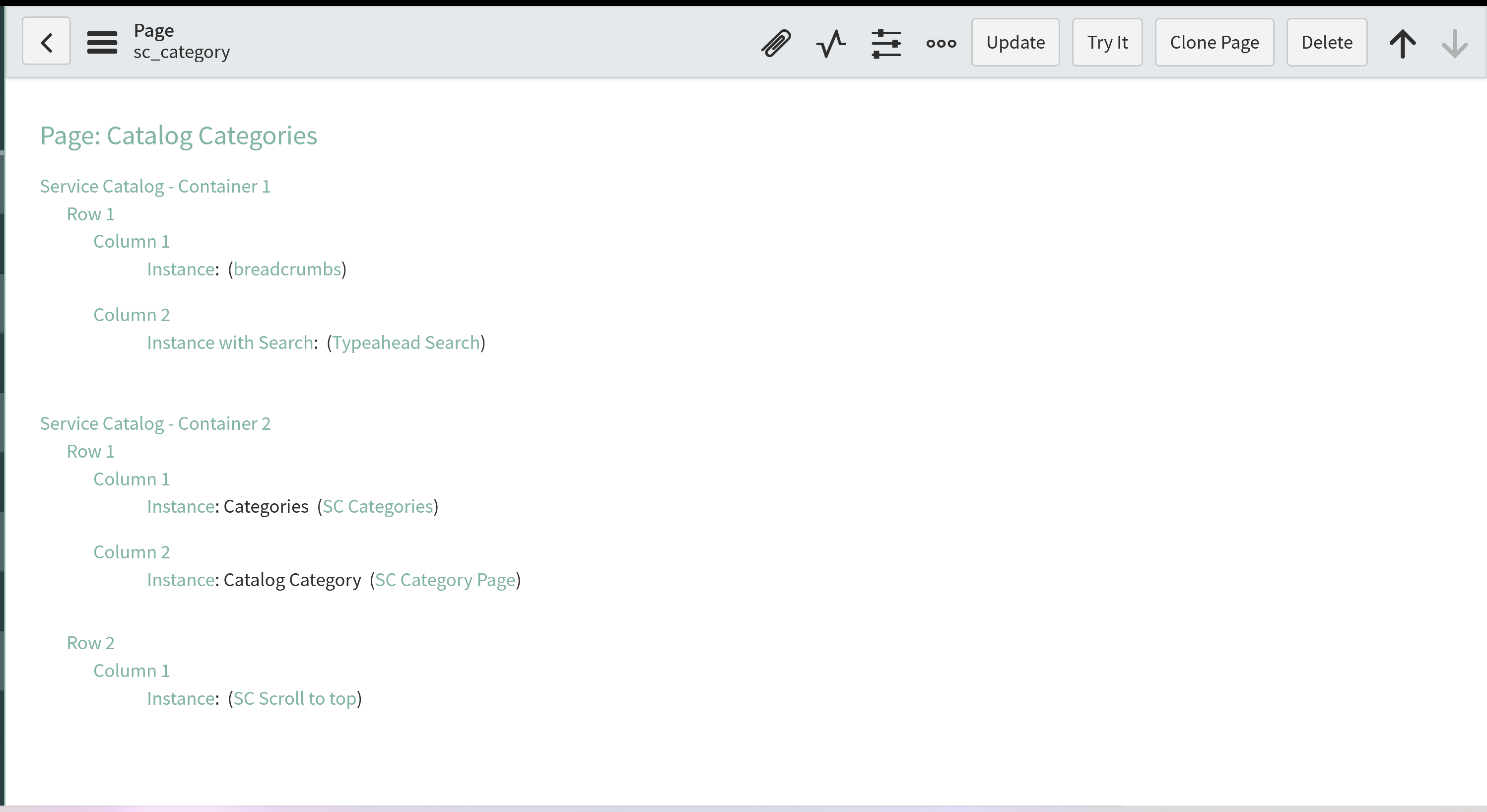
Last time, we took a look at a number of different examples of pages that could serve as a model for locating an app in the Collaboration Store. We decided to use the Service Portal page sc_category, the Service Catalog category browse page, as a starting point for our efforts. Taking a look at the page, we can see two containers containing three rows of various widgets.

sc_category page contents
The only thing that we really need off of this page at this point is our own copy of the SC Category Page widget, so let’s go make a copy of that and call it Collaboration Store, since this is basically going to be the storefront of our Collaboration Store.

Cloning the SC Category Page widget
Once we make the copy, we can update the Name, ID, and Description fields and save our new widget.

New Collaboration Store widget
Now that we have our own copy to play with, let’s take a look at that HTML and see what we want to keep and what we want to toss.
{{data.error}}
{{data.category.title}}
{{data.category.description}}
| ${Item} | ${Description} | ${Price} |
|---|---|---|
|
|
{{::item.short_description}} | {{::item.price}} |
Starting at the top, the All Categories button has no use in our scenario, so we can cut that part out. The category title and category description data can be replaced with the name and description of the store (the Host instance). The next block contains the pair of icons used to select between a display of tiles or a simple list. I like those options, so we will keep that section intact. Following that we have a loading block and a nothing to see here block, both of which would seem to have a valid use in our adaptation, so we will leave those there for now as well.
The next section is the table view, with columns for Item, Description, and Price. We will do something similar, but our columns will be Application, Description, Version, and Provider. The next section is the tile view, and we will work our same data points into the tile layout as well. The final block is all of the elements of the optional Show More Items section, and we can just leave that in place for now. That leaves our HTML looking something like this:
{{data.error}}
{{data.store.name}}
{{data.store.description}}
| ${Name} | ${Description} | ${Version} | ${Provider} |
|---|---|---|---|
|
|
{{::item.description}} | {{::item.version}} | {{::item.provider}} |
-
v{{::item.version}} {{::item.provider}}
Now that we have the HTML all roughed out, it would nice to bring it up and see how it looks, but we are going to need some data first. For that, we are going to have take a look at the widget’s server-side script. Let’s take a quick peek and see what it is that we have to work with.
(function() {
if (input && input.category_id)
data.category_id = input.category_id;
else
data.category_id = $sp.getParameter("sys_id");
data.catalog_id = $sp.getParameter("catalog_id") ? $sp.getParameter("catalog_id") + "" : "-1";
var catalogsInPortal = ($sp.getCatalogs().value + "").split(",");
var isCatalogAccessibleViaPortal = data.catalog_id == -1 ? true : false;
catalogsInPortal.forEach(function(catalogSysId) {
    if (data.catalog_id == catalogSysId) {
        isCatalogAccessibleViaPortal = true;
    }
});
data.categorySelected = gs.getMessage('category selected');
if(!isCatalogAccessibleViaPortal) {
    data.error = gs.getMessage("You do not have permission to see this catalog");
    return;
}
var catalogDisplayValue;
if (data.catalog_id && data.catalog_id !== "-1") {
    var catalogObj = new sn_sc.Catalog(data.catalog_id);
    if (catalogObj) {
        if (!catalogObj.canView()) {
            data.error = gs.getMessage("You do not have permission to see this catalog");
            return;
        }
        catalogDisplayValue = catalogObj.getTitle();
    }
}
if (options && options.sys_id)
    data.category_id = options.sys_id;
data.showPrices = $sp.showCatalogPrices();
data.sc_catalog_page = $sp.getDisplayValue("sc_catalog_page") || "sc_home";
data.sc_category_page = $sp.getDisplayValue("sc_category_page") || "sc_category";
catalogDisplayValue = catalogDisplayValue ? catalogDisplayValue : $sp.getCatalogs().displayValue + "";
var catalogIDs = (data.catalog_id && data.catalog_id !== "-1") ? data.catalog_id : $sp.getCatalogs().value + "";
var catalogArr = catalogDisplayValue.split(",");
var catalogIDArr = catalogIDs.split(",");
data.sc_catalog = catalogArr.length > 1 ? "" : catalogArr[0];

data.show_more = false;
if (GlideStringUtil.nil(data.category_id)) {
     data.items = getPopularItems();
     data.show_popular_item = true;
     data.all_catalog_msg = (($sp.getCatalogs().value + "").split(",")).length > 1 ? gs.getMessage("All Catalogs") : "";
     data.all_cat_msg = gs.getMessage("All Categories");
     data.category = {title: gs.getMessage("Popular Items"),
                                 description: ''};
    return;
}

data.show_popular_item = false;
// Does user have permission to see this category?
var categoryId = '' + data.category_id;
var categoryJS = new sn_sc.CatCategory(categoryId);
if (!categoryJS.canView()) {
    data.error = gs.getMessage("You do not have permission to see this category");
    return;
}
data.category = {title: categoryJS.getTitle(),
                                 description: categoryJS.getDescription()};

var catalog = $sp.getCatalogs().value;

data.items = [];
var itemsInPage = options.limit_item || 9;

data.limit = itemsInPage;
if (input && input.new_limit)
    data.limit = input.new_limit;
if (input && input.items) {
    data.items = input.items.slice();//Copy the input array
}

if (input && input.startWindow) {
    data.endWindow = input.endWindow;
}
else {
    data.startWindow = 0;
    data.endWindow = 0;
}

while (data.items.length < data.limit + 1) {
    data.startWindow = data.endWindow;
    data.endWindow = data.endWindow + itemsInPage;
    var itemGR = queryItems(catalog, categoryId, data.startWindow, data.endWindow);
    if (!itemGR.hasNext())
        break;
    fetchItemDetails(itemGR, data.items);
}

if (data.items.length > data.limit)
        data.show_more = true;

data.more_msg = gs.getMessage(" Showing {0} items", data.limit);

data.categories = [];
while(categoryJS && categoryJS.getParent()) {
    var parentId =  categoryJS.getParent();
    categoryJS = new sn_sc.CatCategory(parentId);
    var category = {
        label: categoryJS.getTitle(),
        url: '?id='+data.sc_category_page+'&sys_id=' + parentId
    };
    data.categories.unshift(category);
}

data.all_catalog_msg = (($sp.getCatalogs().value + "").split(",")).length > 1 ? gs.getMessage("All Catalogs") : "";

function fetchItemDetails(itemRecord, items) {
    while (itemRecord.next()) {
            var catalogItemJS = new sn_sc.CatItem(itemRecord.getUniqueValue());
            if (!catalogItemJS.canView())
                continue;

            var catItemDetails = catalogItemJS.getItemSummary();
            var item = {};
            item.name = catItemDetails.name;
            item.short_description = catItemDetails.short_description;
            item.picture = catItemDetails.picture;
            item.price = catItemDetails.price;
            item.sys_id = catItemDetails.sys_id;
            item.hasPrice = catItemDetails.show_price;
            item.page = 'sc_cat_item';
            item.type = catItemDetails.type;
            item.order = catItemDetails.order;
            item.sys_class_name = catItemDetails.sys_class_name;
            item.titleTag = catItemDetails.name;
            if (item.type == 'order_guide') {
                item.page = 'sc_cat_item_guide';
            } else if (item.type == 'content_item') {
                item.content_type = catItemDetails.content_type;
                item.url = catItemDetails.url;
                if (item.content_type == 'kb') {
                    item.kb_article = catItemDetails.kb_article;
                    item.page = 'kb_article';
                } else if (item.content_type == 'external') {
                    item.target = '_blank';
                    item.titleTag = catItemDetails.name + " ➚";
                }
            }
            items.push(item);
        }
}

function queryItems(catalog, categoryId, startWindow, endWindow) {
        var scRecord = new sn_sc.CatalogSearch().search(catalog, categoryId, '', false, options.show_items_from_child != 'true');
        scRecord.addQuery('sys_class_name', 'NOT IN', 'sc_cat_item_wizard');
        scRecord.addEncodedQuery('hide_sp=false^ORhide_spISEMPTY^visible_standalone=true');
        scRecord.chooseWindow(startWindow, endWindow);
        scRecord.orderBy('order');
        scRecord.orderBy('name');
        scRecord.query();
        return scRecord;
}

function getPopularItems() {
    return new SCPopularItems().useOptimisedQuery(gs.getProperty('glide.sc.portal.popular_items.optimize', true) + '' == 'true')
        .baseQuery(options.popular_items_created + '')
        .allowedItems(getAllowedCatalogItems())
        .visibleStandalone(true)
        .visibleServicePortal(true)
        .itemsLimit(6)
        .restrictedItemTypes('sc_cat_item_guide,sc_cat_item_wizard,sc_cat_item_content,sc_cat_item_producer'.split(','))
        .itemValidator(function(item, itemDetails) {
            if (!item.canView() || !item.isVisibleServicePortal())
                return false;

            return true;
        })
        .responseObjectFormatter(function(item, itemType, itemCount) {
            return {
                order: 0 - itemCount,
                name: item.name,
                short_description: item.short_description,
                picture: item.picture,
                price: item.price,
                sys_id: item.sys_id,
                hasPrice: item.price != 0,
                page: itemType == 'sc_cat_item_guide' ? 'sc_cat_item_guide' : 'sc_cat_item'
            };
        })
        .generate();
}

function getAllowedCatalogItems () {
    var allowedItems = [];
    catalogIDArr.forEach(function(catalogID) {
        var catalogObj = new sn_sc.Catalog(catalogID);
        var catItemIds = catalogObj.getCatalogItemIds();
        for(var i=0; i<catItemIds.length; i++) {
            if (!allowedItems.includes(catItemIds[i]))
                 allowedItems.push(catItemIds[i]);
        }
    });
    return allowedItems;
}
})();
There is a lot here to digest, and an awful lot that is not relevant to our purpose, particularly all of those things that are related to catalogs and categories. We may want to just toss this out and replace it with some simple logic to pull in the Host information for the header and then all of the apps for the main section. Either way, this seems like a little more work than just rearranging the HTML, so let’s save all of that for our next installment.
https://snhackery.com/2022/09/12/collaboration-store-part-lxxvi/#utm_source=rss&utm_medium=rss&utm_campaign=collaboration-store-part-lxxvi