
Service Bridge: RTD Compatibility Rollback Using Inactive Revisions
 New article articles in ServiceNow Community
·
Dec 16, 2025
·
article
New article articles in ServiceNow Community
·
Dec 16, 2025
·
article
Issue:
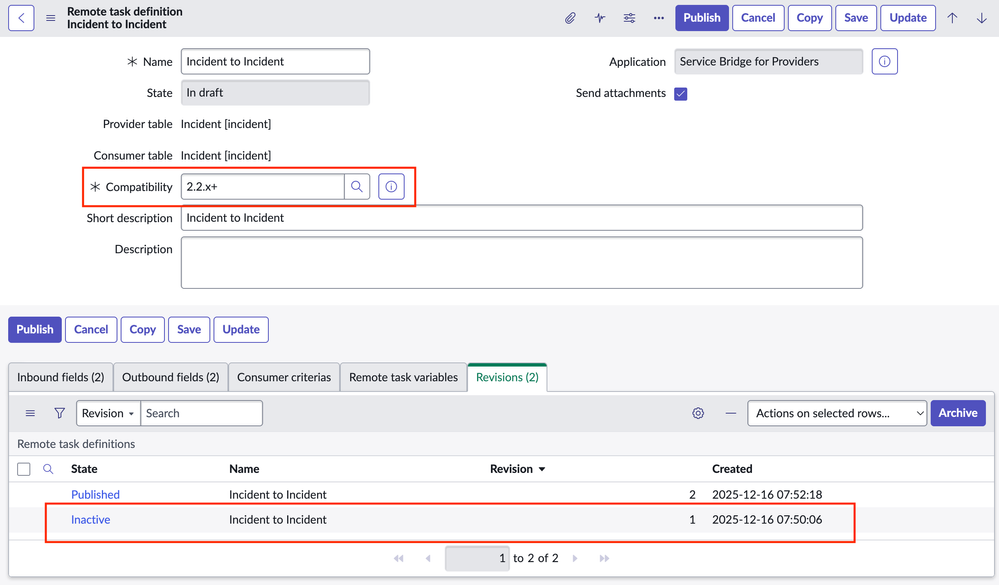
Updating a Remote Task Definition (RTD) to a compatibility of 2.2.x+ resulted in a consumer on an older version of Service Bridge not being able to receive and activate the RTD. We attempted to revert the compatibility back to 2.0.x+, but that option was no longer available once the RTD had been updated to 2.2.x+.
What steps can be taken to restore the RTD's compatibility to 2.0.x+?
Solution:
- Open the updated Remote Task Definition (RTD), look at the Revisions related list, and open an Inactive revision which is at a compatibility 2.0.x+.
2. Open the Inactive revision.
3. Create a copy of the Inactive 2.0.x+ revision with the Copy UI Action.

4. Now you have a copy of the Remote Task Definition with the original compatibility of 2.0.x+.

View original source
https://www.servicenow.com/community/technology-articles/service-bridge-rtd-compatibility-rollback-using-inactive/ta-p/3450976