
Show or Hide Specific Radio Button Options in ServiceNow
 New article articles in ServiceNow Community
·
Dec 16, 2025
·
article
New article articles in ServiceNow Community
·
Dec 16, 2025
·
article
Overview
ServiceNow supports dynamic option management for dropdown (choice) fields using built-in APIs. However, radio button fields do not have the same out-of-the-box (OOB) support.
This article explains:
- The difference between dropdown vs radio button behavior
- Why
addOption()andremoveOption()do not work for radio buttons - How to show or hide specific radio button options using a reusable client-side approach
- Important prerequisites such as disabling Isolate Script
Example used: Incident form
Field type: Radio Button Choice
Field name: u_radio_button
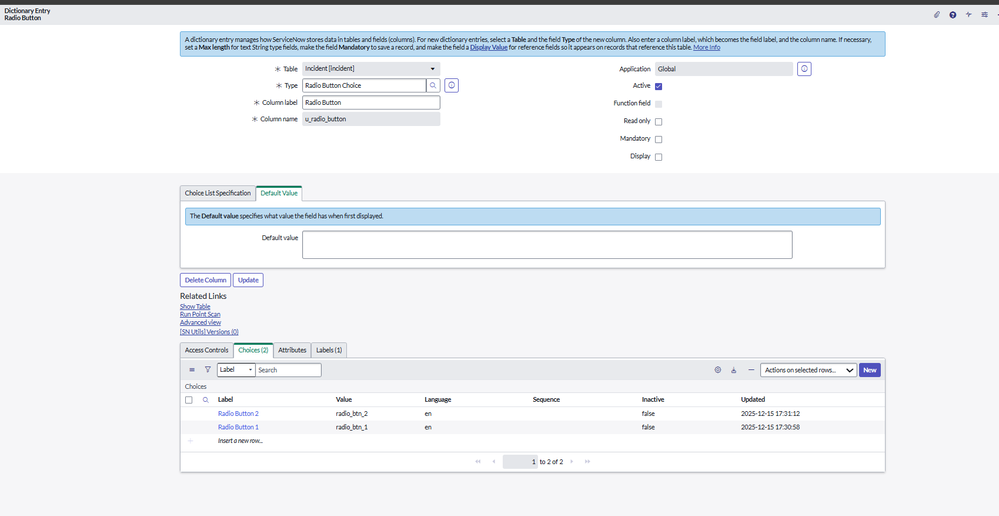
Example Field Configuration (Dictionary Entry)
Table: Incident [incident]
Column label: Radio Button
Column name: u_radio_button
Type: Radio Button Choice
Choices
| Label | Value |
|---|---|
| Radio Button 1 | radio_btn_1 |
| Radio Button 2 | radio_btn_2 |

Dropdown vs Radio Button – OOB Capability Comparison
Dropdown (Choice) Fields
ServiceNow provides native APIs:
g_form.addOption('priority', '6', 'Low Impact');
g_form.removeOption('priority', '1');
These APIs dynamically add or remove options and work across UI16, Workspace, and Catalogs.
Radio Button Fields
For radio button fields:
g_form.addOption()is not supportedg_form.removeOption()is not supported- No OOB API exists to manage radio options dynamically
Radio button choices are rendered as static HTML elements at page load.
Important Prerequisite
Isolate Script must be unchecked
This solution relies on direct DOM manipulation, which is blocked when script isolation is enabled.
Steps:
- Open the Client Script
- Uncheck Isolate Script
- Save the record
How Radio Buttons Are Rendered
On the Incident form, radio button fields are rendered as:
- A hidden input field that stores the actual value
- Multiple
<label class="radio-inline">elements, one per option
Because the options are HTML-based, g_form cannot directly control them individually.
Reusable Show / Hide Radio Option Function
function toggleRadioOption(fieldName, optionValue, show) {
    var control = g_form.getControl(fieldName);
    if (!control) return;

    var parentDiv = control.closest('.form-field') || control.parentNode;
    if (!parentDiv) return;

    var labels = parentDiv.querySelectorAll('label.radio-inline');

    labels.forEach(function(label) {
        var input = label.querySelector('input[type="radio"]');
        if (input && input.value === optionValue) {

            label.style.display = show ? '' : 'none';

            if (!show && input.checked) {
                g_form.setValue(fieldName, '');
            }
        }
    });
}
Incident Form Examples
Hide “Radio Button 2” on Load
function onLoad() {
    toggleRadioOption('u_radio_button', 'radio_btn_2', false);
}


Show or Hide Dynamically (onChange Example)
function onChange(control, oldValue, newValue, isLoading) {
    if (isLoading) return;

    if (newValue === 'High') {
        toggleRadioOption('u_radio_button', 'radio_btn_2', true);
    } else {
        toggleRadioOption('u_radio_button', 'radio_btn_2', false);
    }
}
Why style.display Is Used
The hidden attribute is not consistently respected across all ServiceNow UIs. Using style.display = 'none' works reliably in Incident forms, Workspace, Catalog Items, and Record Producers.
Key Takeaways
addOption()andremoveOption()work only for dropdown fields- Radio button fields have no OOB option-management APIs
- Radio options are rendered as static HTML
- DOM manipulation is required to show or hide options
- Isolate Script must be unchecked
- A single reusable function can handle both show and hide logic
Conclusion
Although ServiceNow does not provide native APIs to dynamically add or remove radio button options, this DOM-based approach offers a clean and reusable workaround without changing the field type or user experience.
https://www.servicenow.com/community/developer-articles/show-or-hide-specific-radio-button-options-in-servicenow/ta-p/3450257