
Refactoring the SNH Data Table Widget, Part III
“More than the act of testing, the act of designing tests is one of the best bug preventers known.”
— Boris Beizer
Now that we have refactored the various SNH Data Table widgets and added the missing support for clickable aggregate columns and conditional buttons and icons, it’s time to run everything through its paces and make sure that it all works. To begin, let’s just see if the stuff that was working is still working now that we have made all of these changes to the artifacts and added these new features. A good place to start would be with the User Directory, as that little project utilizes a number of different components that were affected by the changes.

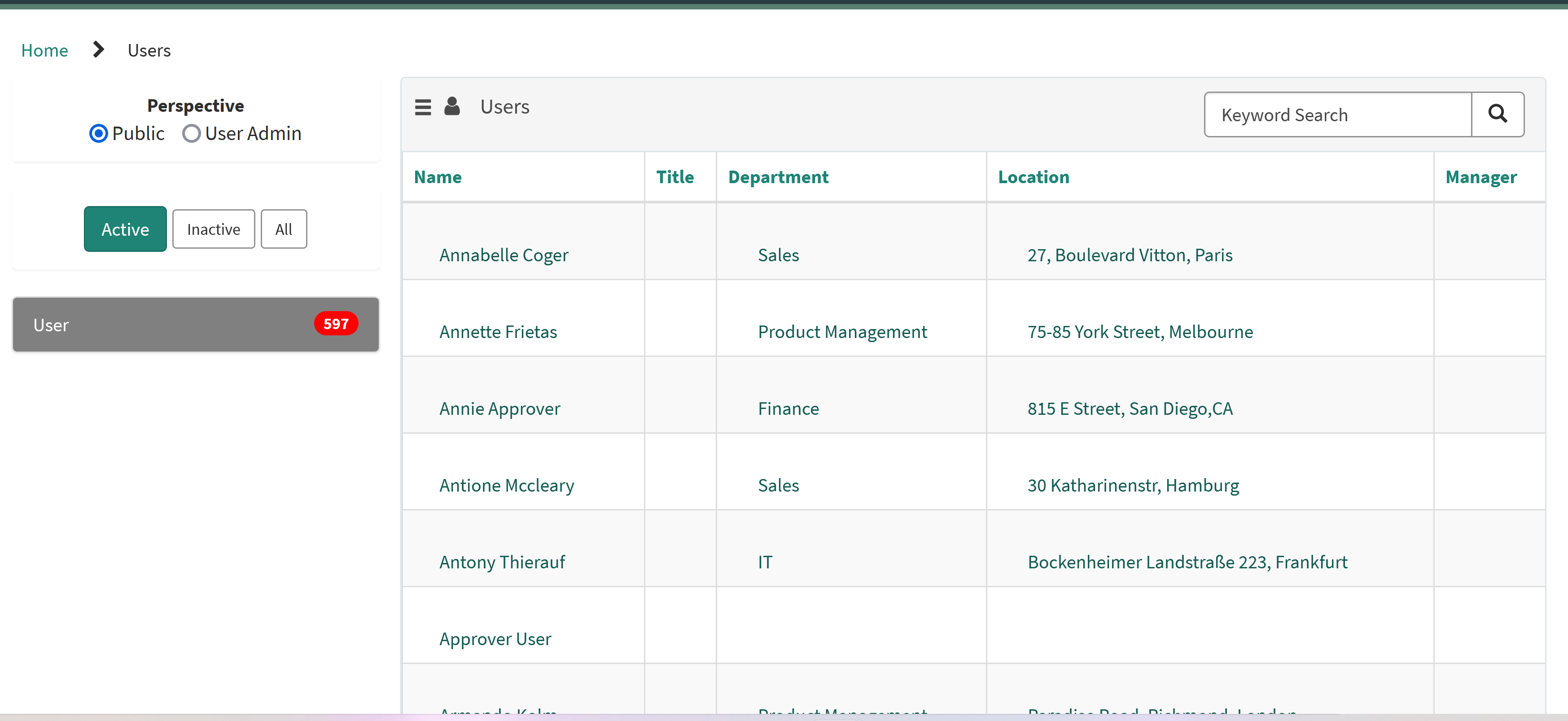
Primary User Directory page
Well, that seems to work, still. Changing perspectives and selecting different states all seem to function as they should as well, as does paging through the data and sorting on the various columns. So far so good. This tests out the SNH Data Table from URL Definition widget as well as the underlying core SNH Data Table widget. In the User Directory, the Department column and the Location column reference links are mapped to two other pages that were built using the SNH Data Table from JSON Configuration widget, and clicking on the value in one of those columns should test out both the reference link handling and that other wrapper widget.

Department Roster page
So far, so good. Clicking on a Location value should test out the reference link handling from this wrapper widget, and also bring up yet another page using the second of the three wrapper widgets.

Location Roster page
Once again, everything seems to be behaving as it should using the two wrapper widgets tested so far. The third wrapper widget, the SNH Data Table from Instance Definition widget, is not used in the User Directory, but we have other test scenarios set up for that one. Before we move on, though we can go ahead and test one more thing while we are working with the User Directory: conditional icons. In the User Admin perspective, there is an icon defined to edit the user’s data. We can add a quick condition to that icon configuration and see how that works out. Just for testing purposes, let’s try the following expression:
item.department.display_value == 'Sales'
If that works, the edit icon should only appear for users who are assigned to the Sales department.

User Directory User Admin perspective with conditional icon
Well, that seems to work as well. Good deal. While we are here, we might as well click on the icon and see if the button click handling works as well as the reference link handling that we tested earlier.

User Profile edit page
And it would seem that it does. That’s about all that we can squeeze out of the User Directory, but we still have a lot more to test, including the third wrapper widget and the other new feature, the clickable aggregate columns. Plus, we still have to do regression testing for bulk actions and clicks that result in a modal pop-up box instead of branching to a new portal page. That’s a lot to get through, so let’s keep plowing ahead.
Our third aggregate column test page was built on the SNH Data Table from Instance Definition widget, so let’s pull that guy up and see how things look.

Aggregate Column test page #3
Well, that all seems to work, and the Network group has two Incidents, so we just need another page to which we can link to display those Incidents. That’s easy enough to do with yet another aggregate column test page using the SNH Data Table from Instance Definition widget, a table name of Incident and a filter of active=trueassignment_group={{sys_id}}.

_Aggregate Column test page #_5
So all of three of the wrapper widgets seem to work, which by default tests out the core widget, and direct links from reference columns, buttons, and aggregate columns all navigate to the appropriate pages. That just leaves bulk actions and modal pop-ups to be tested, both of which will require companion widgets to listen for the associated broadcast messages. For that, we will have to hunt down or create some companion widgets for testing purposes, which might get a little involved, so let’s jump into that next time out.
https://snhackery.com/2022/06/14/refactoring-the-snh-data-table-widget-part-iii/#utm_source=rss&utm_medium=rss&utm_campaign=refactoring-the-snh-data-table-widget-part-iii