
Aggregate List Columns, Part VII
“The most effective way to do it is to do it.”
— Amelia Earhart
Last time, we completed the modifications to the last of the wrapper widgets, so now it is time to tackle the Content Selector Configuration Editor. Before we do that, though, we need to make one small addition to the Configurable Data Table Widget Content Selector itself. This widget builds the URL for the SNH Data Table from URL Definition widget, and so we need to add support for aggregate columns to the process that constructs that URL. I found these lines in the Client controller related to the buttons and icons:
s.buttons = '';
if (tableInfo[state].btnarray && Array.isArray(tableInfo[state].btnarray) && tableInfo[state].btnarray.length > 0) {
s.buttons = JSON.stringify(tableInfo[state].btnarray);
}
So I just made a copy of those lines and then modified the copy to work with aggregates instead of buttons.
s.aggregates = '';
if (tableInfo[state].aggarray && Array.isArray(tableInfo[state].aggarray) && tableInfo[state].aggarray.length > 0) {
s.aggregates = JSON.stringify(tableInfo[state].aggarray);
}
That was another simple and easy fix. Now onto the editor, which I am sure will be quite a bit more involved. Starting with the easy part, which I always like to do, we can take a look at the HTML and hunt for a section related to the buttons and icons, and then copy it to use as a base for creating a similar section for aggregate columns. Here is the relevant code:
| ${Label} | ${Name} | ${Heading} | ${Icon} | ${Icon Name} | ${Color} | ${Hint} | ${Page} | ${Edit} | ${Delete} |
|---|---|---|---|---|---|---|---|---|---|
| {{btn.label}} | {{btn.name}} | {{btn.heading}} | {{btn.hint}} | {{btn.icon}} | {{btn.color}} | {{btn.hint}} | {{btn.page_id}} |  |
 |
Copying that code, making a few text replacements here and there, and then adjusting some of the columns to meet our needs resulted in the following new section of HTML, inserted above the buttons and icons section:
| ${Label} | ${Name} | ${Heading} | ${Table} | ${Field} | ${Filter} | ${Source} | ${Edit} | ${Delete} |
|---|---|---|---|---|---|---|---|---|
| {{agg.label}} | {{agg.name}} | {{agg.heading}} | {{agg.table}} | {{agg.field}} | {{agg.filter}} | {{agg.source}} | |
|
Now we have referenced a few nonexistent functions at this point, but that should not prevent us from pulling up the page and seeing how it looks so far. We can’t really click on anything in the new aggregates section at the moment, but let’s just take a peek and see how it all renders on the screen.

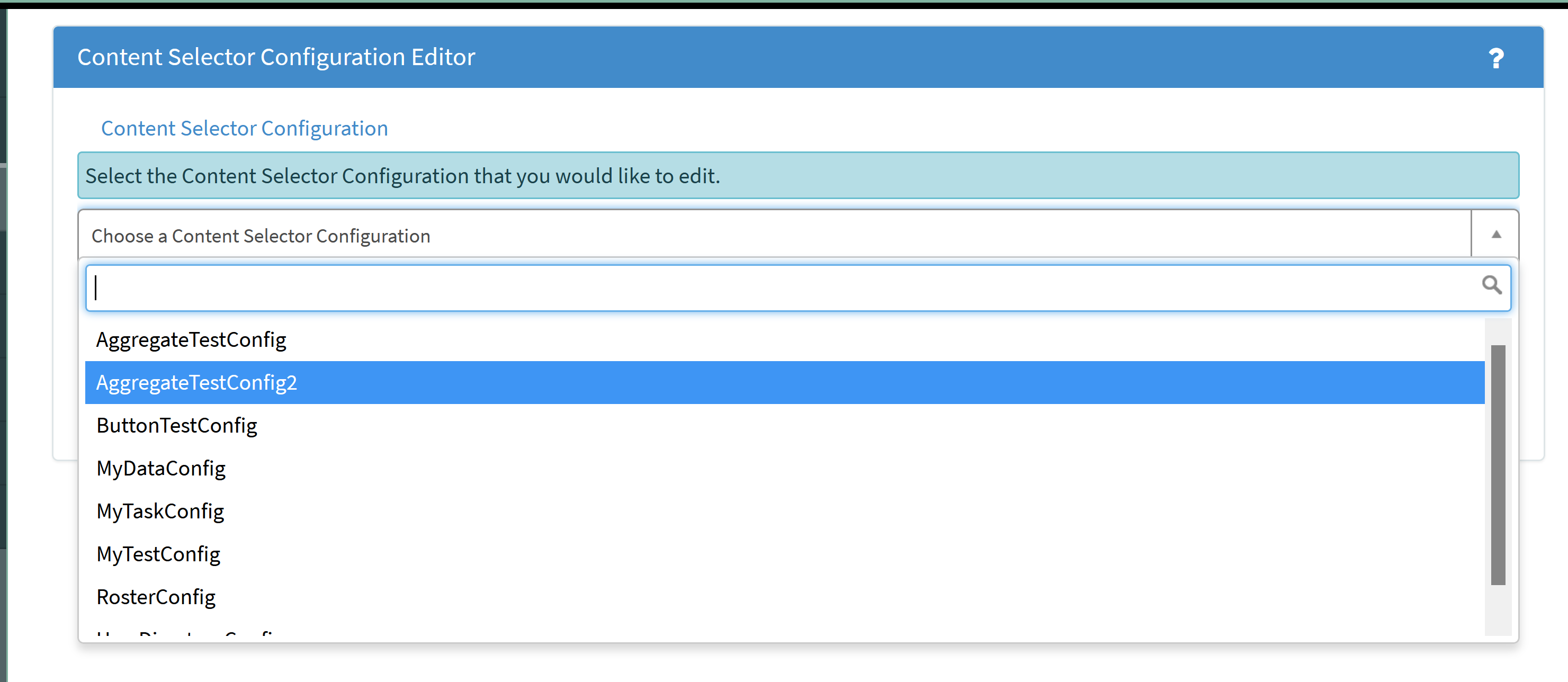
Configuration file selection screen
Let’s select our second test configuration, since that one has a source property defined, and see how things look.

New HTML section for aggregate column definitions
So far, so good. Now we need to create those missing client-side functions referenced in the new HTML, which we should be able to do relatively easily by copying corresponding functions used for the buttons and icons. Let’s start with the Delete function, since that one should be the easiest. Here is the code to delete a button configuration:
$scope.deleteButton = function(button, btnArray) {
var confirmMsg = 'Delete Button/Icon';
confirmMsg += '
Are you sure you want to delete the ' + button.label + ' Button/Icon?';
spModal.confirm(confirmMsg).then(function(confirmed) {
if (confirmed) {
var a = -1;
for (var b=0; b<btnArray.length; b++) {
if (btnArray[b].name == button.name) {
a = b;
}
}
btnArray.splice(a, 1);
}
});
};
… and here is the modified copy that we can use for the aggregates section:
$scope.deleteAggregate = function(aggregate, aggArray) {
var confirmMsg = 'Delete Aggregate Column';
confirmMsg += '
Are you sure you want to delete the ' + aggregate.label + ' Aggregate Column?';
spModal.confirm(confirmMsg).then(function(confirmed) {
if (confirmed) {
var a = -1;
for (var b=0; b<aggArray.length; b++) {
if (aggArray[b].name == aggregate.name) {
a = b;
}
}
aggArray.splice(a, 1);
}
});
};
Next is the Edit function, which is a little more complicated. Once again, we can use the Edit function for the button configurations as a starting point.
$scope.editButton = function(button, btnArray) {
var shared = {page_id: {value: '', displayValue: ''}};
if (button != 'new') {
shared.label = button.label;
shared.name = button.name;
shared.heading = button.heading;
shared.icon = button.icon;
shared.color = button.color;
shared.hint = button.hint;
shared.page_id = {value: button.page_id, displayValue: button.page_id};
}
spModal.open({
title: 'Button/Icon Editor',
widget: 'button-icon-editor',
shared: shared
}).then(function() {
if (button == 'new') {
button = {};
btnArray.push(button);
}
button.label = shared.label || '';
button.name = shared.name || '';
button.heading = shared.heading || '';
button.icon = shared.icon || '';
button.color = shared.color || '';
button.hint = shared.hint || '';
button.page_id = shared.page_id.value || '';
});
};
As we did with the HTML, we can make a few text replacements here and there and then adjust some of the columns to come up with a suitable function for aggregate specifications.
$scope.editAggregate = function(aggregate, aggArray) {
var shared = {};
if (aggregate != 'new') {
shared.label = aggregate.label;
shared.name = aggregate.name;
shared.heading = aggregate.heading;
shared.table = aggregate.table;
shared.field = aggregate.field;
shared.filter = aggregate.filter;
shared.source = aggregate.source;
}
spModal.open({
title: 'Aggregate Column Editor',
widget: 'aggregate-column-editor',
shared: shared
}).then(function() {
if (aggregate == 'new') {
aggregate = {};
aggArray.push(aggregate);
}
aggregate.label = shared.label || '';
aggregate.name = shared.name || '';
aggregate.heading = shared.heading || '';
aggregate.table = shared.table || '';
aggregate.field = shared.field || '';
aggregate.filter = shared.filter || '';
aggregate.source = shared.source || '';
});
};
That was relatively painless, but now we have code that references an entire widget that does not yet exist. Once again, we can create the missing widget by cloning the existing widget for the buttons and icons, but that seems like it might involve a little bit of work. Let’s jump into that in our next installment.
https://snhackery.com/2022/05/02/aggregate-list-columns-part-vii/#utm_source=rss&utm_medium=rss&utm_campaign=aggregate-list-columns-part-vii