
Streamline Flow Error Handling in ServiceNow
 New article articles in ServiceNow Community
·
Dec 01, 2024
·
article
New article articles in ServiceNow Community
·
Dec 01, 2024
·
article
Imagine you’re a developer worked on a ServiceNow flow. When an error occurs in flow after submitting the request , endusers/requestors often doesn’t understand what went wrong or how to resolve it. By enabling Error Handler, you can automate error management and make the process seamless.
For instance:
• Scenario: An error occurs in a flow.
• Error Handler Solution: Automatically create an incident/ send email with error details.
This way, the issue is logged and tracked immediately, without requiring manual intervention or investigation.
Outcome: Endusers stay informed, and support teams can act quickly to resolve the incident,ensuring smooth flow operations.
Benefits of Flow Error Handling
Error Handler Components
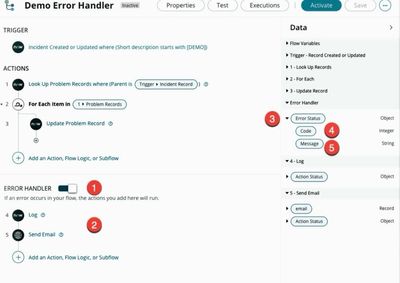
1. Error Handler Switch: Easily enable or disable error handling for any flow.
2. Error Handler Section: Add up to 10 actions, subflows, or logic steps to manage and resolve errors.
3. Error Status Data Pills:
4. Code: Indicates if an error occurred (1 = error, 0 = success).
5. Message: Provides error details for debugging.
Available States:
• Completed (Error Caught): Error handled successfully within the flow.
• Completed (Error Skipped): Custom actions continued execution despite an error.
• Error: Occurs when the error handler is disabled or fails.
What Happens When an Error Occurs?
• The flow stops and executes the error handler section.
• If resolved, the flow ends with “Completed (Error Caught).”
• If unresolved, the flow stops with an “Error” state.

https://www.servicenow.com/community/developer-blog/streamline-flow-error-handling-in-servicenow/ba-p/3116786