
Embedding image attachments in the body of Notifications (HTML)
 Allen Andreas
Hi,
Recently someone had asked a question on the forums that grabbed my curiosity, so I decided to dig in and check some things out. Their question was essentially: how to take an attachment variable on a catalog item and embed that attachment within a notification body. This is different than just using the "Include Attachments" checkbox on the notification as that would just include all record attachments as an attachment to the email, but not actually embedding it in the body.
So, I did some quick testing and came up with a few use case examples where this solution could be utilized. This basically involves creating a mail script and then utilizing that properly within your notification.
Option 1: Embed an image attachment from an attachment type variable in the body of a notification:
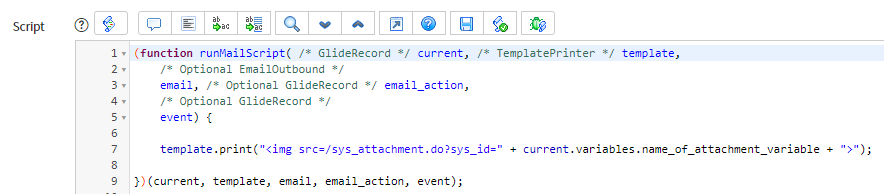
- Create a mail script using example code:
template.print("<img src=/sys_attachment.do?sys_id=" + current.variables.name_of_attachment_variable + ">");
You can change current.variables to just current if the attachment type field is actually on your table instead of a catalog item - Within your notification Message HTML field, you'd call the mail script for example:
Here's your embedded image: ${mail_script:name_of_mail_script}
- The final result would look something like this:


Option 2: Embed one or more image attachments that are directly attached to a record in the body of a notification:
- Create a mail script using example code:
var gr = new GlideRecord('sys_attachment'); gr.addQuery('table_sys_id', current.sys_id); gr.addQuery('content_type', "CONTAINS", "image"); //This line helps ensure you're only grabbing image type attachments gr.query(); while (gr.next()) { template.print("<img src=/sys_attachment.do?sys_id=" + gr.getValue('sys_id') + ">"); }
- Follow step 2 from Option 1, above
- The final result would look something like this:


There's always more you can do (i.e., adding height="x" and width="y" as well in the img src line to control the height and width of the image in the notification), but hopefully this helps guide you if this is something you're looking to accomplish.
Please be sure to bookmark this article as well as mark it as Helpful if you thought it was helpful.
Interested in other articles I've written? Check out this Delta Exam Guide article!
Thanks and take care! 
https://www.servicenow.com/community/developer-articles/embedding-image-attachments-in-the-body-of-notifications-html/ta-p/2322765