
How to add a Highlight to the Selected Navigation Module in ServiceNow
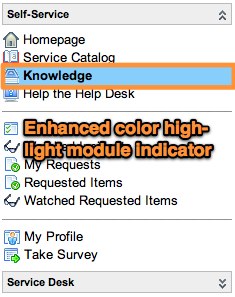
I received a client request last night asking if there was any way to provide some sort of additional highlighting to the currently-selected module in the left navigation. You're probably already aware that when you click on a link in the left nav that link changes to a bold text. The client wanted to add a background highlight color in addition to the bolded text so that the selected module would be easier to see. The end result of this customization looks something like this...

Here's a link to the full SNCGuru solution...
http://www.servicenowguru.com/system-ui/ui-scripts-system-ui/highlight-selected-navigation-module/
https://www.servicenow.com/community/in-other-news/how-to-add-a-highlight-to-the-selected-navigation-module-in/ba-p/2269400