
Animated Loading Message & Collapsible Details on ServiceNow Form or Field (Client-side)
 ServiceNow Developer Pro-Tips
·
Oct 09, 2022
·
article
ServiceNow Developer Pro-Tips
·
Oct 09, 2022
·
article

I recently found myself in a bit of a sticky pickle in ServiceNow. I was building a **client-side UI Action** which needed to call a Script Include via [GlideAjax](https://ajax.snc.guru).
The server-side component of that script would then call a REST API and retrieve some data.
The data would be transformed and then returned to the client to be displayed in the form.
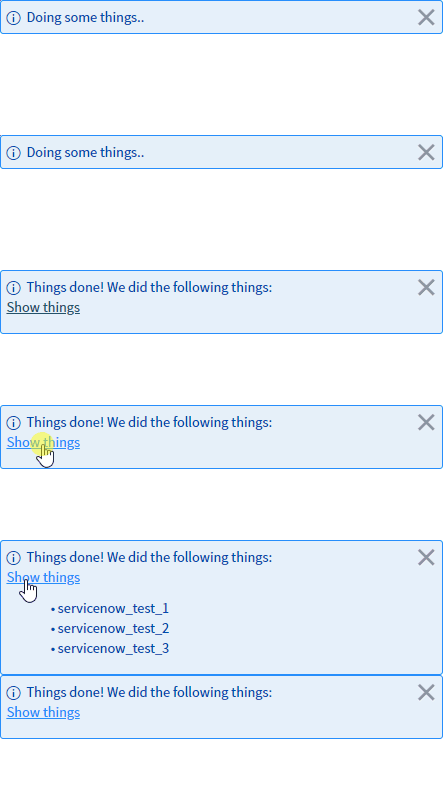
This caused two major issues:
1. The response could take a while, so it looks for several seconds as though clicking the button did nothing.
2. When the response did arrive, there could potentially be a lot of data to display in the form message.
As you can see in the gif above, I was able to solve both issues with a fancy bit of code. And now I’m gonna share that code with you!
This article will tell you _how_ I solved them, and provide you with the code I used (made fully modular so you can customize its behavior for your own situation). You can then include those functions in your Client Script in order to achieve similar functionality, with only a couple of lines of code!
> **Edit 10/10/22**: Some folks in the ServiceNow Development community [Discord](https://discord.snc.guru) and [Slack](https://slack.snc.guru) have asked a very good question that I thought it important enough to answer right at the top of this article:
> “_Doesn’t this ‘lock up’ the form/browser session while the animated loading message is displayed?_”
>
> The answer to this very reasonable question is, luckily, **no**!
> Even though both methods for displaying [animated loading messages](#loading%5Fmessage) require some code to be executing in the background, and JS is single-threaded, this does not lock up the browser session. If you want a more detailed explanation, expand the section below.
**Additional details** (expand)
> _How does it not lock up the session?_
> The user's browser-session does not lock up for the same reason that **asynchronous** [GlideAjax](https://ajax.snc.guru) calls don't lock up the browser. Asynchronous code executes only on some condition or timer (in this case, a timer, typically between 130 and 230 milliseconds).
> The [CSS animation for animated form messages](#loading%5Fmessage%5Fsimple) happens using some kinda fancy asynchronous CSS-engine processor code, and the [JavaScript Interval method for brute-force-animating field messages](#loading%5Fmessage%5Fbrute%5Fforce) are both asynchronous.
> This means that the repeating part of the animation code (each “tick” of the animation) happens only about once every 130-230 milliseconds, and takes less than half a millisecond to execute. This translates to basically nothing more than a few “frames” of your monitor’s refresh-rate per second. Human visual acuity is not sufficient to detect delays of such a tiny fraction of a second, especially when broken out into 4-6 tiny chunks within each second. Your browser is constantly doing teensy little things like that in the background all the time.
> In other words - none of the code here will result in any kind of browser “session lock”. In fact, the whole purpose of doing these asynchronous processes is to _avoid_ browser session-lock!
# Index
* [TLDR: Just Give me the Code!](#tldr)
* [Animated “Loading” Message](#loading%5Fmessage)
* [Simple CSS Animated Form Message](#loading%5Fmessage%5Fsimple)
* [Animated Field Message Using Brute Force](#loading%5Fmessage%5Fbrute%5Fforce)
* [Message with Collapsible Details Panel](#collapsible%5Fmessage)
* [Convert Array to HTML List](#html%5Ffrom%5Farray)
* [Putting it all Together](#all%5Ftogether)
# TLDR: Just Give me the Code!
Okay, fine, I’ll give you the code — but listen, you really _should_ read the rest of this article to learn some important info about how all of this works, and to better understand what’s going on under the hood.
With that said, here’s the code and how to use it:
1. Create your Client Script or UI Action (with the "Client" checkbox ticked).
2. Copy-and-paste _all_ of the code from [this gist](https://gist.github.com/thisnameissoclever/69b4c537f7897c163fd86d2fc795f5ac) into the **bottom** of the main function of your Client Script or client-side UI Action.
1. Alternatively, you can create a [Global UI Script](https://docs.servicenow.com/csh?topicname=c%5FUIScripts.html&version=latest) to store the functions in the above gist.
3. Customize and use one of the below example scripts in your Client Script or client-side UI Action.
**Animated "Loading" _form_ message during GlideAjax call** (expand) **Animated "Loading" _field_ message during GlideAjax call** (expand) **Expandable form message with some text hidden** (expand)
# Animated "Loading" Message
[  ](https://handbook.snc.guru)
The problem I was running into, is that this REST API could sometimes take **quite some time to respond** (anywhere from 5 to 15 seconds).
This meant that after the user clicks the UI Action, **nothing would appear to happen** for at least several seconds.
This is obviously a terrible user-experience! Users would click the button, wait two seconds, click it again, and then again, and again, all before the first response could be received.
On top of a poor user experience, this can also lead to an unnecessarily high API load.
So, how do we solve this problem?
As you’ve probably guessed from the title of this article, we’re going to show a “loading” message while the request is processing, then clear it and show the results once it’s finished.
But this won’t be just _any_ loading message!
We’re _fancy_, so we’re gonna make this loading message **_animated_**!
## Solution 1: Simple CSS Animated Form Message
Luckily, **form messages** created from client-side scripts in ServiceNow can support HTML and CSS! This means that we can use a simple CSS animation to animate an ellipses at the end of our message (_“simple”_ here meaning _“pretty darn complicated because it’s still CSS”_).
[Follow Tim on LinkedIn](https://www.linkedin.com/comm/mynetwork/discovery-see-all?usecase=PEOPLE%5FFOLLOWS&followMember=sn-timw)
By calling the below function, we can display a simple loading message that will be followed by an ellipsis (three dots) that will animate from left to right:
```
/**
* Display a simple animated loading message using CSS animations.
* This loading message can be cleared by simply calling g_form.clearMessages() when loading
* has finished.
*
* @param {String} [loadingMsgText="Loading"] - The loading message text.
* This text will be followed by an animated ellipses in the message that's shown at the top
* of the form.
* @param {Number} [msAnimationDuration=800] - The number of milliseconds for which the
* animation should last.
* This is the TOTAL duration of the animation, not the interval between each dot in the
* ellipses being animated.
* @param {Number} [steps=5] - The number of "steps" for the animation to take over the
* duration specified in msAnimationDuration.
* 4-5 is recommended. The default value is 5.
*
* @example
* //With no arguments, will show "Loading..." with the ellipses being animated over 800ms.
* showSimpleLoadingMessage();
*
* //With one argument, the message you specify will be shown followed by an animated "...".
* showSimpleLoadingMessage('Processing request');
*
* //With two arguments, you can specify the duration - this animation will be slower.
* showSimpleLoadingMessage('Processing', 1500);
*
* //With three arguments, you can specify the number of "steps" the animation will take over
* // the specified number of milliseconds. This will be slower and take more animation steps.
* showSimpleLoadingMessage('Processing', 1200, 8);
*/
function showSimpleLoadingMessage(loadingMsgText, msAnimationDuration, steps) {
//Set default values
loadingMsgText = (typeof loadingMsgText === 'undefined') ? 'Loading' : loadingMsgText;
msAnimationDuration = (typeof msAnimationDuration !== 'number') ? 800 : msAnimationDuration;
steps = (typeof steps !== 'number') ? 5 : steps;
var loadingMsg = '\n' +
'.loading:after {\n' +
' overflow: hidden;\n' +
' display: inline-block;\n' +
' vertical-align: bottom;\n' +
' -webkit-animation: ellipsis steps(' + steps + ', end) ' + msAnimationDuration + 'ms infinite;\n' +
' animation: ellipsis steps(' + steps + ', end) ' + msAnimationDuration + 'ms infinite;\n' +
' content: "\\2026";\n' + //ascii code for the ellipsis character
' width: 0px;\n' +
'}\n' +
'\n' +
'@keyframes ellipsis {\n' +
' to {\n' +
' width: 20px;\n' +
' }\n' +
'}\n' +
'\n' +
'@-webkit-keyframes ellipsis {\n' +
' to {\n' +
' width: 20px;\n' +
' }\n' +
'}\n' +
'';
loadingMsg += '' + loadingMsgText + '';
g_form.addInfoMessage(loadingMsg);
}
```
There are a few different ways in which we can call the above code:
```
//With no arguments, will show "Loading..." with the ellipses being animated over 800ms.
showSimpleLoadingMessage();
//With one argument, the message you specify will be shown followed by an animated "...".
showSimpleLoadingMessage('Processing request');
//With two arguments, you can specify the duration - this animation will be slower.
showSimpleLoadingMessage('Processing', 1500);
//With three arguments, you can specify the number of "steps" the animation will take over
// the specified number of milliseconds. This will be slower and take more animation steps.
showSimpleLoadingMessage('Processing', 1200, 8);
```
Tying it all together, we can implement this functionality using something like the below code:
```
showSimpleLoadingMessage('Processing request');
doSomeVeryLongProcess();
//When the above process is finished, we clear the message:
g_form.clearMessages();
```
## Solution 2: Animated Field Message Using Brute Force
Unfortunately, ServiceNow _does not support HTML/CSS in_ **_field messages_**. Therefore, we have to get a bit clever with our implementation to show an animated loading message on a field.
This requires two steps (in two separate functions): First, begin the message animation. Then, after your long process is complete, end the animation.
```
/**
* Show an animated loading message such as "Loading...", where the dots will be
* animated with the interval specified in msInterval; first showing "Loading.", then
* "Loading..", then "Loading...", up to the number of dots indicated in maxDots.
* Once maxDots is reached, the message will be reset to "Loading." and the animation
* will repeat until stopAnimatedLoadingMessage() is called.
*
* @param {String} fieldName - The name of the field on which to show the loading message.
* @param {String} messageText - The loading message to be shown, which will be followed
* by animated dots (or whatever character is specified in dotChar, if specified).
* @param {"info"|"warning"|"error"} [messageType="info"] - The message type
* ('info', 'warning', or 'error').
* @param {Number} [maxDots=3] - The maximum number of "dots" to show before resetting to
* 1, and repeating the animation.
* @param {Number} [msInterval=180] - The number of milliseconds between animation increments.
* In the example code shown below for example, the string "Loading." will be shown in the
* form message for 170 milliseconds, after which the message will be cleared and
* "Loading.." will be shown for a further 170 seconds, then "Loading...", and then - because
* maxDots is set to 3, the message will be reset and "Loading." will be shown again for 170ms.
* @param {String} [dotChar="."] - The character to add to the end of messageText and animate
* up to the number of characters indicated in maxDots (or up to 3, if maxDots is not
* specified).
* @returns {number} - The interval ID for the animation process. You can save this in a
* variable and pass that variable into stopAnimatedLoadingMessage(), but that isn't strictly
* necessary since this interval ID is also stored in the client data object.
*
* @example
* showAnimatedLoadingFieldMessage(
* 'name', //Field name
* 'Loading',
* 'info',
* 3,
* 170,
* '.'
* );
*
* //Do some stuff that may take a while...
*
* stopAnimatedLoadingFieldMessage('name');
* showExpandingFormMessage(
* 'This text is shown immediately.',
* 'This text is hidden until the expand link is clicked.',
* 'Show more',
* 'Hide details'
* );
*/
function showAnimatedLoadingFieldMessage(
fieldName,
messageText,
messageType,
maxDots,
msInterval,
dotChar
) {
/*
Storing this in the closure scope as an object and accessing it by reference.
This is to preserve the state (the number of dots following the message text)
across executions of the below anonymous function throughout each interval.
*/
var intervalDots = {'count' : 1};
var originalMessageTest = messageText;
messageType = (typeof messageType === 'undefined') ? 'info' : messageType;
msInterval = (typeof msInterval === 'undefined') ? 180 : msInterval;
maxDots = (typeof maxDots === 'undefined') ? 3 : maxDots;
dotChar = (typeof dotChar === 'undefined') ? '.' : dotChar;
var intervalID = setInterval(function() {
var i;
var messageText = originalMessageTest;
if (intervalDots.count > maxDots) {
intervalDots.count = 1;
} else {
intervalDots.count++;
}
//Starting i at 1 since the first loop execution will add one dot.
for (i = 1; i < intervalDots.count; i++) {
messageText += dotChar;
}
g_form.hideFieldMsg(fieldName);
g_form.showFieldMsg(fieldName, messageText, messageType);
}, msInterval, intervalDots);
g_user.setClientData('loading_message_interval_id', intervalID);
return intervalID;
}
/**
* Stop showing an animated loading message that was initiated by calling the
* showAnimatedLoadingMessage() function.
* This function will stop the animation, and clear all form messages.
* Unfortunately, ServiceNow does not provide us with the ability to clear only a
* specific form message, so *all* messages will be cleared when this function executes.
*
* @param {String} fieldName - The name of the field on which the animated loading message is
* currently being shown. Any existing messages on this field will be cleared.
* @param {Number} [intervalID=g_user.getClientData('loading_message_interval_id')] -
* Optionally specify the interval ID returned from the showAnimatedLoadingMessage() function.
* The showAnimatedLoadingMessage() method stores the interval ID in the client data object
* so if this argument is not specified, then the interval ID will be retrieved from there.
*
* @example
* showAnimatedLoadingFieldMessage('some_field', 'Loading', 'info', 3, 170, '.');
* //Do some stuff that may take a while...
* stopAnimatedLoadingFieldMessage('some_field');
*/
function stopAnimatedLoadingFieldMessage(fieldName, intervalID) {
intervalID = (typeof intervalID === 'undefined') ?
g_user.getClientData('loading_message_interval_id') :
intervalID;
if (!intervalID) {
throw new Error(
'Unable to stop interval. Invalid interval ID specified, and previous ' +
'interval ID cannot be found in client data object.'
);
}
clearInterval(intervalID);
g_form.hideFieldMsg(fieldName);
}
```
Despite the fact that that’s an inordinate amount of code (a significant percentage of which, though, is documentation), implementation is actually quite simple:
```
//Show an animated "Processing request..." message on the "name" field.
showAnimatedLoadingFieldMessage('name', 'Processing request', 'info');
doSomeVeryLongProcess();
//When the above process is finished, stop the animation and clear the field message:
stopAnimatedLoadingFieldMessage('name');
```
**Enjoying this article? Don’t forget to [subscribe to SN Pro Tips](https://snprotips.com/subscribe)**!
We never spam you, never sell your information to marketing firms, and never send you things that aren’t relevant to ServiceNow.
We typically _only send out 1-4 newsletters per year_, but trust me - you don't want to miss them!
[**Subscribe here!**](https://snprotips.com/subscribe)
# Message with Collapsible Details Panel
Since ServiceNow’s client-side _form_ messages support HTML, we can do some additional wizardry as well. One thing that I’ve found particularly useful, is to show a _collapsible_ message with some details hidden until the user expands the message.
This can be quite useful when you want to present a lot of information in a form message without overwhelming the user and taking up half their screen with the message.
## Solution
This one only requires a single function-call, but this one - like the showAnimatedLoadingFieldMessage() function - has a lot of customizability in how it functions. Most of this is superfluous, however, as it has reasonable defaults for most arguments.
By calling the below function, we can show a short form message, but have additional details available if the user expands the message to show more details:
```
/**
* Display an expandable form message. This message will be shown at the top of whatever form
* this code is executed on. The text in firstLine will be shown, but the text in flyoutText
* will be hidden until the user clicks the 'expand' link.
*
* @param {String} firstLine - The first line of text in the message, which will be shown
* immediately when this code executes. Unlike the text in flyoutText, this text will not
* be hidden.
* @param {String|HTML_TEXT} flyoutText - This text will be hidden by default, but will be shown
* once the user clicks the 'expand' link (which you can customize by setting expandLinkText).
* @param {String} [expandLinkText="Show more"] - Optionally specify the text to be shown as
* a clickable link, which will cause the form message to expand and display the text
* specified in flyoutText.
* @param {String} [collapseLinkText="Hide details"] - Optionally specify the text to be shown
* after the user clicks the 'expand' link text (specified in expandLinkText).
* This text will be shown when the message is expanded and the text specified in flyoutText
* is shown. Upon clicking this text, the message will be collapsed, flyoutText will be hidden,
* and the link text will revert back to that specified in expandLinkText.
*
* @example
* showExpandingFormMessage(
* 'This message expands',
* flyoutListHTML,
* 'Show more',
* 'Hide details'
* );
*/
function showExpandingFormMessage(firstLine, flyoutText, expandLinkText, collapseLinkText) {
var formMsg = firstLine;
expandLinkText = (typeof expandLinkText !== 'string') ? 'Show more' : expandLinkText;
collapseLinkText = (typeof collapseLinkText !== 'string') ? 'Hide details' : collapseLinkText;
formMsg += '
formMsg += '';
formMsg += '
formMsg += flyoutText;
formMsg += '
formMsg += '
g_form.addInfoMessage(formMsg);
}
```
To call this function, we have a few options:
```
showExpandingFormMessage(
'This message can be expanded!', //The message to be shown initially.
'A whole bunch of info can be included here without cluttering the screen, as this text will only be shown when the user expands the message.',
'Show more', //The clickable text that will expand the message.
'Hide details' //The clickable text to collapse the message, once expanded.
);
//Or we can call the function with only two arguments:
showExpandingFormMessage(
'This message can be expanded!', //The message to be shown initially.
'Longer text to show when expanded',
);
```
# Convert Array to HTML List
Sometimes you might want to display a larger set of data (ideally in a collapsible form message), but you want to make it look pretty and HTML-ized for the user. You might, for example, have an array of data that you want to show in an HTML list.
Using the below function, we can display an array of data to the user in a meaningful and attractive way, and - using the method above - keep that data hidden until the user expands the message.
```
/**
* Convert an array into an HTML list, using the specified list style-type.
*
* @param {Array} msgArray - An array of strings to return as HTML list elements.
* @param {String} [listStyle=disc] - Optionally specify the list-style-type
* Valid style-types can be found at the following link:
* https://www.w3schools.com/cssref/playdemo.asp?filename=playcss_list-style-type
* For example, for a simple bulleted list, you can this to 'disc' (or not specify a value, as
* disc is the default value). For an ordered numerical list, you can set this to 'decimal'.
* For roman numerals, you can set this to 'upper-roman' or 'lower-roman'.
* You can even have no list bullet type, which just shows the elements in a list without a
* bullet, by setting this value to the string 'none'.
* @param {String} [listElementPrefixStr=] - Optionally specify a string to show at the beginning
* of each element in the array, in the returned HTML.
* For example, if you have an element like "Element one", and you set this value to the string
* "- ", then the returned HTML list will contain an element with the string "- Element one".
* @returns {string} - An HTML list of all the elements in msgArray.
* @example
* var arrListElements, flyoutListHTML;
* showSimpleLoadingMessage('Loading');
*
* //Do some stuff that may take a while...
*
* arrListElements = ['First list element', 'Second list element', 'Third list element'];
* flyoutListHTML = getHTMLListFromArray(
* arrListElements,
* 'disc',
* 'Element: '
* );
* g_form.clearMessages();
* showExpandingFormMessage(
* 'This message expands',
* flyoutListHTML,
* 'Show more',
* 'Hide details'
* );
*/
function getHTMLListFromArray(msgArray, listStyle, listElementPrefixStr) {
var i, msgText;
listStyle = (typeof listStyle !== 'string') ? 'disc' : listStyle;
listElementPrefixStr = (typeof listElementPrefixStr !== 'string') ? '' : listElementPrefixStr;
if (msgArray.length <= 0) {
return '';
}
msgText = '
- ';
- ' + listElementPrefixStr + msgArray[i] + ' ';
for (i = 0; i < msgArray.length; i++) {
msgText += '
}
msgText += '
return msgText;
}
```
Usage is as easy as:
```
var flyoutListHTML = getHTMLListFromArray(
arrListElements,
'disc'
);
```
# Putting it all Together!
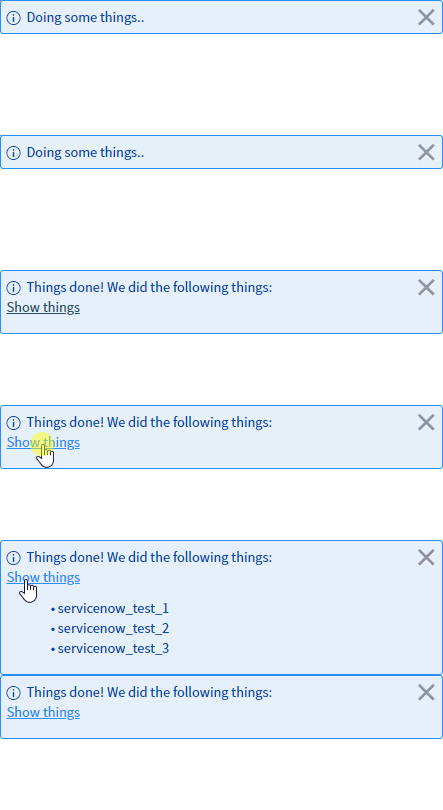
Now that we know how to do all of that, we can include the functions above (_or just copy and paste_ [_everything in this gist_](https://gist.github.com/thisnameissoclever/69b4c537f7897c163fd86d2fc795f5ac) _at the bottom of our Client Script or client-side UI Action script’s primary function or into a UI Script_) and get the results shown in the following gif using something like the below code!
```
var arrListElements, flyoutListHTML;
showSimpleLoadingMessage('Retrieving data');
arrListElements = slowFunctionThatReturnsAnArrayOfStrings();
flyoutListHTML = getHTMLListFromArray(
arrListElements,
'disc',
'Element: '
);
g_form.clearMessages();
showExpandingFormMessage(
'This message expands',
flyoutListHTML,
'Show more',
'Hide details'
);
```
---
## Subscribe
Sign up with your email address to receive news and updates.
First Name Last Name
Email Address Sign Up
We respect your privacy.
Thank you!
---
* [ January 2026](https://snprotips.com/blog?month=01-2026)
* Jan 8, 2026 [Flow Designer vs. Scripting - REST Message Performance](https://snprotips.com/blog/) Jan 8, 2026
* [ September 2025](https://snprotips.com/blog?month=09-2025)
* Sep 29, 2025 [Find Filthy Inefficient Single-Record Queries FAST](https://snprotips.com/blog/) Sep 29, 2025
* Sep 14, 2025 [Communicating Changes to Your Users (& Setting Default User Preferences in ServiceNow)](https://snprotips.com/blog/) Sep 14, 2025
* [ March 2025](https://snprotips.com/blog?month=03-2025)
* Mar 24, 2025 [Calculate Distance Between Two Locations in ServiceNow (without an API call!)](https://snprotips.com/blog/) Mar 24, 2025
* Mar 11, 2025 [5 Ways to Check your ServiceNow Instance for DANGEROUS CODE in Less Than 5 minutes](https://snprotips.com/blog/) Mar 11, 2025
* [ March 2024](https://snprotips.com/blog?month=03-2024)
* Mar 28, 2024 [How to Identify Duplicate Records by Multiple Fields in ServiceNow](https://snprotips.com/blog/) Mar 28, 2024
* Mar 7, 2024 [How to Merge Personal & Company ServiceNow Accounts](https://snprotips.com/blog/) Mar 7, 2024
* [ February 2024](https://snprotips.com/blog?month=02-2024)
* Feb 12, 2024 [5 Lessons About Programming From Richard Feynman](https://snprotips.com/blog/) Feb 12, 2024
* [ July 2023](https://snprotips.com/blog?month=07-2023)
* Jul 5, 2023 [Managing Instance-Specific System Properties for Dev/Test/Prod in ServiceNow](https://snprotips.com/blog/) Jul 5, 2023
* [ April 2023](https://snprotips.com/blog?month=04-2023)
* Apr 28, 2023 [Your ACLs and Business Rules are Broken (Here's How to Fix Them)](https://snprotips.com/blog/) Apr 28, 2023
* [ December 2022](https://snprotips.com/blog?month=12-2022)
* Dec 13, 2022 [ServiceNow Developers: BE THE GUIDE!](https://snprotips.com/blog/) Dec 13, 2022
* [ October 2022](https://snprotips.com/blog?month=10-2022)
* Oct 19, 2022 [A Faster, More Efficient Client-side GlideRecord (Free tool!)](https://snprotips.com/blog/) Oct 19, 2022
* Oct 9, 2022 [Animated Loading Message & Collapsible Details on ServiceNow Form or Field (Client-side)](https://snprotips.com/blog/) Oct 9, 2022
* [ August 2022](https://snprotips.com/blog?month=08-2022)
* Aug 23, 2022 [Using .addJoinQuery() & How to Query Records with Attachments in ServiceNow](https://snprotips.com/blog/) Aug 23, 2022
* Aug 18, 2022 [Free, Simple URL Shortener for ServiceNow Nerds (snc.guru)](https://snprotips.com/blog/) Aug 18, 2022
* Aug 16, 2022 [How to Get and Parse ServiceNow Journal Entries as Strings/HTML](https://snprotips.com/blog/) Aug 16, 2022
* Aug 14, 2022 [New tool: Get Latest Version of ServiceNow Docs Page](https://snprotips.com/blog/) Aug 14, 2022
* [ March 2022](https://snprotips.com/blog?month=03-2022)
* Mar 4, 2022 [How to Set or Change ServiceNow Application's Repository URL, Credentials, or SSH Key](https://snprotips.com/blog/) Mar 4, 2022
* [ February 2022](https://snprotips.com/blog?month=02-2022)
* Feb 7, 2022 [How to return a CSV file from a Scripted REST API (SRAPI) in ServiceNow](https://snprotips.com/blog/) Feb 7, 2022
* [ May 2021](https://snprotips.com/blog?month=05-2021)
* May 3, 2021 [Adding a Guided Setup to Your ServiceNow Application](https://snprotips.com/blog/) May 3, 2021
* [ April 2021](https://snprotips.com/blog?month=04-2021)
* Apr 27, 2021 [Use Automated Tests to Validate "Guided Setup" Completion & Functionality.](https://snprotips.com/blog/) Apr 27, 2021
* [ February 2021](https://snprotips.com/blog?month=02-2021)
* Feb 11, 2021 ["Processors", SRAPIs, and How to Run a Script and Redirect a User From a URL in ServiceNow](https://snprotips.com/blog/) Feb 11, 2021
* [ November 2020](https://snprotips.com/blog?month=11-2020)
* Nov 17, 2020 [SN Guys is now part of Jahnel Group!](https://snprotips.com/blog/) Nov 17, 2020
* [ September 2020](https://snprotips.com/blog?month=09-2020)
* Sep 14, 2020 [Better ServiceNow Notifications (& Another FREE Tool!)](https://snprotips.com/blog/) Sep 14, 2020
* [ July 2020](https://snprotips.com/blog?month=07-2020)
* Jul 31, 2020 [Debugging Client & Catalog Client Scripts in ServiceNow](https://snprotips.com/blog/) Jul 31, 2020
* [ January 2020](https://snprotips.com/blog?month=01-2020)
* Jan 20, 2020 [Getting Help from the ServiceNow Community](https://snprotips.com/blog/) Jan 20, 2020
* [ December 2019](https://snprotips.com/blog?month=12-2019)
* Dec 18, 2019 [Can ServiceNow Script Includes Use the "current" Variable?](https://snprotips.com/blog/) Dec 18, 2019
* [ November 2019](https://snprotips.com/blog?month=11-2019)
* Nov 18, 2019 [Handling 'text/plain' and Other Unsupported Content Types in ServiceNow Scripted REST APIs](https://snprotips.com/blog/) Nov 18, 2019
* [ April 2019](https://snprotips.com/blog?month=04-2019)
* Apr 21, 2019 [Understanding Attachments in ServiceNow](https://snprotips.com/blog/) Apr 21, 2019
* Apr 10, 2019 [Using Custom Search Engines in Chrome to Quickly Navigate ServiceNow](https://snprotips.com/blog/) Apr 10, 2019
* Apr 4, 2019 [Set Catalog Variables from URL Params (Free tool)](https://snprotips.com/blog/) Apr 4, 2019
* Apr 1, 2019 [Outlook for Android Breaks Email Approvals (+Solution)](https://snprotips.com/blog/) Apr 1, 2019
* [ March 2019](https://snprotips.com/blog?month=03-2019)
* Mar 11, 2019 [GlideFilter is Broken - Free Tool: “BetterGlideFilter”](https://snprotips.com/blog/) Mar 11, 2019
* [ February 2019](https://snprotips.com/blog?month=02-2019)
* Feb 27, 2019 [Making Update Sets Smarter - Free Tool](https://snprotips.com/blog/) Feb 27, 2019
* [ November 2018](https://snprotips.com/blog?month=11-2018)
* Nov 29, 2018 [How to Learn ServiceNow](https://snprotips.com/blog/) Nov 29, 2018
* Nov 6, 2018 [ServiceNow & ITSM as a Career?](https://snprotips.com/blog/) Nov 6, 2018
* [ October 2018](https://snprotips.com/blog?month=10-2018)
* Oct 19, 2018 [Asynchronous onSubmit Catalog/Client Scripts in ServiceNow](https://snprotips.com/blog/) Oct 19, 2018
* Oct 11, 2018 [How to do Massive, Slow Database Operations Efficiently With Event-Driven Recursion](https://snprotips.com/blog/) Oct 11, 2018
* [ September 2018](https://snprotips.com/blog?month=09-2018)
* Sep 18, 2018 [Broken Queries & Query Business Rules in ServiceNow](https://snprotips.com/blog/) Sep 18, 2018
* Sep 7, 2018 [JournalRedactor - Easily Redact or Delete Journal Entries in ServiceNow!](https://snprotips.com/blog/) Sep 7, 2018
* [ July 2018](https://snprotips.com/blog?month=07-2018)
* Jul 23, 2018 [Admin Duty Separation with a Single Account](https://snprotips.com/blog/) Jul 23, 2018
* [ June 2018](https://snprotips.com/blog?month=06-2018)
* Jun 19, 2018 [Improving Performance on Older Instances with Table Rotation](https://snprotips.com/blog/) Jun 19, 2018
* Jun 4, 2018 [New Free Tool: Login Link Generator](https://snprotips.com/blog/) Jun 4, 2018
* [ May 2018](https://snprotips.com/blog?month=05-2018)
* May 29, 2018 [Learning ServiceNow: Second Edition!](https://snprotips.com/blog/) May 29, 2018
* [ April 2018](https://snprotips.com/blog?month=04-2018)
* Apr 17, 2018 [Upgrading From Express to Enterprise: What's Missing](https://snprotips.com/blog/) Apr 17, 2018
* Apr 12, 2018 [If a Genie Gave Me Three Wishes, I'd Use Them All to "Fix" Scope](https://snprotips.com/blog/) Apr 12, 2018
* [ March 2018](https://snprotips.com/blog?month=03-2018)
* Mar 19, 2018 [Service Catalog "Try in Portal" button](https://snprotips.com/blog/) Mar 19, 2018
* Mar 15, 2018 [Video: Custom Output Transition Conditions From a Single Workflow (Script) Activity](https://snprotips.com/blog/) Mar 15, 2018
* [ February 2018](https://snprotips.com/blog?month=02-2018)
* Feb 11, 2018 [We have a new book! ](https://snprotips.com/blog/) Feb 11, 2018
* [ November 2017](https://snprotips.com/blog?month=11-2017)
* Nov 6, 2017 [Requiring Attachments (& Other Miracles) in Service Portal](https://snprotips.com/blog/) Nov 6, 2017
* [ September 2017](https://snprotips.com/blog?month=09-2017)
* Sep 12, 2017 [Handling TimeZones in ServiceNow (TimeZoneUtil)](https://snprotips.com/blog/) Sep 12, 2017
* [ July 2017](https://snprotips.com/blog?month=07-2017)
* Jul 27, 2017 [How to Enable DOM Manipulation in ServiceNow Service Portal Catalog Client Scripts](https://snprotips.com/blog/) Jul 27, 2017
* [ June 2017](https://snprotips.com/blog?month=06-2017)
* Jun 25, 2017 [What's New in ServiceNow: Jakarta (Pt. 1)](https://snprotips.com/blog/) Jun 25, 2017
* Jun 4, 2017 [Powerful Scripted Text Search in ServiceNow](https://snprotips.com/blog/) Jun 4, 2017
* [ May 2017](https://snprotips.com/blog?month=05-2017)
* May 9, 2017 [Work at Lightspeed: ServiceNow's Plan for World Domination](https://snprotips.com/blog/) May 9, 2017
* [ April 2017](https://snprotips.com/blog?month=04-2017)
* Apr 9, 2017 [Avoiding Pass-By-Reference Using getValue() & setValue()](https://snprotips.com/blog/) Apr 9, 2017
* Apr 4, 2017 ["Learning ServiceNow" is Now Available for Purchase!](https://snprotips.com/blog/) Apr 4, 2017
* [ March 2017](https://snprotips.com/blog?month=03-2017)
* Mar 12, 2017 [reCAPTCHA in ServiceNow CMS/Service Portal](https://snprotips.com/blog/) Mar 12, 2017
* [ December 2016](https://snprotips.com/blog?month=12-2016)
* Dec 20, 2016 [Pro Tip: Use updateMultiple() for Maximum Efficiency! ](https://snprotips.com/blog/) Dec 20, 2016
* Dec 2, 2016 [We're Writing a Book! ](https://snprotips.com/blog/) Dec 2, 2016
* [ November 2016](https://snprotips.com/blog?month=11-2016)
* Nov 10, 2016 [Chrome Extension: Load in ServiceNow Frame](https://snprotips.com/blog/) Nov 10, 2016
* [ September 2016](https://snprotips.com/blog?month=09-2016)
* Sep 7, 2016 [Force-Include Any Record Into an Update Set](https://snprotips.com/blog/) Sep 7, 2016
* Sep 1, 2016 [GlideRecord Pagination - Page through your GlideRecord query](https://snprotips.com/blog/) Sep 1, 2016
* [ July 2016](https://snprotips.com/blog?month=07-2016)
* Jul 17, 2016 [Granting Temporary Roles/Groups in ServiceNow](https://snprotips.com/blog/) Jul 17, 2016
* Jul 15, 2016 [Scripted REST APIs & Retrieving RITM Variables via SRAPI](https://snprotips.com/blog/) Jul 15, 2016
* [ May 2016](https://snprotips.com/blog?month=05-2016)
* May 17, 2016 [What's New in Helsinki?](https://snprotips.com/blog/) May 17, 2016
* [ April 2016](https://snprotips.com/blog?month=04-2016)
* Apr 27, 2016 [Customizing UI16 Through CSS and System Properties](https://snprotips.com/blog/) Apr 27, 2016
* Apr 5, 2016 [ServiceNow Versions: Express Vs. Enterprise](https://snprotips.com/blog/) Apr 5, 2016
* [ March 2016](https://snprotips.com/blog?month=03-2016)
* Mar 28, 2016 [Update Set Collision Avoidance Tool: V2](https://snprotips.com/blog/) Mar 28, 2016
* Mar 18, 2016 [ServiceNow: What's New in Geneva & UI16 (Pt. 2)](https://snprotips.com/blog/) Mar 18, 2016
* [ February 2016](https://snprotips.com/blog?month=02-2016)
* Feb 22, 2016 [Reference Field Auto-Complete Attributes](https://snprotips.com/blog/) Feb 22, 2016
* Feb 6, 2016 [GlideRecord & GlideAjax: Client-Side Vs. Server-Side](https://snprotips.com/blog/) Feb 6, 2016
* Feb 1, 2016 [Make Your Log Entries Easier to Find](https://snprotips.com/blog/) Feb 1, 2016
* [ January 2016](https://snprotips.com/blog?month=01-2016)
* Jan 29, 2016 [A Better, One-Click Approval](https://snprotips.com/blog/) Jan 29, 2016
* Jan 25, 2016 [Quickly Move Changes Between Update Sets](https://snprotips.com/blog/) Jan 25, 2016
* Jan 20, 2016 [Customize the Reference Icon Pop-up](https://snprotips.com/blog/) Jan 20, 2016
* Jan 7, 2016 [ServiceNow: Geneva & UI16 - What's new](https://snprotips.com/blog/) Jan 7, 2016
* Jan 4, 2016 [Detect/Prevent Update Set Conflicts Before They Happen](https://snprotips.com/blog/) Jan 4, 2016
* [ December 2015](https://snprotips.com/blog?month=12-2015)
* Dec 28, 2015 [SN101: Boolean logic and ServiceNow's Condition Builder](https://snprotips.com/blog/) Dec 28, 2015
* Dec 17, 2015 [Locate any record in any table, by sys\_id in ServiceNow](https://snprotips.com/blog/) Dec 17, 2015
* Dec 16, 2015 [Detecting Duplicate Records with GlideAggregate](https://snprotips.com/blog/) Dec 16, 2015
* Dec 11, 2015 [Array.indexOf() not working in ServiceNow - Solution! ](https://snprotips.com/blog/) Dec 11, 2015
* Dec 2, 2015 [Understanding Dynamic Filters & Checking a Record Against a Filter Using GlideFilter](https://snprotips.com/blog/) Dec 2, 2015
* [ October 2015](https://snprotips.com/blog?month=10-2015)
* Oct 20, 2015 [Bookmarklet: Load the current page in the ServiceNow frame](https://snprotips.com/blog/) Oct 20, 2015
* [ August 2015](https://snprotips.com/blog?month=08-2015)
* Aug 27, 2015 [Easily Clone One User's Access to Another User](https://snprotips.com/blog/) Aug 27, 2015
https://snprotips.com/blog/2022/10/7/animated-progress-message-with-collapsible-details-on-servicenow-form-client-side