
🚀 Agile Card Labels: Automatically Reflect Story Status in the Agile Board
 New article articles in ServiceNow Community
·
Oct 20, 2025
·
article
New article articles in ServiceNow Community
·
Oct 20, 2025
·
article
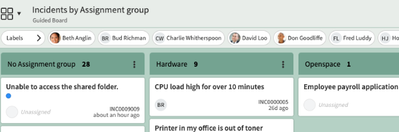
In Agile development within ServiceNow, visibility is key. Our team uses Agile Development and the Agile Board to manage and prioritise work - but manually keeping labels in sync with the story status became a hassle.
To solve this I found this ServiceNow KB: Visual Task Board: a business rule can update the card by adding a label when task is updated - Supp...
Which talked through building a Business Rule that automatically updates labels on VTB cards based on key field values like Priority, Blocked and State.


A business rule that runs on the story table for any creations or updates
This then looks up the related VTB Cards & the values on the story record
Then adds/Removes the corresponding labels that are stored in the label_entry field

Created system properties to hold the sys_ids of the labels that I wanted to reference so they were not hard coded, and created a loop to update for each one.
Here is a code snippet to show this for high priority stories:
if (current.priority == 1 && !highPriorityTag.next()) {
    highPriorityTag = new GlideRecord('label_entry');
    highPriorityTag.label = highPriorityLabelSysId;
    highPriorityTag.table = 'vtb_card';
    highPriorityTag.read = 'yes';
    highPriorityTag.title = "High Priority Tag for " + gr.task.number;
    highPriorityTag.table_key = gr.sys_id;
    highPriorityTag.insert();
} else if (current.priority != 1 && highPriorityTag.next()) {
    highPriorityTag.deleteRecord();
}

After deploying this:
- The Agile board became a real-time status dashboard
- Product owners and BA's could immediately identify blocked or test-ready stories
- Developers had less admin work keeping cards in sync
https://www.servicenow.com/community/developer-articles/agile-card-labels-automatically-reflect-story-status-in-the/ta-p/3408476