
Employee Center Favorites
 New article articles in ServiceNow Community
·
Oct 15, 2025
·
article
New article articles in ServiceNow Community
·
Oct 15, 2025
·
article
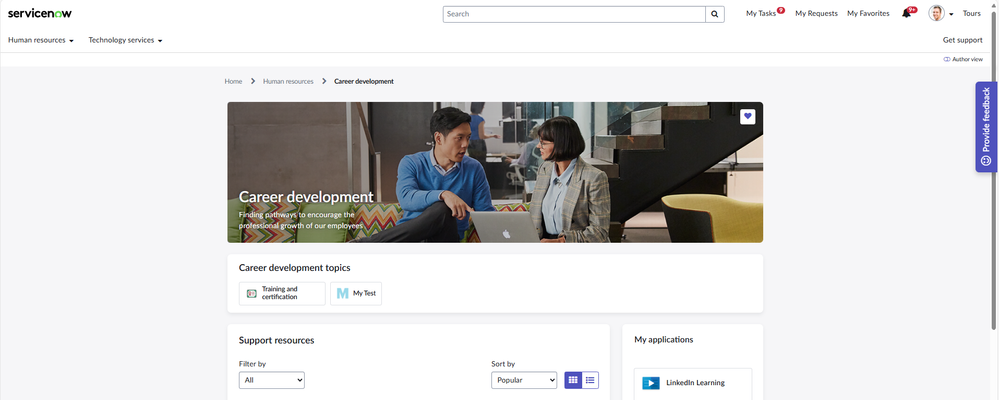
As part of what came out in January 2025 release, there was an update to Favorites on Employee Center. You are now able to favorite Topic pages just like other things in the portal. Let's take a look at some of the features around Favorites on Employee Center.
For Topic pages, it's as simple as marking the heart on the right side of the header image to add the Topic to the Favorites list.

Once it's marked, that Topic page shows up under My Favorites along with Articles and Requests.

I added a new test Topic with a large file size icon and filled in the Description field completely. On that Favorites page, a card for that Topic will have around 120 characters displayable for the Description on the List View.


That same Topic will have around 104 displayable characters on the Card View. I've been on projects where we shortened the Descriptions of Topics to ensure they fit onto the cards completely, but still make sense. With no associated icon, the Article card displays 140 in Card View and around 260 in List View.

Looking at the widget code, I didn't realize this was available, but there is a system property to limit the number of permitted Favorite items for a user. This property was blank when I first brought it up, so I set it to something to see how it would work.

Once you reach the limit, there is an alert that pops up to let you know you can't add any more Favorites.

This message was triggered in the Script Include FavoriteAPISNC. For what it's worth, the wording of the error message looks to be slightly different in Mobile.

https://www.servicenow.com/community/employee-center-blog/employee-center-favorites/ba-p/3405732