
Building ServiceNow forms with React
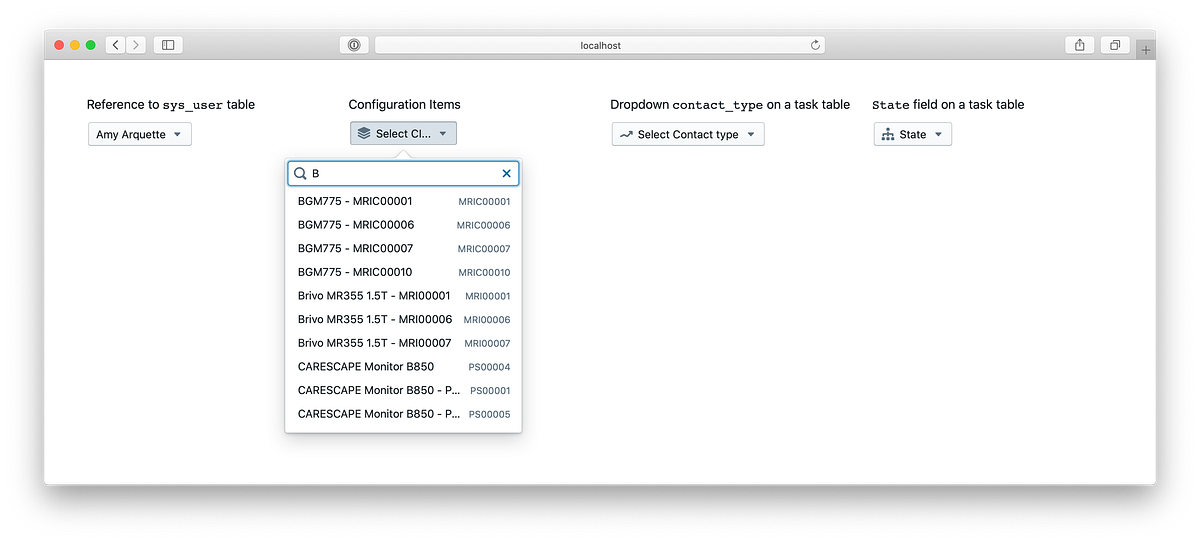
About a year ago I posted an article about building a ServiceNow reference field with React. That is a good proof of concept how to use React components to implement the most complex ServiceNow field type.
Today, I have a new version of that component available, which is a bit simpler, more efficient and robust:
- Effectively works with thousands of records
- Interactive real-time filtering, infinite scrolling
- Can be easily modified to address custom requirements and styles
- ~130 lines of code
How to install and run examples locally
You can find a component implementation in reference-field.js. It is based on react-window and react-window-infinite-loader and can be easily modified to address required styles, additional functionality etc.
Example of how to use the component:
<ReferenceField
table="sys_user"
primaryField="name"
secondaryField="email"
placeholder="Select a user..."
onChange={handleUser}
icon="diagram-tree"/>
API:
- table — ServiceNow table to pull records from
- primary field — primary field to be used for filtering
- secondary field — secondary field to display in the list
- placeholder — text to display when nothing selected yet
- onChange — function to be triggered when a record selected
- icon — blueprintjs icon name (https://blueprintjs.com/)
ServiceNow Dropdown field component
In addition to a reference field component, the repo contains a simple ServiceNow dropdown component:
- Based on ServiceNow Table API
- Can be easily modified to address custom requirements and styles
- ~30 lines of code
Dropdown component implemented in dropdown-field.js. It is a simple implementation with no particular dependencies, except of axios (http calls) and blueprintjs (styling).
Example of how to use the component:
<DropDownField
table="task"
field="state"
placeholder="State"
icon="diagram-tree"
onChange={handleChoice}/>
API:
- table — ServiceNow where the dropdown defined
- field — ServiceNow field name
- placeholder — text to display when nothing selected yet
- icon — blueprintjs icon name https://blueprintjs.com/
- onChange — function to be triggered when option selected
https://pishchulin.medium.com/building-servicenow-forms-with-react-f230a777c712?source=rss-4b2609af2935------2