
Server-Side UI Actions: Opening Links in a New Tab
 Semaphore Partners Blog
·
Sep 26, 2025
·
article
Semaphore Partners Blog
·
Sep 26, 2025
·
article
Links. They go places! But what if we wanted them to go to a different tab?
ServiceNow lets us add links to forms via UI Actions, which is great! What's not so great is that one cannot easily configure these links to open in a new tab... at least when using server-side UI Actions.
The current wisdom is that you need to use client-side UI Actions...
function myNewTab() {
  g_navigation.openPopup('task_list.do?sysparm_query=active%3Dtrue');
}
_g_navigation.openPopup is a client-side API with no server-side equivalent
This is well and good until you realize that client-side UI Actions can't use current. Without current, we're forced to resort to workarounds like g_scratchpad or GlideAjax. Such workarounds impose extra complexity and make a real headache of building what should be simple page links.
Well... Guess what? There's a better way!
First, a caveat: this trick is for Classic Forms only. This limitation exists because the classic UI uses HTML forms for everything, including UI Actions. HTML forms have a target property, which allows us to change the form submission behavior to open in a new tab.
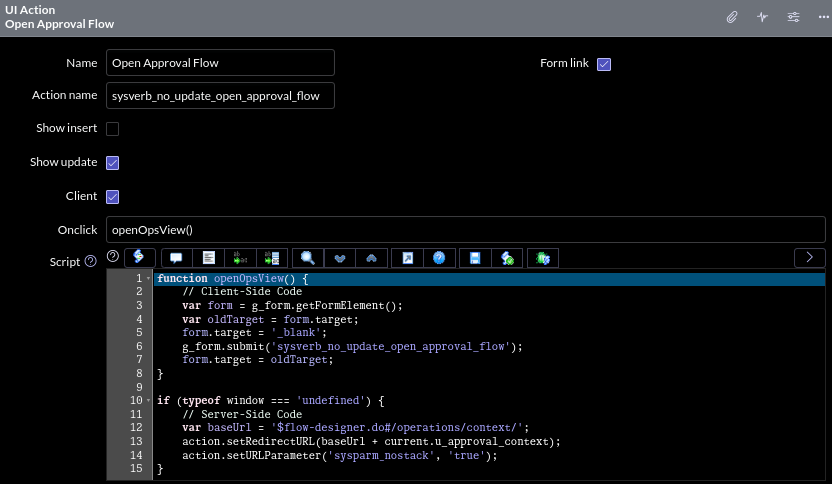
_UI Action that computes the URL server-side, on-demand
Let's hop into it. The above example is the whole cake: It opens a new tab, runs some server-side code to compute the link, then redirects the window.
function openOpsView() {
    // Client-Side Code
    var form = g_form.getFormElement();
    var oldTarget = form.target;
    form.target = '_blank';
    g_form.submit('sysverb_no_update_open_approval_flow');
    form.target = oldTarget;
}

if (typeof window === 'undefined') {
    // Server-Side Code
    var baseUrl = '$flow-designer.do#/operations/context/';
    action.setRedirectURL(baseUrl + current.u_approval_context);
    action.setURLParameter('sysparm_nostack', 'true');
}
_UI Action Script
_Click here to learn more about this type of "hybrid" UI Script!
Breaking down each part individually...
- Client: Setting this true allows us to temporarily change the client-side form's
targetto_blank. This trick is what causes the UI Action to open a new tab when callingg_form.submit. - Action Name: The
sysverb_no_update_prefix skips form saving/mandatories. - Script: The code within our
ifblock is server-side and triggers at the moment the new tab is opening. We use it to compute the link with access tocurrentand then server-side redirect the still-loading tab viaaction.setRedirectURL
💡
In this example, we also apply sysparm_nostack, which prevents the new tab from interfering with the main tab's back-button history.
This is only necessary for internal links. There's no need to worry about the stack when redirecting to outside websites!
This technique has a few notable downsides...
- Synchronous: Interacting with the original tab is blocked while this runs.
- Classic Forms Only: Not compatible with Lists or Workspaces.
That's about it, really! For more polished parts of your UX, it's still advisable to invest the requisite effort for a g_scratchpad-based implementation, because the blocking is perceptible.
On the other hand: This is certainly better than g_scratchpad for cases where you need to compute links on-demand (e.g. for pageload performance or special behavior). The only alternative in those cases was GlideAjax, which was often overkill.
On the other, other hand: GlideAjax is capable of calling non-blocking server-side code. As clunky as it is, GlideAjax still has good use for more heavy-duty interaction requirements.
https://www.semaphorepartners.com/post/serveropening-links-in-a-new-tab-via-ui-action