
ServiceNow 101 : Core table vs Base table vs Custom Table vs Parent table vs Extended table
 New article articles in ServiceNow Community
·
Nov 26, 2024
·
article
New article articles in ServiceNow Community
·
Nov 26, 2024
·
article
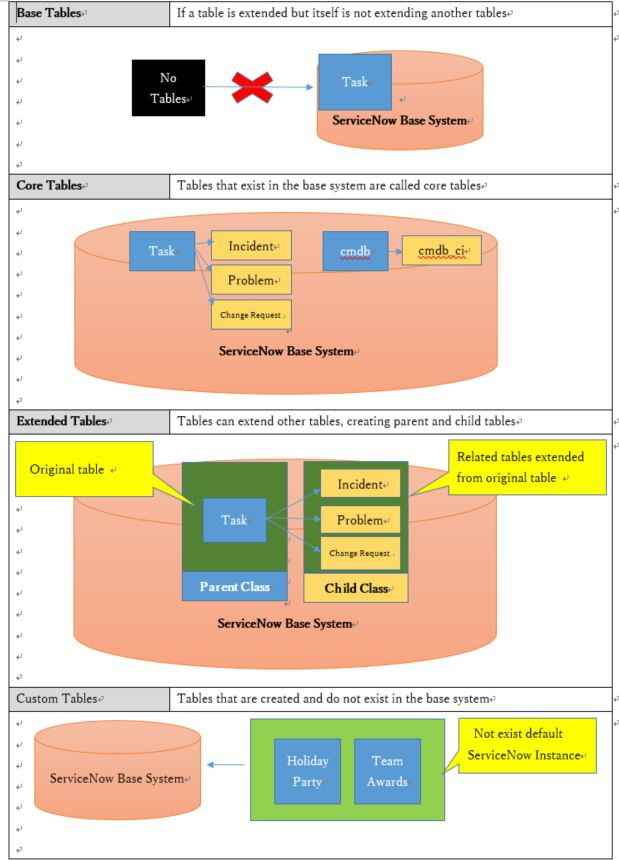
- Core = Any table that exists by default in the baseline instance.
- Custom = Any table that is created by an Admin that does not exist in the baseline instance.
- Base Class = Any table that is a parent table (has children) [extended], but is not a child of any other table [doesn't extend or not extending].
This pertains to any table, but think of it primarily in regards to newly created tables to help separate Core from Custom.
Parent Class = Any table that has children tables [is extended by], but that is also the child of another table [extends].
This pertains to any table, but think of it primarily in regards to newly created tables to help separate Core from Custom.
Child Class = Any table that has a parent table [is extended from]. This pertains to any table, but think of it primarily in regards to newly created tables to help separate Core from Custom.
Core Base = Any table that is installed by default in the baseline instance that is a parent class table without being the child of another. (Example: [task], [cmdb])
Core Parent = Any table that is installed by default in the baseline instance that is a parent class table that also is a child of another. (Example: [cmdb_ci], [change_request])
Core Child = Any table that is installed by default in the baseline instance that is the child of another table. (Example: [cmdb_ci_application])

Bonus Read - Database views
A database view defines table joins for reporting purposes, combine data from multiple tables into a single, unified view.
Limitations
- Database views cannot be created on tables that participate in table rotation.
- It is not possible to edit data in the database view output.
- Database view tables cannot be added as a data preserver in clone requests.
https://www.servicenow.com/community/admin-experience-articles/servicenow-101-core-table-vs-base-table-vs-custom-table-vs/ta-p/3113231