
Render List Collector Variable as GlideList in Helsinki
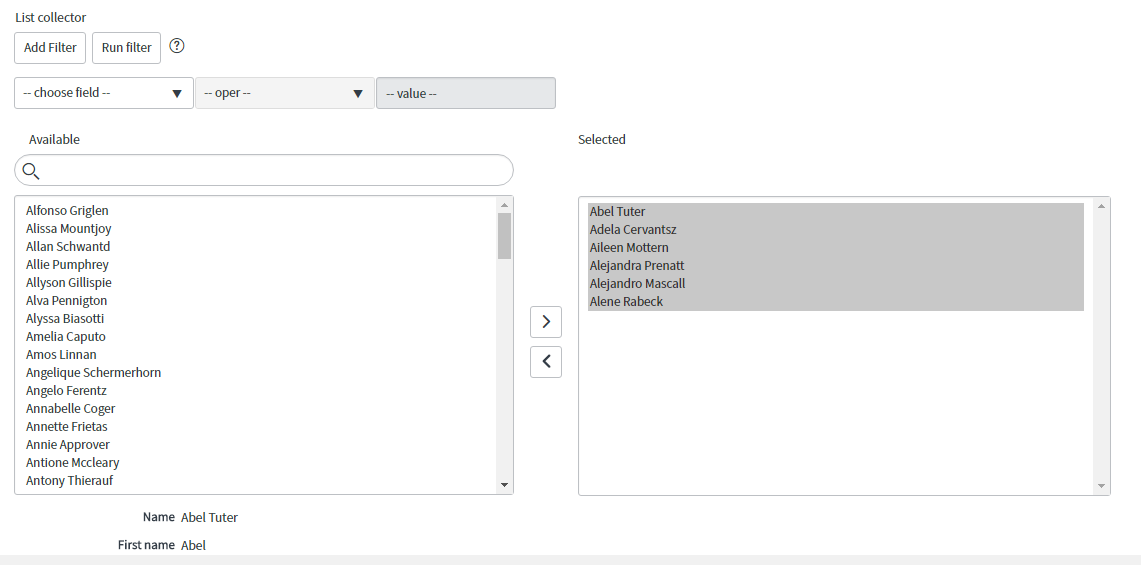
Did you know that in Helsinki you can force a list collector variable to display as a glide list field by adding an attribute to the variable definition record? Neither did I until this morning and I wanted to share that out.
Why would you even want to do this? Well, list collectors are nice and basically allow you a multiple select reference field where you have all the records on a table on the left and you can move one or more values to the right.

It's a nice feature, but list collector variables take up a ton of space, load more slowly than other variable types, and require some DOM manipulation in order to set the values on the right hand side. It's a pretty common ask to use the list field type (like the watch list on the task table) as it takes up less room, loads more quickly, and can be manipulated using the g_form.setValue() method. It's been possible to do this in the past, but requires a ui macro and hasn't worked all that well for me.
In Helsinki, I can add the glide_list attribute to the variable definition and then that list collector magically turns into a glide list.

Shows this:

Expanded:

I think there is definitely a place for both of these types of renderings, but it's nice to have an easy way to toggle between the two.
https://www.servicenow.com/community/developer-blog/render-list-collector-variable-as-glidelist-in-helsinki/ba-p/2268304