
Multi Row Variable Sets (MRVS)
 SN Scout
·
Dec 18, 2020
·
article
SN Scout
·
Dec 18, 2020
·
article
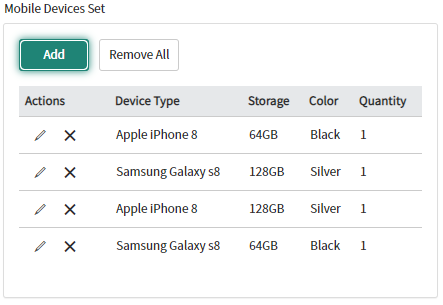

I was SO excited when ServiceNow introduced the Multi Row Variable Sets (MRVS) feature with the London release.
I had used a great app from the ServiceNow Share Catalog Table Variables (CTV)
Pre-Kingston - (Steve Wilson), Kingston - (Jonathan Barnes). They worked well for the basic use cases where you might want a user to enter multiple lines of the same variables. The issue was the immense limitations of ongoing visibility, editability, and script access to those values.
With the release of MRVS, most of the issues were solved. As soon as it was available, I dug in to figure out how to wield this new tool. I found an excellent article set fromBrad Tilton regarding the basics of how to use and script the MRVS. (Part 1: Exploring MRVS,Part 2: Scripting MRVS). Thedoc site and features have improved as progressed. I've used the skeleton script below to parse through and act on MRVS sets along with the single variables associated with a submitted record.
Use cases
So why would you need this? Users need to be able to submit one request with multiple entries for the same item. The screenshot above demonstrates a use case available in yourPersonal Developer Instance (PDI) where a user may need to order multiple devices. Other examples might be:
- Network Firewall rules - multiple rules may be needed for a single request to be successful.
- HR Onboarding for a whole cohort of new hires
- Hardware equipment orders with multiple components
- Application access for multiple systems with varying access levels and or individuals
- Multi-course registration
- Tuition reimbursement
Honestly, the list can go on forever-ish.
Shortfalls
While I've been extolling the virtues of MRVS, it's not a panacea, there are somethings it can't do.
- You can't paste in a spreadsheet - a user who has to input more than a few lines will find it cumbersome to manually enter in lots of rows
- onSubmit catalogs client scripts are not supported for MRVS
- Scripts for MRVS must be inside the MRVS, scripts on the catalog item won't affect it.
- Not every variable type is supported - most notably macros, HTML, List collectors, and UI pages which are used quite a bit in the rest of the form and behavior of catalog items.
- Map to field not available for target record value population
- Cascading is not supported for Order Guides (I'm not a fan of Order Guides anyway)
- MRVS are not supported in Mobile
- MRVS can't be added inside of containers (actually, you can, but they won't show up)
To me those are all minimal in the long view. The benefits far outweigh these shortfalls.
Script to print variables
(click here for clean snippet to copy/paste)
| 1 2 3 4 5 6 7 8 9 10 11 12 13 14 15 16 17 18 19 20 21 22 23 24 25 26 27 28 29 30 31 32 33 34 35 36 37 38 39 40 41 42 43 44 45 | var current; var gr = new GlideRecord('sc_req_item'); if (gr.get('your sys_id here')) { current = gr; } var count = 0; for (vars in current.variable_pool) { count++; break; } var hasVars = count > 0; //check that this record has variables if (hasVars) {//If a variable pool exists then collect variables with valid content var table = current.getTableName(); var itemVars = current.variables.getElements(true); for (var i = 0; i < itemVars.length; i++) { var varToUse = itemVars[i]; var isMultiRow = varToUse.isMultiRow(); if (isMultiRow) { var vCount = varToUse.getRowCount(); if (vCount > 0) { var rows = varToUse.getRows(); var vId = itemVars[i].getLabel(); for (var j = 0; j < varToUse.getRowCount(); j++) { var row = rows[j]; var cells = row.getCells(); for (var k = 0; k < cells.length; k++) { var cell = cells[k]; gs.print('Row ' + j +' - ' + cell.getLabel() + ': ' + cell); } } } } else { var thisQuestion = varToUse.getQuestion(); gs.print(thisQuestion.getLabel() + ': ' + thisQuestion.value.toString().trim()); } } } |
|---|
>
https://snscout.blogspot.com/2020/12/multi-row-variable-sets-mrvs.html