
Service Portal – Impersonate Dialog
Recently, I have been involved heavily in building out our Service Portal at my company as we are going live with it. In the process of doing so, I need to be able to impersonate ESS users in the Service Portal similar to that of the Platform UI. Service Portal does not have that out-of-box so I did some research. However, most of what I found either requires me to clone the stock header or having to add a widget to the page. I wanted to find a better way to implement this solution that does NOT require cloning or adding a widget to the page and so, I started working on a solution that would fit my needs better. I would like to thank mhedtke24 for the jQuery selector in this awesome post and Shahid Shah for the $http API path in this cool widget on ServiceNow share, as well as jpierce.cerna for the clever way to remove the spModal footer. The update set is available on ServiceNow Share and the link is at the end of this post, without further ado, let’s get started!
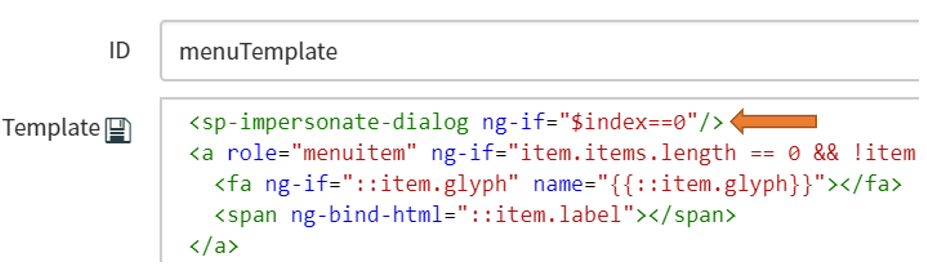
I needed the ability to “inject” my own menu item to the Service Portal stock menu. I can do this by creating my own angular provider. However, I still need to figure out a way to somehow call/invoke it without cloning the stock header. I was able to achieve this by adding the angular provider to the menuTemplate that is called by the header menu, I added an $index check so that the provider is only called once:
MenuTemplate:

I created the provider mentioned above and added it to the “Angular Provider” related list on the Stock Header form. Note that the name of the provider is camelCase and is translated to sp-impersonate-dialog

Angular Provider (Directive):
Type: Directive
Name: spImpersonateDialog
Script:
| 1234567891011121314151617181920212223242526272829303132 | function spImpersonateDialog(spModal,glideUserSession,$http,$rootScope,$log){ //inject dependencies here, and use in the link function return { restrict: 'E', // 'A'= attribute, 'E' = element, 'C' = Class link: function(scope){ if(scope.user.logged_in && !$rootScope.isDirectiveLoaded){ $rootScope.isDirectiveLoaded = true; $http.get('/api/now/ui/impersonate/recent').success(function(response) { $rootScope.recentImpersonatedUsers = response.result; glideUserSession.loadCurrentUser().then(function(currentUser) { var index = response.result.map(function(user){return user.user_sys_id;}).indexOf(currentUser.userID); if(currentUser.hasRole('impersonator') || index != -1){ $('#sp-nav-bar > ul:nth-child(2) > li.hidden-xs.dropdown > ul > li:nth-child(1)').after('
| ------------------------------------------------------- | --------------------------------------------------------------------------------------------------------------------------------------------------------------------------------------------------------------------------------------------------------------------------------------------------------------------------------------------------------------------------------------------------------------------------------------------------------------------------------------------------------------------------------------------------------------------------------------------------------------------------------------------------------------------------------------------------------------------------------------------------------------------------------------------------------------------------------------------------------------------------------------------------------------------------------------------------------------------------------------------------------------------------------------------------------------------------------------------------------------------------------------------------------------------------------------------------------------------------------------------------------------------------------------------------------------------------------------------------------------------------------------------------------------------------------------------------------------- |
Here, I used three dependencies:
– spModal: to load the impersonation widget.
– glideUserSession: get access to the current user object, equivalent to g_user.
– $cookies: this allows me to add a custom cookie to track whether or not impersonation is taking place.
In the link function, I perform the following checks/actions:
– If the user is currently logged in, check if this user has a “impersonator” role or if impersonation is taking place. If so, inject the additional menu item to the list after “Profile” and add a click event to it. When clicked, it will open the impersonate-dialog widget.
– If user is not logged in, remove the cookies. No errors if the cookie does not exist.
The rest is standard format for AngularJS provider, you can find more information here. Next, let’s move on to the widget.
Impersonate Dialog Widget:
Name: Impersonate Dialog
ID: impersonate-dialog
Body HTML template:
| 1234567891011121314151617181920212223242526 | <!--sn-record-picker--> <!--unImpersonate-button--> ${Unimpersonate} <!--recent-users-list-container--> Recent Impersonations |
|---|
http://helpfultechblog.com/servicenow/service-portal-impersonate-dialog/?utm_source=rss&utm_medium=rss&utm_campaign=service-portal-impersonate-dialog