
Business rule, workflow and flow designer execution order.
 New article articles in ServiceNow Community
·
Nov 25, 2024
·
article
New article articles in ServiceNow Community
·
Nov 25, 2024
·
article
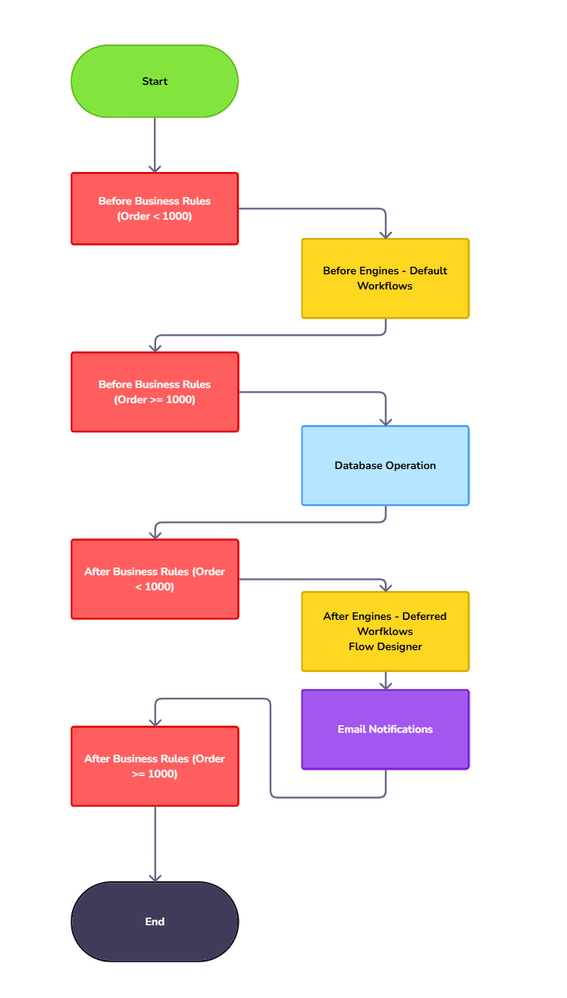
It is crucial to understand the execution order of Business Rules, Workflows, and Flow Designer. In many cases, the order of these events is important. Scripts, assignment rules, business rules, workflows, escalations, and engines all take effect in relation to a database operation, such as insert or update.

Detailed Execution order of scripts and engines
- Start
- Before Business Rules (Order < 1000)
- Scripts configured to execute before the database operation with an order less than 1000.
- Before Engines (No specific order)
- Approval engine (for task and sys_approval_approver tables)
- Assignment rules engine (for task tables)
- Data policy engine
- Escalation engine
- Field normalization engine
- Role engine (for sys_user, sys_user_group, sys_user_grmember, and sys_user_role tables)
- Execution plan engine (for task tables)
- Update version engine (for sys_update_xml table)
- Data lookup engine inserts or updates
- Workflow engine (for default workflows)
- Approval engine (for task and sys_approval_approver tables)
- Before Business Rules (Order >= 1000)
- Scripts configured to execute before the database operation with an order greater than or equal to 1000.
- Database Operation
- Insert, update, delete.
- After Business Rules (Order < 1000)
- Scripts configured to execute after the database operation with an order less than 1000.
- After Engines (No specific order)
- Label engine
- Listener engine
- Table notifications engine
- Role engine (for sys_user, sys_user_group, sys_user_grmember, and sys_user_role tables)
- Text indexing engine
- Update sync engine
- Workflow engine (for deferred workflows)
- Trigger engine (for all Flow Designer flows)
- Label engine
- Email Notifications (Based on weight)
- Notifications sent on an insert, update, or delete
- Event-based notifications
- Notifications sent on an insert, update, or delete
- After Business Rules (Only active records, Order >= 1000)
- Scripts configured to execute after the database operation with an order greater than or equal to 1000.
- End
Bonus Read Business Rule Process Flow
Business rules run based on two sets of criteria.
- When to run the business rule in relation to a database operation.
- What record operation the business rule applies to.

Must Read
Controlling When Business Rules Run
Execution order of scripts and engines
Workflow Engine Overview
Script Execution in ServiceNow: An In-Depth Look
View original source
https://www.servicenow.com/community/workflow-automation-articles/servicenow-101-business-rule-workflow-and-flow-designer/ta-p/3111476