
How to download and use all node logs to improve instance health
System logs do not provide all the useful information about your instance. Slow ACL’s, slow business rules and other issues might be important for your instance health and performance monitoring, however they are only found in the node logs. If you never browsed node logs, you will be surprised how many issues it can reveal. However, getting to all node logs is problematic.

If you’ll go to the “Node Log File Download” module and open any log file, you will only see “Download” button. If you press it, you will get a log file from a single node only – that node is the one you are logged onto.
Ok, that’s just one node. I just have to log in another node and download the logs one by one?
Kind of. This was possible prior to Madrid release, where you were able to switch to another node by modifying certain cookies. However, as of Madrid, it is more complicated than that, you need to decode IP and port values in certain way or use Chrome plugins that might not be allowed in your company (BIGipServerpool_${instance.name} value: ${decoded_IP}.${decoded_port}.0000).
Luckily, some ServiceNow developer actually build a feature which is kind of hidden, not documented and not known, but it allows us to solve this specific issue.
- Go to “Node Log File Download” module and stay in the list view.
- Locate any node log and right-click it.
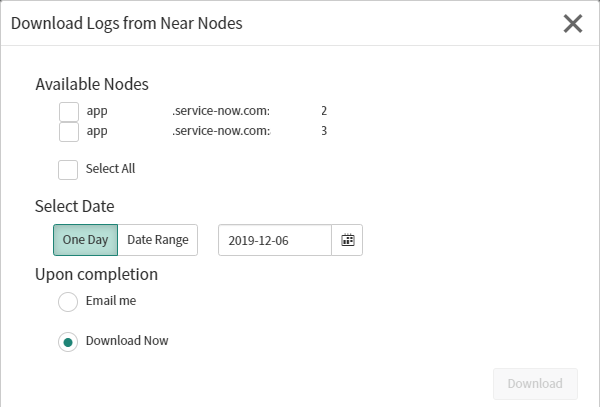
- Select “Download Logs from Near Nodes”.
- You are given an option to select multiple nodes and log date range.

Now, if you go to “Node Log Download History” module, all your previously downloaded logs will be saved as attachments for your future reference.
Also note, there are API’s that allows us to create scheduled scripts to scrape the node logs to search for useful information. This might allow us to supplement and automate our instance monitoring which is not covered by the system logs.
https://servicenowthink.wordpress.com/2019/12/07/how-to-download-servicenow-node-logs-when-you-cannot-switch-nodes/