
Document Template Setup for Contracts using SOM (Sales and Order Management)
 New article articles in ServiceNow Community
·
Aug 12, 2025
·
article
New article articles in ServiceNow Community
·
Aug 12, 2025
·
article
Goal
This guide walks you through the process of delivering a sample contract using a quote and opportunity in ServiceNow. We are going to use the best practises for Document Templates that was built on Sales and Order Management (SOM) module.
1. Install Document Templates Plugin
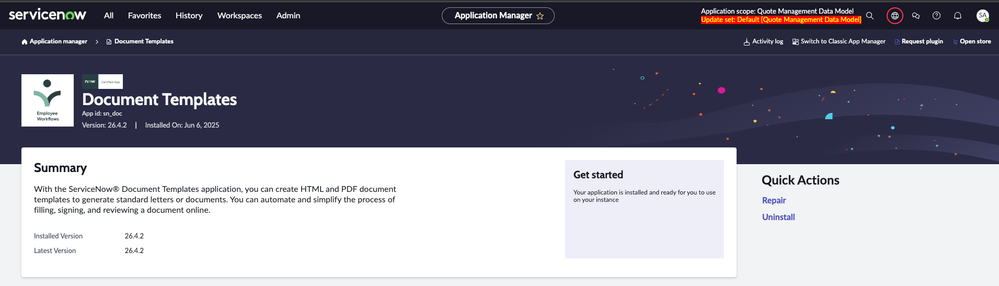
To start using templates, make sure the Document Templates plugin is installed.
- Plugin Name:
sc_doc - After installation, you'll be able to create reusable templates and attach them to several processes such as: Opportunities and Quotes.

Plugin Document Templates
2. Creating a Template
Based on the customer demand, multiple templates can be created and linked to a quote.
In our use case, we created an HTML template to generate a sales contract with:
- Product descriptions </>
- Budget spreadsheets </>
- Technologies involved 📄
- Contractual clauses 📄


HTML Document Template View
🔗 Official ServiceNow guide on setting up HTML document template
3. Template Scripts Used
In order to retrieve all necessary information, custom scripts may be required to extract details not directly available on the quote record.
Here are two examples:
- Product Descriptions: All the information of the products can be found on the line items.
Here we have an example how to create HTML Template Script:

(function runTemplateScript(target, docTemplate) { var html = '', count = 1; // Query all quote line items related to the current quote record var gr = new GlideRecord('sn_quote_mgmt_core_quote_line_item'); gr.addQuery('quote', target.getValue('sys_id')); gr.query(); // Loop through each quote line item while (gr.next()) { // Get product description and name from the related product offering var desc = gr.getDisplayValue('product_offering.description') || ''; var name = gr.getDisplayValue('product_offering.name'); // Only include the product if a description exists if (desc) { // Add the product name with a numbered label html += `
2.${count} ${name}
`; // Add the product description html += `${desc}
`; count++; // Increment the counter } } // Return the final HTML output return html; })(target, docTemplate);Budget Spreadsheets: A custom table that shows investments, deadlines, and total values of all quote line itens from the quote.
(function runTemplateScript(target, docTemplate) { var html = ''; var totalAmount = 0; // Add the section title html += 'Product Budget
'; // Start the table with headers html += ''; html += ''; html += ''; html += ''; html += ''; html += ''; html += ''; html += ''; // Query quote line items related to the current quote var gr = new GlideRecord('sn_quote_mgmt_core_quote_line_item'); gr.addQuery("quote", target.getValue('sys_id')); gr.query(); // Loop through each quote line item while (gr.next()) { var product = gr.getDisplayValue("product_offering"); var quantity = gr.getValue("quantity"); var termMonth = gr.getValue("term_month"); var unitPrice = parseFloat(gr.getValue("list_price") || 0); var totalLine = parseFloat(gr.getValue("cumulative_net_price") || 0); totalAmount += totalLine; // Add a table row for the product html += ''; html += ''; html += ''; html += ''; html += ''; html += ''; html += ''; } // Add the total row html += ''; html += ''; html += ''; html += ''; // Close the table html += '
'; return html; })(target, docTemplate);Product Quantity Term (months) Unit Price Total Value ' + product + ' ' + quantity + ' ' + termMonth + ' ' + unitPrice.toFixed(2).replace('.', ',') + ' ' + totalLine.toFixed(2).replace('.', ',') + ' Total Amount: R$ ' + totalAmount.toFixed(2).replace('.', ',') + ' To understand a little more about script templates:
🔗 Official ServiceNow guide HTML document Script documentation
4. HTML Document Template Example Content (SOM)

HTML Document Template Example
5. Instance Configuration (SOM)
Before creating opportunities and quotes with attached templates, the sales catalog must be properly set up. Click on the links below, and you will see how to do set up step by step:
🔗 Create Product Offering Category
Once you've set up an offer, you will have this view of a product:

Product Configured
⚠️ After following the previous steps, go to the catalog and click on the "Regenerate Catalog Hierarchy Cache" UI action (This is specific to the SOM module).
6. Creating an Opportunity and Quote to generate the PDF Contract
To simulate a sale and generate the contract, click on the links and follow the steps:
🔗 How to create a new opportunity
🔗 Create a quote from an Opportunity
Steps to reproduce this process:
- Create an Opportunity.
- Add the required products.
- Generate the quote.
- Generate the Document.


Furthermore, if you would like to explore more funcionalities, I have done an update set that you can test on your PDI.
If you're working on SOM implementations involving contracts, quotes, or dynamic document generation, this guide is a solid foundation to build on.
servicenow #som #csm
https://www.servicenow.com/community/som-articles/document-template-setup-for-contracts-using-som-sales-and-order/ta-p/3326392