
CMDB Data Certification Migration
 New article articles in ServiceNow Community
·
Aug 11, 2025
·
article
New article articles in ServiceNow Community
·
Aug 11, 2025
·
article
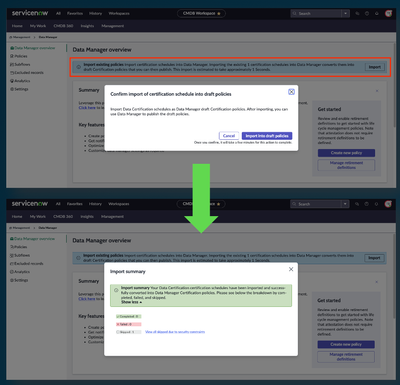
Certification Schedule Import Overview
Persona: CMDB Administrator
Role: data_manager_admin, sn_cmdb_admin
Data Certification Schedule Import
- CMDB Administrators can import existing Certification Schedules from the legacy Data Certification UI16 application into Data Manager (DM).
- Certification schedules available for import are displayed on the DM overview page.
- After the import process is complete, a summary is displayed indicating the number of schedules that completed importing, failed or were skipped.
- Links to failed or skipped certification schedules are provided to assist with troubleshooting.

- Certification schedules are imported as DM Certification policies and left in a "draft" state.
- The Certification policies can be accessed from the Draft policies tab in the Policies section of DM in CMDB Workspace.
- Draft Certification policies can be reviewed and published by editing the policy.
- Note that security constraints may prevent fully displaying filter conditions in imported policies.
Imported Data Certification Schedules
- Two fields added to the cert_schedule table:
- migration_status – choice field with values: Cancelled, Complete, Failed, Imported, In Progress, Ready, Skipped due to security constraints
- migration_exception – text field, stores messages when a schedule is unable to import
- migration_status – choice field with values: Cancelled, Complete, Failed, Imported, In Progress, Ready, Skipped due to security constraints
- When a legacy certification schedule has been successfully imported, the following fields are set:
- active = false
- migration_status = Complete
- active = false
- These fields can be reset to the following if a certification schedule needs to be imported again:
- active = true
- migration_status = Ready
- active = true
View original source
https://www.servicenow.com/community/cmdb-articles/cmdb-data-certification-migration/ta-p/3337848