
Event Management – delay alert action rule processing
 ServiceNow Tipps
·
Sep 19, 2018
·
article
ServiceNow Tipps
·
Sep 19, 2018
·
article
By default ServiceNow processes the alert action rules directly when the alert is created. This can create false incidents if you already have remediation tasks implemented which fire, when an alert is raised (one example is automatic recovery actions in SCOM).
To avoid that you can create a system property, which will generally delay the process of the alert action rules. With that solution you handle all alerts in the same way and you cannot have exceptions.
How to implement:
- Enter sys_properties.list in the filter navigator and press Enter.
- Click the New button.
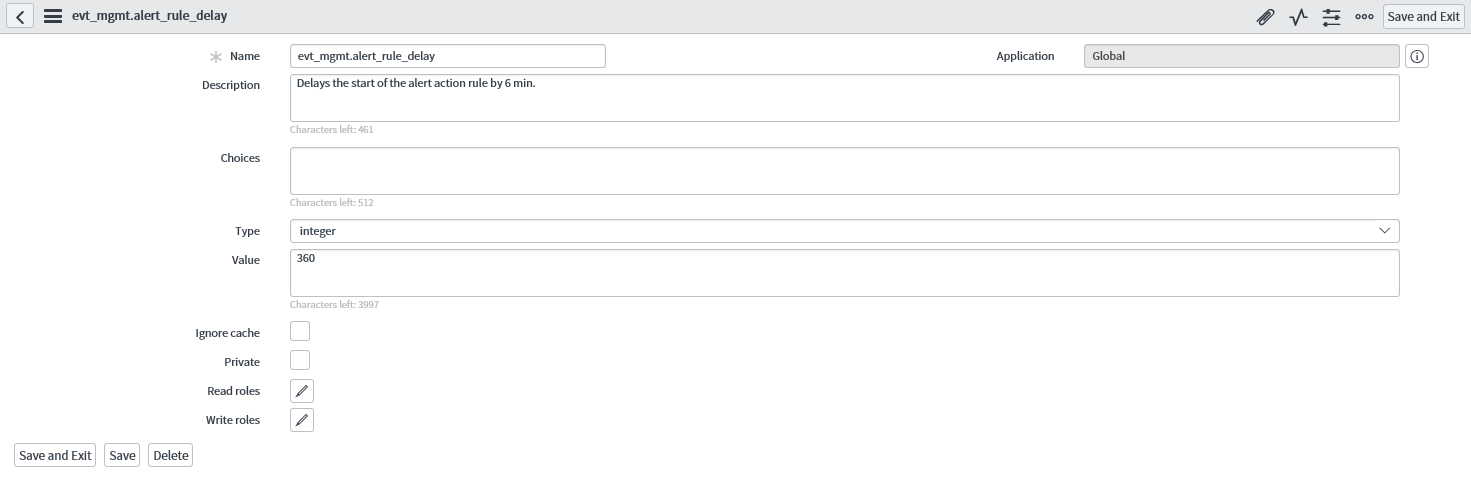
- Name the new property evt_mgmt.alert_rule_delay, select Type integer and enter a value in seconds.

Here you can see, I have entered 360 for 6 minutes.
Why did I select 6 min? The reason is that the SCOM connector by default checks every 2 min. Most of the SCOM rules run every 5 min. With 6 min delay most of the short outages should not create Incidents.
The result is this:

You can see that the task is created 6 min after the original alert.
Attention: This system property is tested in the Jakarta release. I cannot guarantee, that it works in other releases or will be replaced by new functionality in newer releases.
https://servicenowtipps.wordpress.com/2018/09/19/event-management-delay-alert-action-rule-processing/