
Now Assist for CSM - Sentiment Analysis
 New article articles in ServiceNow Community
·
Aug 06, 2025
·
article
New article articles in ServiceNow Community
·
Aug 06, 2025
·
article
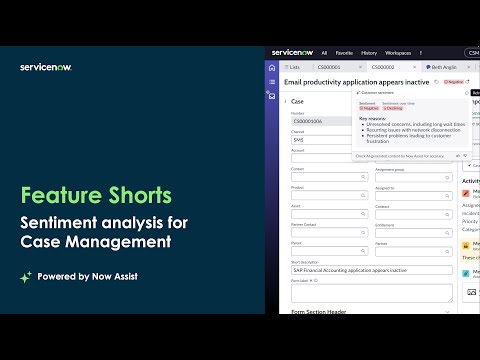
Understand customer feelings and personalize interactions with emotional insight
Sentiment Analysis is a generative AI capability that evaluates and summarizes customer sentiment on case records. t uses case activity such as description, state, priority and additional comments to classify sentiment as positive, neutral, or negative. When sentiment is flagged, the system also provides suggested actions or guidance to help agents resolve the case empathetically and reduce potential escalations.

Key Capabilities
- Sentiment classification on case activity
Analyzes the tone of customer-facing communication stored in case records to classify sentiment and can refresh it as new activity is recorded. A red dot then appears in the sentiment menu. - Visible reasoning for sentiment
Offers transparent explanations on why a sentiment was classified on a specific level, helping agents better understand the customer's emotional state. - Embedded in CSM Configurable Workspace
Sentiment indicators and explanations appear within the case record, requiring no workflow changes for agents. - Suggested actions to address sentiment
Provides guidance or suggestions when negative sentiment is detected, helping agents defuse frustration or tailor their resolution approach. - Trigger workflows using sentiment
Integrates with Flow Designer and Now Assist Skill Kit to take automated actions like escalations, surveys or assignments based on sentiment status. You can also use Now Assist Skill Kit to change the inputs and outputs of the skill. - Evaluate synthesized sentiment per account: Provides a dashboard with sentiment scored derived from the customer cases and features several charts, metrics, filters and sorting to dive deep in the health of the account
Implementation
Prerequisites
- Enable the Now Assist for CSM and AI Search plugins
- Case Management and CSM Configurable Workspace are actively used
- Skill Overview
- Configure Sentiment Analysis skill
- Use Sentiment Analysis skill
Key Best Practices
- Surface sentiment indicators early in the case workflow and list views to help agents personalize responses
- Choose carefully the best fitting skill availability conditions for your use case
- Use sentiment to trigger proactive case routing or escalation
- Monitor usage and feedback to adjust how sentiment signals are used
Formal Learning
Now Learning: Now Assist for CSM Essentials Path
Measured Success
| Outcome | How It Supports Customer Service Teams | Key Metric |
|---|---|---|
| Faster issue escalation | Flags emotionally urgent cases for faster routing | Average time to escalate flagged cases |
| Enhanced agent empathy | Helps agents adjust tone and message based on customer emotions | % of cases with sentiment-informed resolution |
| Improved customer satisfaction | Resolves emotionally negative cases before they lead to churn | Case CSAT and sentiment recovery rate |
| Reduced escalation volume | Prevents avoidable escalations by addressing early frustration | % reduction in avoidable escalations |
| Streamlined workflow automation | Uses sentiment as a signal to automate assignments and routing decisions | Number of sentiment-triggered flows |
Frequently Asked Questions
Where are the sentiment results shown?
In the CSM Configurable Workspace, within the case form, with sentiment classification and explanation visible to the agent. Sentiment analysis for accounts is found by opening the account record, in the right side panel within Workspace. This skill can't be displayed in Now Assist Panel.
Can I configure how often the skill is triggered?
OOTB there is a scheduler frequency and this can be changed in days, hours, minutes and seconds. Do note that lowering the job schedule period will result in increased number of actions, resulting in higher assist usage.
Can I configure the attribution of roles in the sentiment?
Yes, you can choose tables, requestor and fulfiller fields and roles to help the LLM identify the correct personas and where their data is stored
Does this work on live chat or surveys?
No. Sentiment is only analyzed from data stored on the case record. That includes chat transcripts, emails, comments, or surveys logged within the case.
Can I automate actions based on negative sentiment?
Yes. Use Flow Designer or the Now Assist Skill Kit to route or escalate based on flagged sentiment.
Does it support custom fields?
Yes. Admins can include custom fields for sentiment evaluation during skill setup using Now Assist Skill Kit on a cloned skill.
Are the suggestions editable or configurable?
No. The suggestions are generated by the skill and provide guidance only. However, workflows based on sentiment flags can be fully customized via Flow Designer.
https://www.servicenow.com/community/csm-articles/now-assist-for-csm-sentiment-analysis/ta-p/3345541