
CWM: Connected Work FAQs
 New article articles in ServiceNow Community
·
Jul 31, 2025
·
article
New article articles in ServiceNow Community
·
Jul 31, 2025
·
article
What is Connected Work?

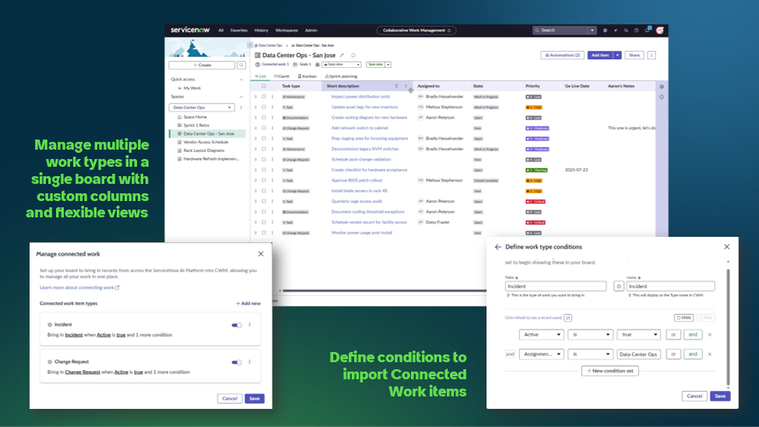
Connected Work is the ability to import any task-based table directly into a CWM board, such as Incidents, Change Requests, Project Tasks, and many more. This features enables teams to plan and manage multiple work item types, along with CWM tasks in a single pane of glass. In addition, teams can add custom columns to Connected Work, giving them flexibility to manage work the way they want.
Connected Work is available in the Collaborative Work Management store app version 7.0.0 or later.
Importing Work
What kind of tables can be imported into a board?
Any “task” type table can be imported. This includes tables such as: Incidents, Stories, Scrum tasks, Incidents, Problems, Projects, Project tasks, Demand tasks, Change Requests, and Catalog tasks.
How many different tables can be imported into a board?
Up to 10 different tables can be imported per board
How many items can be imported?
You can only add a connected work item if your filter returns fewer than 100 items at setup. However, an admin can configure this limit to be up to 500 by updating system property: sn_cwm.connect_work_import_limit.
Once connected, the board will auto-sync up to the latest 1,000 items every time it loads. If there are more than 1,000 matching items, only the most recent 1,000 will display.
Will the data refresh automatically?
Yes. If you’d like to manually refresh the datat, you can navigate to managing the connected work items and you will have the option from the related actions icon […] to manually refresh the data.
Editing Connected Work Items
Can users edit fields from Connected Work items directly within CWM?
Yes, data such as state, priority, description, and other fields can be edited within CWM. However, edits to connected work items must be made in the side panel form view. They cannot be edited in-line or by dragging-and-dropping on Kanban boards. Moving connected work items is a planned enhancement for future releases.
Do fields added in CWM reflect on the Connected Work items outside of CWM?
When Story Points, Acceptance Criteria, Sprints, or any custom columns are added to Connected Work items in CWM, that data will only appear in the CWM board and will not make any changes to the record outside of CWM.
How do you remove a Connected Work item?
To remove that item type entirely from the board, you can click on Connected Work items and from the Manage Connected Work items pop-up, click the related actions icon […] and delete the item type.
To remove an individual item type, you can simply delete the row from the board. This will hide the item from the board, but it will not delete the record.
Licensing
What license and roles are required to use Connected Work?
Users need either a CWM or SPM Std/Pro license to access CWM which includes the Connected Work functionality.
What work items will users be able to update?
Users can only manage the work that they are entitled to and have access to based on ACLs. For example, SPM license is required to manage Project tasks, ITSM license is required to manage incidents. If two users in the same space have different entitlements or access levels, they will see different information on the board.
Can users without a SPM license see and update project or demand tasks?
No, users will need an SPM license to update project and demands tasks.
Limitations
Can I make in-line changes or move Connected Work items in the Kanban?
With the exception of custom columns, updates to Connected Work items can only be in be made by clicking the item to open the side panel editor. There, users will see all of the fields on the Connected Works items.
What functionality will not be applied to Connected Work items?
Automations, Templates, and Duplicate Boards will not be support connected work items.
Connected Work items (other than RIDAC, Story, Project Tasks, and Demand Tasks) will not appear in My Work. However, this is a planned enhancement.
Other
Does this replace Unified Backlog and VTBs?
Connected Work can, in the majority of cases, take the place of Unified Backlog and VTBs, with the additional benefits of custom columns, flexible views, and end-user access controls.
Connected Work will pull in the original story rather than making a copy of the record. You also cannot convert tasks into stories from CWM.
Unlike Triage boards, teams will build a condition rule to select work to import rather than individually selecting items. Currently CWM does not support Scrum task hierarchies for “Group By,” but those features are planned for future releases.
https://www.servicenow.com/community/cwm-articles/cwm-connected-work-faqs/ta-p/3337946