
Quick docusign setup with document templates in the HRSD
 New article articles in ServiceNow Community
·
Jul 14, 2025
·
article
New article articles in ServiceNow Community
·
Jul 14, 2025
·
article
Hi Everyone,
This document provides instructions for setting up DocuSign and enabling external signing through document templates in the HRSD module.
Required Plugins:
- Document Template Integration with DocuSign
- Document Template
- Human Resources Scoped App: Core
Configuration Steps for DocuSign Spoke
- Create a DocuSign Developer Account
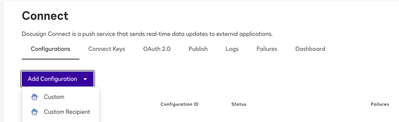
- In the Admin tab, navigate to ‘Connect’.
- Create a new ‘Custom’ configuration.
- Fill in the following details:
a. Name: Enter your instance name or any preferred identifier.
b. URL to Publish:https://{instance_name}.service-now.com/api/sn_docusign_spoke/docusign_webhook
c. Event Settings:
- Data Format: Legacy
- Event Message Delivery Mode: Aggregate
- Trigger Events: Envelope Sent, Envelope Delivered, Envelope Signed/Completed, Envelope Declined, Envelope Voided
d. Integration and Security Settings:
- Select Include Basic Authentication Header and provide the ‘admin’ username and password. - Click on Apps and Keys:
a. Under Authentication, add the Secret Key and save it for later use.
b. Additional Settings:
- Redirect URIs:https://{instance_name}.service-now.com/oauth_redirect.do
c. Save the configuration.
Configuration Steps in the ServiceNow Instance
- Download the setup folder.
- Import all XML files provided in the setup.
- Open the script in the Background Scripts module.
- Update the specified values in the script, then run it.
- Assign the ‘sn_docusign_spoke.docusign_admin’ role to the ‘admin’ user.
- Navigate to
/oauth_2_0_credentials_list, open the DocuSignCreds entry, and click Get OAuth Token. - Go to
/sn_docusign_spoke_accounts_listand click Get Accounts. (Refresh the page you should be able to see a record).
Testing the Flow
- Create an HR case with the HR Service ‘Verification of Employment’.
- Remove the Document Template category and select the DocuSignHTML template that was imported.
- Ensure that the ‘Opened For’ user has a valid email address linked to the HR case.
- Change the case state to Work in Progress.
- Preview the document and initiate the Document Task.
- You should see a Document Task created.
- Open the document, sign it, and after a few seconds, the Document Task should automatically close
Let me know if you face any issue.If the blog helped, please give it a like.


View original source
https://www.servicenow.com/community/community-resources/quick-docusign-setup-with-document-templates-in-the-hrsd/ta-p/3268519