
Generate labor cost plans by individual resources based on Resource Assignments
 New article articles in ServiceNow Community
·
Jul 04, 2025
·
article
New article articles in ServiceNow Community
·
Jul 04, 2025
·
article
Effective labour cost planning is crucial for accurate project budgeting and financial forecasting. In the new financials experience, ‘Role’, ‘Employee Type’ and ‘Expense Type’ are available out of the box as the financial planning attributes i.e. labor cost plans on work items will be generated for the unique combination of these attributes based on the resource assignments. However, customers can configure the attributes as per their organizational needs to track financials.
Detailed information on how to configure such attributes is available in this article - Configure financial planning attributes to categorise labor costs based on the Resource Assignments
A common ask from customers has been to be able to generate cost plans unique to each individual resource for detailed visibility of estimates based on the resource assignments in the new Resource Management capability.
If you are looking for granular cost plans closer to the labor cost plan generation in the classic experience based on the resource plans, this document outlines a step-by-step guide to generating labor cost plans specific to individual users. By following these steps, organizations can improve financial tracking, accountability, and decision-making in resource management.
Step 1: Add a New Reference Column to the cost plan table
Begin by adding a column of type ‘Reference’ that references the ‘sys_user’ table in the following table:
- Cost_plan
Step 2: Configure a New Planning Attribute
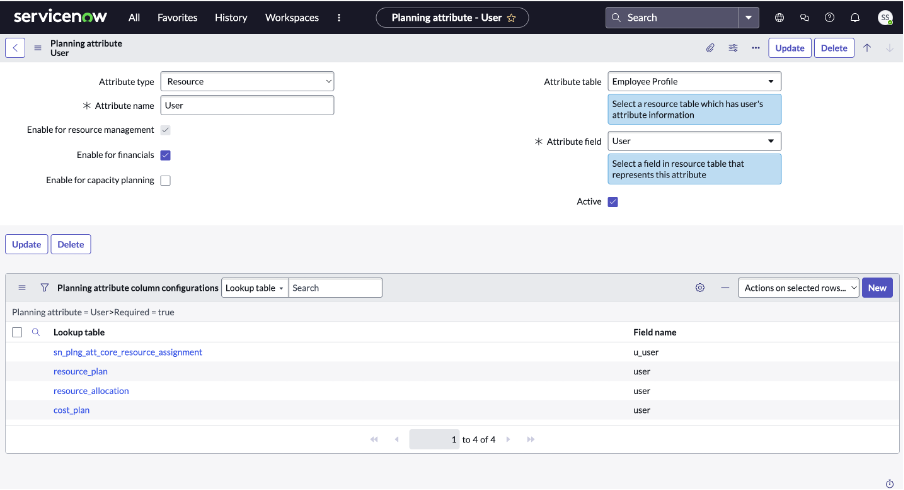
Next, add a planning attribute for user with the following configuration:
- Type: Resource
- Enable it for financials
- Mark the ‘Active’ checkbox
Update the planning attribute column configurations by pulling up the columns with ‘resource’ or ‘user’ values as shown below.

Step 3: Assign Resources to a Project
Proceed to add resource assignments to the relevant project. These assignments link specific users (resources) to the tasks or deliverables they are responsible for within the project.

Step 4: Generate Labor Costs
Finally, generate the labor costs. Once completed, you will observe that the system creates cost plans that are unique to each user. This level of granularity allows for detailed cost analysis and ensures that each individual's contribution is financially accounted for.

Implementing these steps enhances the precision of cost tracking and improves overall project financial transparency.
https://www.servicenow.com/community/spm-articles/generate-labor-cost-plans-by-individual-resources-based-on/ta-p/3310371