
Copy Favorites from One Instance to Another in ServiceNow
 New article articles in ServiceNow Community
·
Jul 04, 2025
·
article
New article articles in ServiceNow Community
·
Jul 04, 2025
·
article
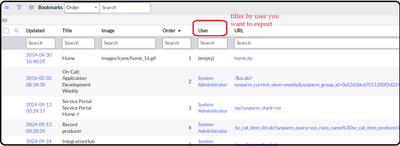
I was curious to know how we can export favorites in ServiceNow, just like browser bookmarks. So, I got into the community, learned the process, and now I’m sharing it with you all
Copy Favorites - Introduction
• Copying favorites between instances in ServiceNow can
streamline your workflow and ensure consistency across
environments.
• This guide will walk you through the steps to achieve this.
Copy Favorites - Table Names
• The tables involved in this process are sys_ui_bookmark and
sys_ui_bookmark_group.
Copy Favorites - Steps to Copy Favorites
• Export Favorites from Source Instance:
• Navigate to the sys_ui_bookmark and sys_ui_bookmark_group tables.
• Sort it by name you want to export.
• Ensure you include both sys_ui_bookmark and sys_ui_bookmark_group xmls from the tables.

• Import Favorites to Target Instance:
• Log in to the target instance.
• Navigate to the sys_ui_bookmark and sys_ui_bookmark_group tables and import
respected xml in it.

Copy Favorites - Tips and Best Practices
•Verify Data: Ensure that the favorites are correctly mapped and
imported by checking the target instance.
•Backup: Always backup your data before performing
import/export operations.
https://www.servicenow.com/community/developer-articles/copy-favorites-from-one-instance-to-another-in-servicenow/ta-p/3310013