
Notifications for Employee Center
 New article articles in ServiceNow Community
·
Jun 26, 2025
·
article
New article articles in ServiceNow Community
·
Jun 26, 2025
·
article
Introduction
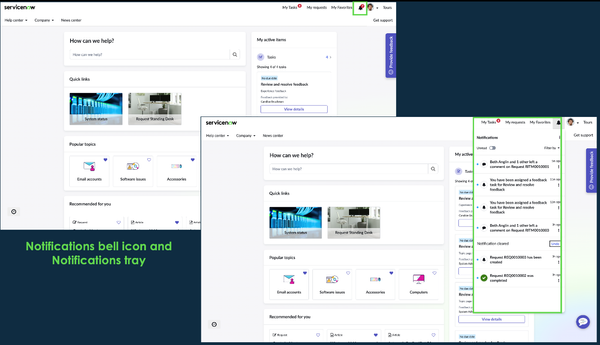
We’re excited to introduce the new Notifications feature for Employee Centre, providing employees with timely and relevant updates in one central location. As the portal continues to integrate more departments, this new capability ensures that employees can easily stay informed about all their work-related activities, tasks, comments, or approvals. See details on the feature below:
- Notifications available on portal: Notifications on portal are accessible via a bell icon in the Employee Center portal header. Clicking the bell icon opens the notification tray for employees to view all their notifications. Admins have the flexibility to configure how notifications appear, including the option to display the bell icon with or without a notification count (the default is to show the count), and whether it reflects the number of unread or unseen notifications, by default it is configured to show count for unseen notifications. Additionally, admins can also configure the duration for which the unread notifications are shown, by default it is set to display unread notifications for up to 60 days.

- Admins can create and configure notifications content: Admins can easily create and manage portal notification content, including notification text with parameterized inputs, icons, and more. They can define a notification to be shown as critical or reminder and more. They can also group notifications for better clarity (e.g., "Joe and 3 others have commented..."). Additionally, admins can configure read/unread and seen/unseen indicators, ensuring a more organized and efficient notification experience for employees. We have also shipped pre-configured notifications for incidents, requests, HR tasks, news, and more.

- Employees can manage their notifications: We have included a range of filters to help employees easily manage their alerts. By default, notifications can be filtered via standard filters such as Critical or Reminder, and once an employee marks sets any notifications for reminders, they will appear under these filters. Admins can also configure additional filters to categorize notifications based on activity type, such as comments, requests, or tasks. Employees can take global actions, like Mark All as Read, to quickly clear their notifications. Additionally, individual notification actions allow employees to Remind Me, Mark as Read, or Clear Notification, providing greater flexibility in managing their alerts.

| How to get access? License & Family release compatibility – The Notifications capability is available for all ServiceNow customers who are on Yokohama family release*.* Plugins required – The Notifications capability is delivered via a new plugin called Notifications for Employee Center application (version 1.0.2) and Employee Center (version 36.0.7). Technical Details- Admins can configure the Notifications feature by reviewing and updating out-of-the-box settings, such as badging behaviour and notification content. They can also define their own set of notification category filters to tailor the experience to their organization’s needs. Refer to Notifications for Employee Center product documentation for additional details. |
|---|
View original source
https://www.servicenow.com/community/employee-center-articles/notifications-for-employee-center/ta-p/3301753