
Customizing Display Value on Search Suggestions for Reference Fields in ServiceNow (Native UI)
 New article articles in ServiceNow Community
·
Jun 26, 2025
·
article
New article articles in ServiceNow Community
·
Jun 26, 2025
·
article
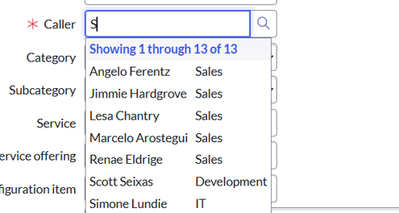
Hi Community,
While working on a configuration in ServiceNow’s Native UI, I encountered a use case where the requirement was to display the Department field value instead of the default Email in the search suggestions of a reference field.
Here’s a step-by-step guide to customizing the search suggestion list for a reference field using the ref_ac_columns attribute.
Use Case:
Display the Department field value in the suggestion list of a reference field (e.g., Caller) instead of, or in addition to, the default Email value.
Configuration Steps:
- Navigate to the Reference Field:
- Right-click on the reference field (e.g., Caller) in the form.
- Select Configure Dictionary.
- Right-click on the reference field (e.g., Caller) in the form.
- Add the
ref_ac_columnsAttribute:
- In the Attributes field, add the following:
in attribute Field.
ref_ac_columns=department - This will ensure that the Department field value appears in the suggestion list when searching in the reference field.
- In the Attributes field, add the following:


To Display Multiple Fields (e.g., Email and Department):
If you want to show both the Email and Department values in the search suggestion list, use a semicolon-separated format:
in attribute Field.
ref_ac_columns=email;department
💡 Note:
- Attribute values should be separated by commas when combining multiple attributes.
- Field values within the
ref_ac_columnsattribute should be separated by semicolon(;).

If you found this article helpful, please consider giving it a thumbs up!
Best regards,
Samaksh Wani
Rising Star 2023 & 2024
https://www.servicenow.com/community/developer-articles/customizing-display-value-on-search-suggestions-for-reference/ta-p/3301316