
How to create your own ServiceNow MCP Server
 New article articles in ServiceNow Community
·
Jun 24, 2025
·
article
New article articles in ServiceNow Community
·
Jun 24, 2025
·
article
How to create your own ServiceNow MCP Server
Code: anilvaranasi/ServiceNowMCPServer
In order to implement Agentic AI one of the first steps it to be able to build AI agents that can interact with ServiceNow. One of the easiest ways to interact with ServiceNow is via REST APIs. This blog covers steps on how to build an MCP server that helps in interacting with ServiceNow via REST APIs and consuming the MCP Server via Claude desktop MCP client.
This requires basic knowledge of python and understanding of MCP (Model Context Protocol). To get required basic understanding please refer to : Introduction - Model Context Protocol
References
Example Servers - Model Context Protocol
echelon-ai-labs/servicenow-mcp: MCP Server for ServiceNow
How to Build Your Own MCP Server
modelcontextprotocol/inspector: Visual testing tool for MCP servers
The Essential Guide to HTTP Request Parameters in REST API
Install Claude desktop
To install Claude desktop follow the steps provided here : For Claude Desktop Users - Model Context Protocol
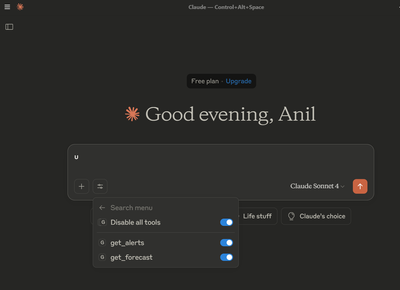
Once its successfully installed launch the desktop client which should look like below.

Create your own ServiceNow MCP Server
Python code for creating MCP server is available here: ServiceNowMCPServer/mcpnow1.py at master · anilvaranasi/ServiceNowMCPServer
Download the python code locally and update your instance url and credentials in the file mcpnow1.py

Search for claude_desktop_config.json file and update MCP server details of mcpnow1.py, sample config.json would look like below.

You can also open config via Claude desktop client Developer menu options -> Open App configuration file

Once the file is updated restart Claude desktop client from desktop icons


Once you reload the client you should see MCP server

Testing authentication
Prompt: Test function to verify nowauth is running with authentication.
Endpoint: GET https://dev251734.service-now.com/api/x%5F146833%5Fawesomevi/test

Once tool is available test below example prompts.
Testing with an input parameter
Endpoint: GET https://dev251734.service-now.com/api/x_146833_awesomevi/test/{table_name}
Prompt: Get ServiceNow table description for a given table.


Testing with OOB APIs
Get short description for a given incident
Endpoint: GET https://dev251734.service-now.com/api/now/table/incident?sysparm_fields=short_description&sysparm_query=number={inputincident}
Prompt: Get short_description for a given incident based on input incident number INC0008001

Similar incidents for a given incident
When incident number INC0000019 is provided as input it found INC0000015 which contains key words Cant and Launch from original incident Can't launch 64-bit Windows 7 virtual machine


Another example

This is just an initial attempt to PoC MCP server setup there is lot of potential to build complex usecases which can be leveraged in implementing Agentic AI. I hope you will look forward for future posts on this topic.
https://www.servicenow.com/community/developer-articles/how-to-create-your-own-servicenow-mcp-server/ta-p/3298144