
May 2025 Release: AI Agents for Health and Safety Incident Investigator
 New article articles in ServiceNow Community
·
Jun 23, 2025
·
article
New article articles in ServiceNow Community
·
Jun 23, 2025
·
article
Incident Investigator
Plugin: AI Agents for Health and Safety (sn_hs_ai_agents)
Persona: Health and Safety Teams using Health and Safety Incident Management
Agentic workflow name: Create actions for safety incidents
Roles: requires [now_assist_panel_user]
Docs page: link to docs.
With ServiceNow’s investment in Agentic AI, customers can now use agentic AI to reduce manual effort during safety investigations. Utilizing ServiceNow’s LLM, Incident Investigator is the first use case of Agentic AI for the Health and Safety Product.
For customers utilizing Health and Safety Incident Management, Incident Investigator streamlines the investigation process and reduces time and manual effort for safety teams working on Health and Safety Incidents. Agentic AI will gather and analyze relevant incidents, knowledge articles, and previously submitted corrective and preventive actions for historical insight. From this analysis, an AI agent will generate draft actions to create an incident action plan that the EHS team can then select relevant actions to be automatically generated. By reducing repetitive and manual tasks, Incident Investigator drives efficiency during incident investigations.
How to Use:
- Navigate to the Health and Safety Workspace
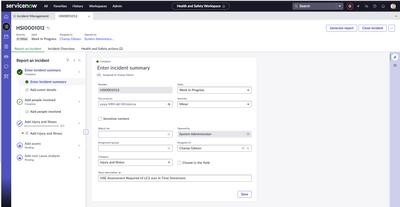
- Open a Health and Safety Incident record

- Open the Now Assist panel by selecting the sparkles
- In the Now Assist panel type "Help me analyze health and safety incident ${number}" with your Incident record number entered


The AI agent will then analyze the Health and Safety incident, similar Health and Safety incidents, previous actions, and relevant knowledge articles to generate a plan

Once a recommended action plan has been generated, input the corresponding number for the action(s) that you'd like to create.
Ex. 2.

The AI Agent will generate an action based on the selected choice.

The action will assign to the assigned to user on the Health and Safety Incident but can be reassigned to anyone across the organization.

Note: The above example walks through the creation of a single corrective or preventive action but multiple can be generated at once depending on the EHS team members input.
How to Set Up:
Download Now Assist for Health and Safety (sn_hs_gen_ai) v1.0.1
Download AI Agents for Health and Safety (sn_hs_ai_agents) v1.0.0


- Navigate to AI Agent Studio

- Select Overview
- In the Agent Studio Workspace select Explore all
- Filter and search for Create actions for safety incidents
- Select to open

- Review the information and instructions
- Select continue
Verify the status is active
Verify the Now Assist Panel display is highlighted


- Select save and test
Your AI agent should now be active and ready to use.
For more info refer to docs docs.
https://www.servicenow.com/community/health-safety-blog/may-2025-release-ai-agents-for-health-and-safety-incident/ba-p/3297838