
How to save Knowledge articles in scoped applications & source code control
 New article articles in ServiceNow Community
·
Jun 16, 2025
·
article
New article articles in ServiceNow Community
·
Jun 16, 2025
·
article
If you want to make sure that artifacts you create like a knowledge articles are saved within your scoped application, so that users who install your app can access records or articles, read on.
Step-by-Step Solution
Ideally you will want to create records in your scoped app.
1. Best practice: Create a Knowledge Base Scoped to Your App
Create a new Knowledge Base (KB) that is dedicated to your app:
- Go to Knowledge > Administration > Knowledge Bases
- Click New
- Give it a meaningful name (something like
My App Knowledge Base)
2. Create Knowledge Articles Within That Base
- Make sure you're in your app's scope (it's easy if you open your app with App Engine Studio)
- Navigate to Knowledge > Articles
- Create articles within your newly created KB
3. Include the record as an Application File
ServiceNow doesn't automatically include KB articles when exporting an application unless explicitly added. Do this:
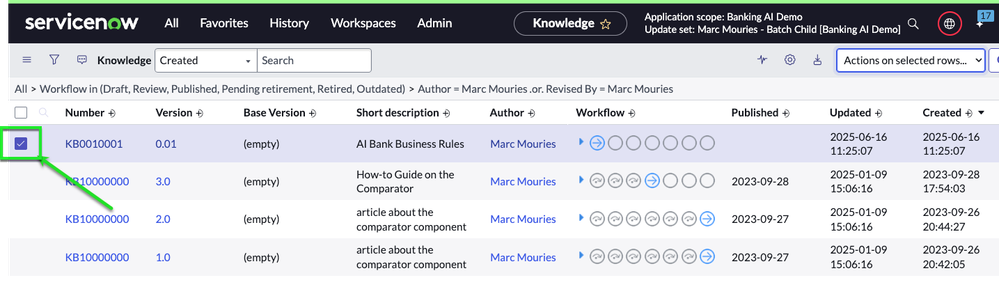
- Go to the list of your records (Knowledge Articles or any other you want to include)
- Click the menu on the right "Actions on selected rows"
- icon (top left) and select Add to Application File
- In the "Create Application File from Record" window. Select the option you want for Load When, and then Click OK.
- Now go to App Engine Studio > Source control > Commit changes
(this option is only available if you have linked your app to a Git repository)
- See that the KB or record is ready to be committed to your repo as an application file
- Test in a Clean Instance
- Install the app (via store or update set) into a clean PDI or sub-prod instance
- Validate that your records are present
- Install the app (via store or update set) into a clean PDI or sub-prod instance


Note that you can also use the option to add the record to your update set if you only want to share the app via an update set.
View original source
https://www.servicenow.com/community/developer-articles/how-to-save-knowledge-articles-in-scoped-applications-amp-source/ta-p/3290556