
Handling 'text/plain' and Other Unsupported Content Types in ServiceNow Scripted REST APIs
> **_Update, Jan 15, 2020_**_: Added a section at the bottom to cover how to handle the_ **_application/x-www-form-urlencoded_** _Content-type._
If you’ve ever tried to set up an AWS/SNS integration, you know that ServiceNow fails (rather spectacularly) to handle certain standard REST API request “Content-Types”; most notably, **text/plain**.
[ ](http://handbook.snc.guru/)
In this article, we’re going to discuss what happens when you you try to integrate with something that’s trying to send a plain-text payload, and how you can make it work. At the bottom of the article, we’ll have a simple Script Include that you can import into your instance to get around this issue, and make your plain-text integrations work.
## The Problem
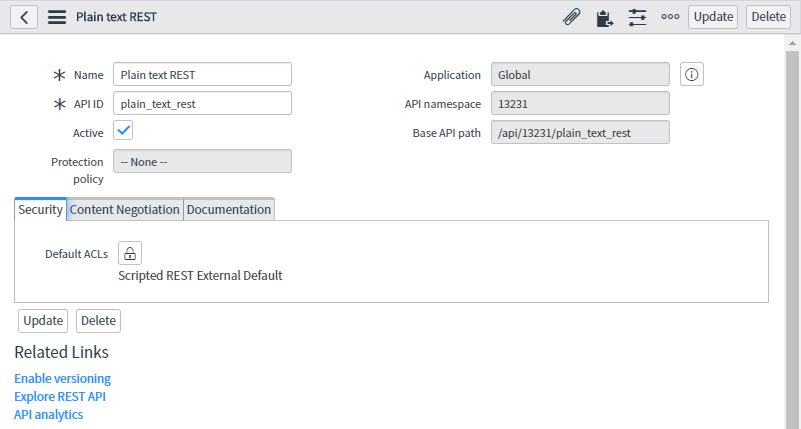
To illustrate the issue, I’ll wake up my PDI, and set up a Scripted REST API (**SRAPI**) that’s meant to accept a plain-text payload. I’ll include the steps to set this up, in case you want to follow along in your own PDI.
First, in the Application Navigator, I’m going to open up **System Web Services** \> **Scripted Web Services** \> **Scripted REST APIs**. On the corresponding list view, I’ll click **New**, and create my new REST API. I’m calling mine “_Plain text REST_”, and setting the API ID to “_plain\_text\_rest_”.
After saving this SRAPI record, I need to create a new **REST Resource**, so in the **Resources** related list, I’ll click **New**. I’ll name the new resource **text-test**, and set the **HTTP method** field to **POST**.
In the **Content Negotiation** form tab, I need to check the **Override supported request formats** checkbox, and set the **Supported request formats** field to **text/plain** (otherwise, it’ll reject any plain-text requests without actually running the code in my SRAPI).
Finally, I’ll put a really simple script in the **Script** field, that just logs the contents of the request itself:
(function process( request, response) { gs.log( request.body.data ); })(request, response);
After saving the Resource record, it should look something like this:
And that’s about all there _ought_ to be to it - but if you’ve tried this yourself, you know that we’re not done yet.
To demonstrate the problem, I’ll fire up [Postman](https://www.getpostman.com/), create a new **POST** request, set my Basic Auth credentials to a test user account that I created in my PDI previously, add a **Content-Type** header and set it to **text/plain**, add some plain ol’ text to the **body**, and hit **Send**.
{ "error": { "message": "com.glide.rest.domain.ServiceException: Service error: attempt to access request body is not allowed when request method is GET or DELETE", "detail": "" }, "status": "failure"
}
Hang on a minute, what’s this? The response body contains an error, but the error doesn’t make any sense!
> attempt to access request body is not allowed when request method is GET or DELETE
But my request method _isn’t_ GET or DELETE — it’s **POST**!
Maybe if I have a look at the error logs in my instance, it’ll say something more sensical.
…Then again, maybe not. Somehow, that’s even _less_ helpful; and it still gives me that _weird_ error that talks to GET and DELETE requests:
> com.glide.rest.domain.ServiceException: Service error: attempt to access request body is not allowed when request method is GET or DELETE
So what’s going on here?
Well - I have no idea. My guess is that it _assumes_ that the payload is going to be in one of the formats that it understands (XML, JSON, etc.) and if it doesn’t match any of those patterns, then by some rube-goldberg-esque process, it somehow falls through into some condition that fires off this error and then gives up.
Unfortunately, this is a “_hard error_”, by which I mean that it actually halts execution. This means that the error halts execution of my script, and none of the code after the line that triggers the error, is actually run. This is a big problem, since the line that triggers the error is the line that simply accesses the body (_request.body.data_).
After a lot of fiddling, I figured out that it isn’t accessing _request.body_ that’s triggering the error - it’s specifically _request.body_ **_.data_**. If I remove the line of code that’s attempting to access the _.data_ property, the error goes away (but of course, then I can’t do anything with the request). The same problem occurs if I try to access _request.body.dataString_ as well. I assume that’s because the error is happening within the Java “getter” method being run on Mozilla Rhino (the Java-based implementation of JavaScript that ServiceNow uses to run JS on the server). This means that maybe **_I_** can pull the data out of the request body myself, without ever accessing that property directly.
[ ](http://lsn.snc.guru/)
The API documentation for the RESTAPIRequestBody object mentions a property called [dataStream](https://developer.servicenow.com/app.do#!/api%5Fdoc?v=newyork&id=r%5FRESTAPIRequestBody%5FdataStream), which it says you can pass to “_a separate API_” - without ever mentioning what that API is, or even telling us what type of object this property returns, or telling us how to actually use it or demonstrating its usage in the “example”…
_Thanks, ServiceNow_. ಠ\_ಠ
After slamming my forehead against the problem for a while, I finally identified that the type of object that _request.body.dataStream_ contains, is a **_GlideScriptableInputStream_** (great name, guys 👌). That class of object is, of course, undocumented (as far as I could find), but I was able to find one relevant method which accepted that type of object as an argument - **_GlideTextReader_**.
Armed with this knowledge, I put together the following Script Include which has one method that’ll get the contents of any plain-text REST API request body I’ve thrown at it:
var RESTPlainTextUtil = Class.create();
RESTPlainTextUtil.prototype = { initialize: function() { }, getTextBody: function(request, trim) { var reqBodyLine; var reqBodyString = ''; var streamBody = request.body.dataStream; var gtrRequestBodyReader = new GlideTextReader(streamBody); reqBodyLine = gtrRequestBodyReader.readLine(); while(typeof reqBodyLine == 'string') { reqBodyString += reqBodyLine + '\n'; reqBodyLine = gtrRequestBodyReader.readLine(); } return trim ? reqBodyString.trim() : reqBodyString; }, type: 'RESTPlainTextUtil'
};
After saving that Script Include and updating my REST Resource script to the following, everything works perfectly!
(function process( request, response) { gs.log( new RESTPlainTextUtil().getTextBody(request) ); })(request, response);
And the plain-text contents of the request are logged as expected:
There is another _Content-type_ which triggers the error mentioned above: **application/x-www-form-urlencoded**.
> _com.glide.rest.domain.ServiceException: Service error: attempt to access request body is not allowed when request method is GET or DELETE_
Unfortunately, if we use the _new RESTPlainTextUtil().getTextBody(request)_ method to get the contents of requests of _this_ type, we will always get a blank string; even when the request method is _POST_, and the body is not blank!
In this case, ServiceNow treats the body of the message as though the data were URL/query parameters. Even when that’s not the case. That’s a little bit annoying, but now that we know that, we know how to access the body of REST messages using the _application/x-www-form-urlencoded_ Content-type: Simply use _request.queryParams_ to get an object with key/value pairs corresponding to the data that would otherwise be in the body.
Unfortunately, there is no way (that I’ve yet been able to find) to access the exact, original text of the body of the message, which means that signature-based message verification would not be possible. This is a rare and specific use-case, but if you’re trying to integrate between ServiceNow and something like [Chargify’s webhooks](https://help.chargify.com/webhooks/webhooks-reference.html#webhook-signature) for example, you won’t be able to do signature-based verification of those messages without the original message body in its original serialized characters.
If you find this as annoying as I do, open a [HI](http://hi.service-now.com/) ticket and let them know, or post your suggestion to fix it in the [community](https://community.servicenow.com/).
To install the above Script Include in your instance, simply follow the steps below:
1. [**Download this XML file**](https://snprotips.com/s/RESTPlainTextUtil-Script-Include.xml)
2. Navigate to your instance’s **_sys\_script\_include_** table
3. **Right-click** on any of the table column headers on the Script Include table
4. click “**Import XML**” (_Not “Import”, but “Import XML”_)
5. Click **Choose File**, and select the XML file you just downloaded
6. Click **Upload**.
Thanks for reading! If you enjoy our articles, don’t forget to [**subscribe**](https://snprotips.com/subscribe)! You can find some of our YouTube videos [**here**](http://yt.snc.guru/), and you can find my books [**here**](http://books.snc.guru/).
Feel free to connect with me on [**Twitter** ](https://twitter.com/TheTimWoodruff)and [**LinkedIn**](https://www.linkedin.com/in/sn-timw/), and if your company needs some ServiceNow help, you can book a free, no-pressure consultation to discuss rates and how we can help you, [**here**](https://snprotips.com/contact-us).
* [ March 2024 ](https://snprotips.com/blog?month=03-2024)
* [ February 2024 ](https://snprotips.com/blog?month=02-2024)
* Feb 12, 2024 [5 Lessons About Programming From Richard Feynman](https://snprotips.com/blog/2024/5-lessons-about-programming-from-richard-feynman)
* [ July 2023 ](https://snprotips.com/blog?month=07-2023)
* [ May 2023 ](https://snprotips.com/blog?month=05-2023)
* [ April 2023 ](https://snprotips.com/blog?month=04-2023)
* [ December 2022 ](https://snprotips.com/blog?month=12-2022)
* Dec 13, 2022 [ServiceNow Developers: BE THE GUIDE!](https://snprotips.com/blog/2022/12/13/be-the-guide)
* [ October 2022 ](https://snprotips.com/blog?month=10-2022)
* [ August 2022 ](https://snprotips.com/blog?month=08-2022)
* [ March 2022 ](https://snprotips.com/blog?month=03-2022)
* [ February 2022 ](https://snprotips.com/blog?month=02-2022)
* [ May 2021 ](https://snprotips.com/blog?month=05-2021)
* May 3, 2021 [Adding a Guided Setup to Your ServiceNow Application](https://snprotips.com/blog/2021/4/27/adding-a-guided-setup-to-your-servicenow-application)
* [ April 2021 ](https://snprotips.com/blog?month=04-2021)
* [ February 2021 ](https://snprotips.com/blog?month=02-2021)
* [ November 2020 ](https://snprotips.com/blog?month=11-2020)
* Nov 17, 2020 [SN Guys is now part of Jahnel Group!](https://snprotips.com/blog/2020/11/17/the-sn-guys-a-servicenow-consulting-firm-acquired-by-jahnel-group-an-enterprise-software-agency)
* [ September 2020 ](https://snprotips.com/blog?month=09-2020)
* Sep 14, 2020 [Better ServiceNow Notifications (& Another FREE Tool!)](https://snprotips.com/blog/2020/8/27/eliminating-servicenow-notification-nuisance-amp-another-free-tool)
* [ July 2020 ](https://snprotips.com/blog?month=07-2020)
* Jul 31, 2020 [Debugging Client & Catalog Client Scripts in ServiceNow](https://snprotips.com/blog/2020/7/31/debugging-client-amp-catalog-client-scripts-in-servicenow)
* [ January 2020 ](https://snprotips.com/blog?month=01-2020)
* Jan 20, 2020 [Getting Help from the ServiceNow Community](https://snprotips.com/blog/2020/1/20/getting-help-from-the-servicenow-community)
* [ December 2019 ](https://snprotips.com/blog?month=12-2019)
* Dec 18, 2019 [Can ServiceNow Script Includes Use the "current" Variable?](https://snprotips.com/blog/2019/12/18/can-script-includes-use-the-current-variable)
* [ November 2019 ](https://snprotips.com/blog?month=11-2019)
* [ April 2019 ](https://snprotips.com/blog?month=04-2019)
* [ March 2019 ](https://snprotips.com/blog?month=03-2019)
* Mar 11, 2019 [GlideFilter is Broken - Free Tool: “BetterGlideFilter”](https://snprotips.com/blog/2019/3/11/glidefilter-is-broken-heres-an-alternative)
* [ February 2019 ](https://snprotips.com/blog?month=02-2019)
* Feb 27, 2019 [Making Update Sets Smarter - Free Tool](https://snprotips.com/blog/2019/2/27/making-update-sets-smarter)
* [ November 2018 ](https://snprotips.com/blog?month=11-2018)
* [ October 2018 ](https://snprotips.com/blog?month=10-2018)
* [ September 2018 ](https://snprotips.com/blog?month=09-2018)
* [ July 2018 ](https://snprotips.com/blog?month=07-2018)
* Jul 23, 2018 [Admin Duty Separation with a Single Account](https://snprotips.com/blog/2018/7/23/admin-duty-separation-with-a-single-account)
* [ June 2018 ](https://snprotips.com/blog?month=06-2018)
* [ May 2018 ](https://snprotips.com/blog?month=05-2018)
* May 29, 2018 [Learning ServiceNow: Second Edition!](https://snprotips.com/blog/2018/5/29/learning-servicenow-second-edition-is-now-available-for-pre-order)
* [ April 2018 ](https://snprotips.com/blog?month=04-2018)
* [ March 2018 ](https://snprotips.com/blog?month=03-2018)
* [ February 2018 ](https://snprotips.com/blog?month=02-2018)
* Feb 11, 2018 [We have a new book! ](https://snprotips.com/blog/2018/2/11/we-have-a-new-book)
* [ November 2017 ](https://snprotips.com/blog?month=11-2017)
* Nov 6, 2017 [Requiring Attachments (& Other Miracles) in Service Portal](https://snprotips.com/blog/2017/11/5/a-better-way-to-check-for-attachments-including-service-portal)
* [ September 2017 ](https://snprotips.com/blog?month=09-2017)
* Sep 12, 2017 [Handling TimeZones in ServiceNow (TimeZoneUtil)](https://snprotips.com/blog/2017/9/12/handling-timezones-in-servicenow-timezoneutil)
* [ July 2017 ](https://snprotips.com/blog?month=07-2017)
* [ June 2017 ](https://snprotips.com/blog?month=06-2017)
* [ May 2017 ](https://snprotips.com/blog?month=05-2017)
* May 9, 2017 [Work at Lightspeed: ServiceNow's Plan for World Domination](https://snprotips.com/blog/2017/5/9/work-at-lightspeed-servicenows-plan-for-world-domination)
* [ April 2017 ](https://snprotips.com/blog?month=04-2017)
* [ March 2017 ](https://snprotips.com/blog?month=03-2017)
* Mar 12, 2017 [reCAPTCHA in ServiceNow CMS/Service Portal](https://snprotips.com/blog/2016/10/6/implementing-recaptcha)
* [ December 2016 ](https://snprotips.com/blog?month=12-2016)
* [ November 2016 ](https://snprotips.com/blog?month=11-2016)
* Nov 10, 2016 [Chrome Extension: Load in ServiceNow Frame](https://snprotips.com/blog/2016/11/10/chrome-extension-load-in-servicenow-frame)
* [ September 2016 ](https://snprotips.com/blog?month=09-2016)
* [ July 2016 ](https://snprotips.com/blog?month=07-2016)
* [ May 2016 ](https://snprotips.com/blog?month=05-2016)
* May 17, 2016 [What's New in Helsinki?](https://snprotips.com/blog/2016/5/17/whats-new-in-helsinki)
* [ April 2016 ](https://snprotips.com/blog?month=04-2016)
* [ March 2016 ](https://snprotips.com/blog?month=03-2016)
* [ February 2016 ](https://snprotips.com/blog?month=02-2016)
* [ January 2016 ](https://snprotips.com/blog?month=01-2016)
* [ December 2015 ](https://snprotips.com/blog?month=12-2015)
* [ October 2015 ](https://snprotips.com/blog?month=10-2015)
* Oct 20, 2015 [Bookmarklet: Load the current page in the ServiceNow frame](https://snprotips.com/blog/rvicenowprotips.com/2015/10/bookmarklet-load-current-page-in.html)
* [ August 2015 ](https://snprotips.com/blog?month=08-2015)
* Aug 27, 2015 [Easily Clone One User's Access to Another User](https://snprotips.com/blog/rvicenowprotips.com/2015/08/clone-one-users-access-to-another-user.html)
https://snprotips.com/blog/2019/11/18/handling-textplain-and-other-unsupported-content-types-in-scripted-rest-apis