
Activities (Notes) within Resource Assignments
 New article articles in ServiceNow Community
·
May 01, 2025
·
article
New article articles in ServiceNow Community
·
May 01, 2025
·
article
DISCLAIMER: This article describes a proposed solution to support this use case.
The proposed solution requires configuration, as such, there is no liability for ServiceNow to provide support, apply changes, fix defects and review impact during future upgrades.
What problem does this solve?
Bringing proper notes and activity tracking to Resource Assignments allows for documenting changes and details. It is also critical to understand the appropriate process for adding notes, which may be seen as capability limitation – for which guidance is provided for such processes.
This guide will walk you through adding the Activity Formatter (for Notes (journal)) to Resource Assignments and the appropriate utilization of this field.
Configuration of Resource Assignment Form
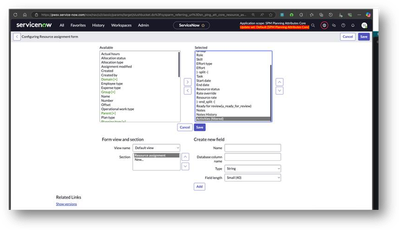
- Add Activities formatter in the Resource Assignment form (Default and Operational work views)

- Configure the Activities

- Remove all fields, except Notes:
This will not work if there are more fields selected

- Result in Resource Management Workspace

Best Practice Process for adding Notes
The Notes field is a journal field: Allows and stores input and displays the combined inputs below the input box. Journal fields display in the activity stream in the form and in the list view.

Thus, you will NOT be able to add notes via the list or a Workspace row, the Resource Assignment record needs to be opened, and notes should then be entered within the form.
- Within Resource Management Workspace


- Within Project Workspace:
- Project Details > Resource assignment (related list) > Open RA

https://www.servicenow.com/community/spm-articles/activities-notes-within-resource-assignments/ta-p/3252289