
Resolving Import Set Field Label Mismatch After ServiceNow Family Release or Patch Update
 New article articles in ServiceNow Community
·
Apr 10, 2025
·
article
New article articles in ServiceNow Community
·
Apr 10, 2025
·
article
Problem
After a ServiceNow family release upgrade or patch update, certain field labels in the target table (e.g., cmdb_ci_computer) may be changed due to localization improvements (especially for non-English locales such as Japanese). This results in:
- Users downloading a data import template using updated field labels.
- When importing data using this new template, the import set table (e.g.,
imp_computer) may create new fields instead of mapping to existing ones. - As a result, data fails to transform to the target table because the Transform Map no longer aligns with the import set labels.
Scenario
For example:
- Before the upgrade, a field had the Japanese label "所在地".
- After the upgrade, the label changes to "ロケーション".
- A new column is created in the import set when uploading data with the "ロケーション" column, leading to transform map failure.
Workaround Solution
To solve this issue, you can identify mismatched labels between the import set source table and the target table using a custom UI Action and Script Include.
Approach
- Compare labels for each field defined in the Transform Map:
- Source Field (Import Set Table)
- Target Field (Target Table)
- Check if their localized labels (e.g., in Japanese) differ.
- Source Field (Import Set Table)
- Log mismatches for further investigation.
- Use the result to update the import set template or transform map accordingly.
Implementation
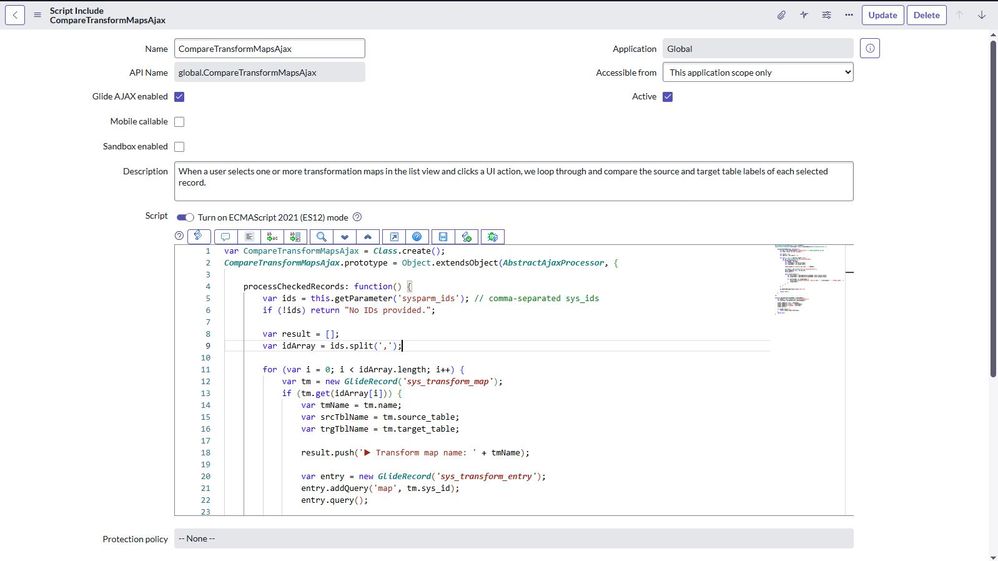
1. Script Include
CompareTransformMapsAjax

var CompareTransformMapsAjax = Class.create(); CompareTransformMapsAjax.prototype = Object.extendsObject(AbstractAjaxProcessor, { processCheckedRecords: function() { var ids = this.getParameter('sysparm_ids'); // comma-separated sys_ids if (!ids) return "No IDs provided."; var result = []; var idArray = ids.split(','); for (var i = 0; i < idArray.length; i++) { var tm = new GlideRecord('sys_transform_map'); if (tm.get(idArray[i])) { var tmName = tm.name; var srcTblName = tm.source_table; var trgTblName = tm.target_table; result.push('▶ Transform map name: ' + tmName); var entry = new GlideRecord('sys_transform_entry'); entry.addQuery('map', tm.sys_id); entry.query(); while (entry.next()) { var sourceLabel = getLabelInfo(srcTblName, entry.source_field); var targetLabel = getLabelInfo(trgTblName, entry.target_field); if (sourceLabel !== targetLabel) { result.push('Mismatch detected - Source Label: ' + sourceLabel + ' | Target Label: ' + targetLabel); } } } } gs.addInfoMessage(result.join('
')); return "Done!"; } }); function getLabelInfo(tableName, elementName) { var sysDoc = new GlideRecord('sys_documentation'); var userLang = gs.getSession().getLanguage(); sysDoc.addQuery('name', tableName); sysDoc.addQuery('element', elementName); sysDoc.addQuery('language', userLang); sysDoc.query(); if (sysDoc.next()) { return sysDoc.label.toString(); } return null; }
2. UI Action (List Button on sys_transform_map)

function onClick() { var selected = g_list.getChecked(); // get selected records if (!selected) { alert("Please select at least one record."); return; } // GlideAjax call to server-side script include var ga = new GlideAjax('CompareTransformMapsAjax'); ga.addParam('sysparm_name', 'processCheckedRecords'); ga.addParam('sysparm_ids', selected); ga.getXMLAnswer(function(response) { alert(response); }); }
3. Select one or more transform maps from the list and click the UI Action (List Button on sys_transform_map)

Result
By running this UI Action, users can:
- Instantly check for label mismatches after upgrades.
- Prevent incorrect field creation in import sets.
- Ensure smooth transformation of imported data without customization.
Recommendation
After every ServiceNow upgrade or patch:
- Run this label check against your key transform maps.
- Update templates or transform maps as needed.
- Educate import users to always use the latest, verified templates.
https://www.servicenow.com/community/international-localization/resolving-import-set-field-label-mismatch-after-servicenow/ta-p/3233667