
Enable Dot-Walked Fields in Client Scripts
 New article articles in ServiceNow Community
·
Apr 09, 2025
·
article
New article articles in ServiceNow Community
·
Apr 09, 2025
·
article
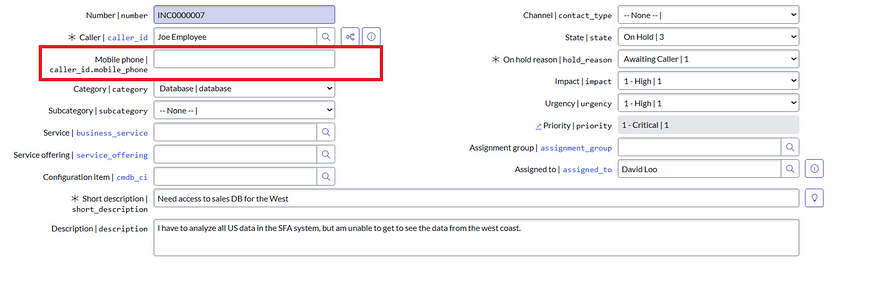
Let’s say you have a reference field like Caller on the Incident form. You want to trigger an onChange Client Script when the phone number of the selected caller changes.

But when you try to create the script, you only see this:

Yep — dot-walked fields like caller.phone_number are missing.
Solution: Use allow_references=true
To fix this, you just need to add a dictionary attribute to the Client Script’s field fieldname.
Steps:
- Go to the Dictionary Entry of the fieldname field.
- In the Attributes field, add allow_references=true

3. Save the Dictionary Entry.

That’s it. You’ve unlocked dot-walking in your onChange scripts.
Things to Keep in Mind
- Upon doing this, the fieldname field will become mandatory and visible always, to fix this please add another attribute "allow_null=true" to fieldname
- You may face a little lag while opening the client script form as it tries to pull the fields and their references
- Haven't noticed any performance issues so far but be sure to check with the platform team before implementing this as this is a Global change
The allow_references=true attribute is a hidden gem that can level up your client scripting skills in ServiceNow.
Feel free to share any feedbacks or suggestions.
You can reach out to me on LinkedIn
Happy Learning!
Deepak Negi
https://www.servicenow.com/community/developer-articles/enable-dot-walked-fields-in-client-scripts/ta-p/3232710