
Proactive Code Check: Adding your own checks
 New article articles in ServiceNow Community
·
Apr 07, 2025
·
article
New article articles in ServiceNow Community
·
Apr 07, 2025
·
article
I wrote a short article about how easy it is to get started with the Impact Health scanner for your update sets recently here.
When I talk to customers about this, one of the first questions that is asked is whether more checks can be added. The answer is yes, of course.
Because the new Proactive code check uses the Instance Scanner as a base, we already know we can do this (even though the OOTB proactive checks are protected/read only).
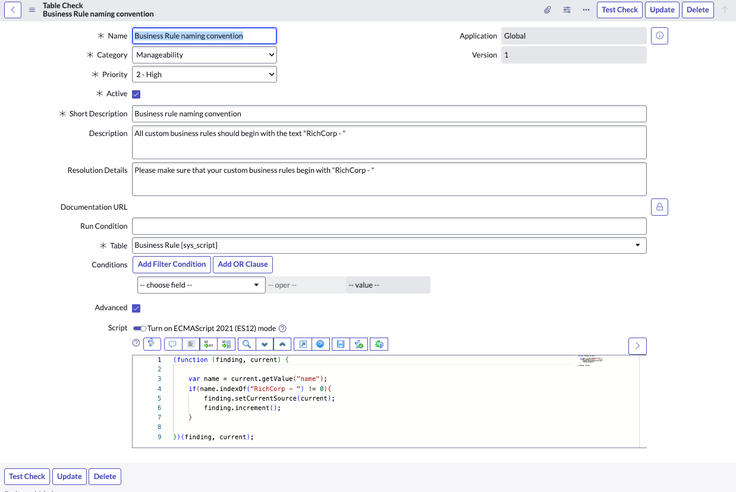
Lets start by creating a basic check for one of the things that almost every customer would want to do at some point - enforce a naming convention for their scripted objects.
Lets do this for business rules, so I can shamelessly use the same BR I used in my previous post and see the extra finding land.
First, I create the check. We want to check the name of the BR record, so we can use a table check for that.

I can create my own suite of checks, to keep my checks together, and add my check to the list of checks.

Then I open the proactive code check suite and I add my own suite as a child suite.

Now lets rescan the update set that contains our (poorly named) Business Rule. We navigate to the scan results for the update set.
Before the rescan…

And after…

And finally lets prove that I have it right, by correcting SOME of the findings, including the BRs name…

There we go

https://www.servicenow.com/community/in-other-news/proactive-code-check-adding-your-own-checks/ba-p/3230084