
Trick & Track! - Platform License Usage
 New article articles in ServiceNow Community
·
Nov 08, 2024
·
article
New article articles in ServiceNow Community
·
Nov 08, 2024
·
article
Use Case:
A majority of customers seek to conduct an audit of their ServiceNow platform licenses to ascertain the number of licenses purchased, as well as to identify those that are underutilized or overutilized, in order to facilitate more efficient usage planning.
Description:
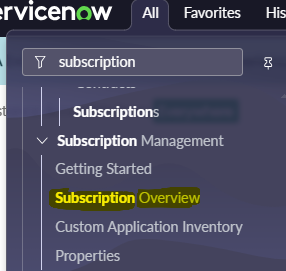
There exists an out-of-the-box capability to address this requirement utilizing the 'Subscription Overview' module. Access to this module will be available through the 'ServiceNow admin' role. The administrator will ensure that the configuration is executed correctly as part of the routine daily house-keeping tasks.
It is essential to understand 3 key aspects when discussing platform license management:
1. The existence of role-based licenses, such as those for ITIL, administrators, and business stakeholders who serve as approvers.
2. Each user is assigned a fixed license, as the concept of a 'floating' license does not apply within the platform.
3. The assignment of roles should be determined by either the User or the Group. In the case of a Group, it must be aligned with the appropriate technician, such as the ServiceDesk team.
Solution:
1. Log in user with admin rights. Go to the left navigation pane > Subscription Overview

2. Upon clicking the 'Subscription Overview,' a list of subscriptions will be displayed along with the number of licenses that have been procured.

3. Two columns are presented, indicating the purchased and allocated licenses. The allocated column should display a value of 0. The mapping of allocated licenses can be accomplished by following the steps outlined below.
Best Practices:
1. Set up roles for resolver or support teams.
2. Associate the resolver group with the user and oversee the availability of support personnel.

4. To determine the number of users assigned to a group, one must first map the configuration. The total number of users consuming the roles should then be calculated, followed by subtracting the number of licenses purchased from this total. To conclude, select the 'Update Allocation Totals' button to display the actual consumption.

Housekeeping Activity:
The BAU Team, possessing administrative rights, should conduct regular checks.
platform #licenseconsumption #licenseusage
Hope you like it. If any questions or remarks, let me know!
If this helped you in any way, I would appreciate it if you hit bookmark or mark it as helpful.
Regards,
Suresh.
https://www.servicenow.com/community/now-platform-articles/trick-amp-track-platform-license-usage/ta-p/3098001