
Aligning Sold Products and Install Base Items with CMDB
 ServiceNow – I'm Ahmed
·
Mar 16, 2025
·
article
ServiceNow – I'm Ahmed
·
Mar 16, 2025
·
article

In CSM, Modelling sold product, install base items, product models, and integrating them into CMDB may be a complicated activity, so what I’m trying to accomplish here is to reflect on how to do it properly.
In this article, I will work with AD Services, a provider of ITSM SaaS.
let’s start with how that SaaS provider models their SaaS product in the CMDB.
Our SaaS provider offers two IT service management services: Standard and Pro. Every solution depends on two application services: production environment and non-production environment. Our SaaS supplier sells just one product model, the ITSM Z20021 Acc build.
Here’s how the CMDB model looks like

AD Services sold its ITSM Pro SaaS solution to Star Tech Services and provisioned two instances for them.

Star Tech Services has launched the SaaS solution and we want to enable AD Services to support Star Tech Services cases.
let’s review what we have done so far
- We created a Product model named ITSM Z20021 Acc build in cmdb_model table
- we created one service in cmdb_ci_service
- we created two service offerings(PRO and Standard) both of them has the same model ID ITSM Z20021 Acc build
- We created two application services for Star Tech Services in cmdb_ci_service_auto
- all relationships between CMDB classes are aligned with CSDM

Let’s design a sold product for Star Tech Services. But first, what is the sold product? According to ServiceNow docs, a record is used to track products or services sold to an account or consumer.
Since Star Tech Services purchased the ITSM Z20021 Acc build, we only need one sold product.
We will click on the Sold product module and hit new, populating the following.
- Name
- Product
- Account
- Contact
once we click on Save, the service offering field will automatically populated

Now we’ve created the sold product, which is linked to the service offering and product model. We need to put together an install-based item. According to the ServiceNow documentation, an install base item represents a product instance that has been configured for a customer. Therefore, each application service requires a separate install base item for the PROD and non-PROD instances.
We will click on the Install-based item module and hit new, populating the following.
- Name
- Product
- CI
- Account
- Contact
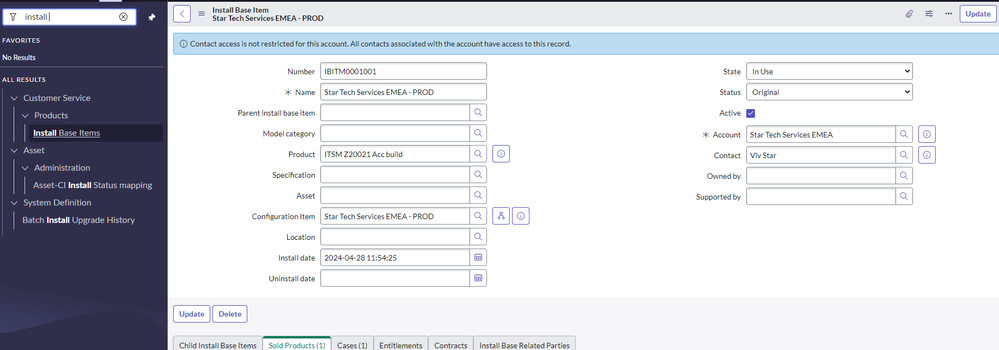
After creating an install-based item record, scroll down to the sold product related list and click edit to connect the sold product to the install-based item.
Here’s my final model of how CMDB, Sold product, and install base item interact.

https://ahmeddrar.me/2025/03/16/aligning-sold-products-and-install-base-items-with-cmdb/