
Simple design for Webhook inbound integration
 New article articles in ServiceNow Community
·
Mar 13, 2025
·
article
New article articles in ServiceNow Community
·
Mar 13, 2025
·
article
I've been dealing with a lot of third-party integration that demands ServiceNow to be ready to accept webhooks whenever an event occurs. The objective of this article is to highlight a few inbound webhook characteristics, as well as basic designs.
Webhooks are utilised when
- The message is triggered by particular events.
- The message is lightweight, containing minimum information in a basic payload.
- The message is push-based to eliminate continual polling.
- The required response is generally a simple acknowledgement.
Here's an example of a simple webhook integration.
- After a case closure in ServiceNow, a customer receives an automated phone call from a third-party system, asking them to rate the service from 1 to 5.
- When the customer provides their rating, the external system triggers a webhook to ServiceNow.
- ServiceNow receives this webhook payload (containing case ID and rating), and instantly updates the corresponding service rating.
Here is the payload that 3rd party tool is going to send
{ "case_number": "CS0123267", "customer_rating": 5 }
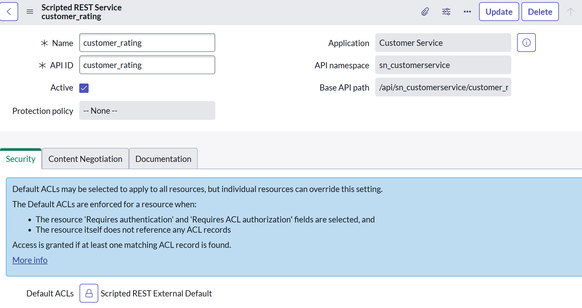
Step-by-Step: Creating a Scripted REST API to Receive Webhooks :
- Navigate to:
System Web Services → Scripted REST APIs. - Click New, provide a name and a base API path, and click Submit.
- Under the created REST API, click Resources, then click New.
- Provide details:
- Name: e.g., "Case Rating Update"
- HTTP method: POST
- Name: e.g., "Case Rating Update"


Now, how will I handle authentication in this example?
I construct a unique, random token and store it securely as a system property of type password (encrypted). The external system should include this key in every webhook request's header. I also checked if URL was what I expected
(function process( /*RESTAPIRequest*/ request, /*RESTAPIResponse*/ response) { var requestedURI = request.url; var validApiKey = gs.getProperty('sn_customerservice.webhook.api.key'); var apiKeyFromHeader = request.getHeader('X-API-Key'); // Validate url and API key if (apiKeyFromHeader !== validApiKey && requestedURI.indexOf('trustedDomain') != -1) { response.setStatus(403); response.setBody({ "error": "Forbidden", "message": "Unauthorized: invalid API key" }); return; } var body = request.body.data; var caseNumber = payload.case_number; var customerRating = payload.customer_rating; var grCS = new GlideRecord('sn_customerservice_case'); grCS.addQuery('number', caseNumber); grCS.query(); if (grCS.next()) { grCS.u_customer_rating = customerRating; grCS.update(); response.setStatus(200); response.setBody({ "message": "Case updated successfully." }); } else { response.setStatus(404); response.setBody({ "error": "Case not found." }); } })(request, response);
https://www.servicenow.com/community/now-platform-articles/simple-design-for-webhook-inbound-integration/ta-p/3200659