
Introducing the New Financials Screen in Portfolio Planning
 New article articles in ServiceNow Community
·
Mar 13, 2025
·
article
New article articles in ServiceNow Community
·
Mar 13, 2025
·
article
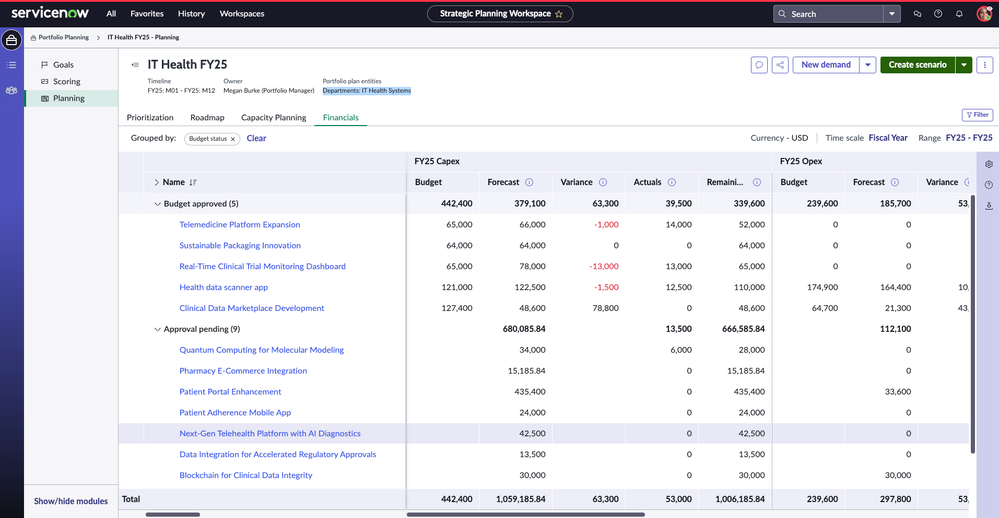
We are excited to announce a new Financials tracking screen for Strategic Portfolio Management (SPM) users in ServiceNow's February 2025 Store Release. This feature empowers portfolio users to track and analyze financials in their portfolio plans effectively.
With this release, you can now view and compare costs and benefits across different time scales and categories, gaining real-time insights into approved budgets, forecasts, variances, actuals, and remaining estimates.
Financial rollups by Expense Type:

Financial Rollups by Cost Type:

Key Capabilities of the New Financials Screen
1. Flexible Time scale Breakdown
Users can view financial data for their portfolio plans in various breakdowns, including:
- Total Portfolio Plan Timeline
- Yearly, Quarterly, or Fiscal Period Views
- Focused time ranges (e.g., a specific quarter)
2. Cost Breakdown by Expense Type or Cost Type
The financials screen supports viewing costs in two ways based on budget attribute configuration:
- Expense Type View: Breaks down costs into Capital Expenditure (Capex) and Operational Expenditure (Opex).
- Cost Type View: Provides a more granular breakdown, such as:
- Software Capex, Software Opex
- Hardware Capex, Hardware Opex
- Labor Capex, Labor Opex, etc.
This feature is a huge advantage as it enables users to view aggregated rollups of budgets and forecasts by cost types, making financial analysis more detailed and insightful.
3. Real Time Financial Comparisons
- Track latest forecasts vs. approved budgets
- Identify variances and take action proactively
- Monitor actuals and remaining estimates to stay within budget
- Monitor the actual monetary benefits against the planned to track value realization
4. Drill down Capabilities:
- Quickly navigate to cost plan details for each planning item (Demands, Projects, Epics) by clicking on the planning item name.
- Perform deeper analysis of cost distributions and spending trends
5. Export Data for Additional Reporting:
- Download financial data in Excel or CSV format for further analysis
How to Enable This Feature in Your Portfolio Plan
To activate this new Financials tracking screen in your existing Portfolio Plan, follow these steps:
- Run a scheduled job named 'Data generation for financials in PPW/SPW' once after the upgrade.
- Ensure that the Portfolio Plan Calendar Type is set to ‘Fiscal’.
- Confirm that your Portfolio Plan contains only Demands, Projects, or Epics as planning item types.
Once enabled, you can immediately start leveraging this powerful financial analysis capability to make data-driven portfolio decisions.
Get Started Today!
This new Financials screen provides a holistic and granular view of your portfolio costs, enabling smarter financial planning and execution. Start using this feature today and take control of your Strategic Planning investments!
For further details, please check the ServiceNow Documentation or contact your SPM Administrator.
https://www.servicenow.com/community/spm-articles/introducing-the-new-financials-screen-in-portfolio-planning/ta-p/3205385